Theme Editor color picker breaks liquid files in the assets folder when choosing branding colors
Nobody has claimed this yet.
- Dominant language
- Ruby
- Stars
- 11.9k
- Forks
- 1.5k
- Avg merge
- 17h 55m
- Merged PRs (30d)
- 3
Description
Issue
If a user chooses a dynamic source for the color picker in the Theme Editor, such as Brand > Primary Color 1, any .liquid files in the assets folder that rely on the setting will output {{ shop.brand.colors.primary[0].background }} instead of the css color.
Expected Behaviour
If the file theme/assets/test.css.liquid has the following
.some-class {
    background-color: {{ settings.theme_color }}; /* set as Brand > Primary Color 1 */
}
it should become
.some-class {
    background-color: #112233; /* set as Brand > Primary Color 1 */
}
Actual
Instead it does this
.some-class {
    background-color: {{ shop.brand.colors.primary[0].background }}; /* set as Brand > Primary Color 1 */
}
Steps to Replicate
- Create a color picker in the theme's settings, such as
{
  "type": "color",
  "id": "theme_color",
  "label": "Theme Color",
  "default": "#000000"
}
- Choose a dynamic color source, such as Brand > Primary Color 1
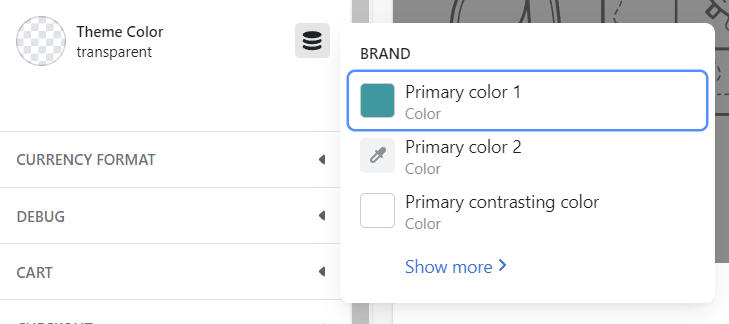
- Create a test.css.liquid file in the assets folder of the theme
.some-class {
    background-color: {{ settings.theme_color }};
}
- Add the css file to the theme to get the link to the generated file, such as
{{ 'test.css' | asset_url | stylesheet_tag }}
- View the file and it will show
{{ shop.brand.colors.primary[0].background }}instead of the css color, such as #112233
.some-class {
    background-color: {{ shop.brand.colors.primary[0].background }};
}
Contributor guide
First steps
- Read the whole issue, then the project's contributing guide.
- Comment on the issue to say you are picking it up — it saves two people doing the same work.
- Fork the repository and make your change on a branch.
- Open a pull request that references the issue number.
Research direction
Start with the Theme Editor dynamic color setting and the theme/assets/test.css.liquid reproduction described in the issue. Trace how settings.theme_color is rendered when its source is Brand > Primary Color 1, then verify the generated asset through {{ 'test.css' | asset_url | stylesheet_tag }}. Done means the asset contains the resolved CSS color, such as #112233, rather than the shop.brand.colors expression.
Written by the indexing model from the issue text.
Assessment
- Tech stack
- ruby
- Domain
- backend
- Issue type
- Bug
- Difficulty
- 4/5
- Estimated time
- 3-5 days
- Activity status
- Stale
- Clarity
- Mostly clear
- Newbie friendliness
- 35/100