Add Globus Share Button
@dylanmcreynolds is already working on this.
Since Aug 18, 2021.
Assessment
This issue has not been assessed yet.
Description
Add a Button to Catanie to optionally add a "Share with Globus" button
Summary
Unfortunately for us, our first installation of SciCat is ingesting MicroCT files. These files are hdf5 and range from ~2-200GB each. As such, the http-based download mechanism with Cataie and ZipService just isn't going to work.
While Globus is not universally used, it's pretty common for a majority of our users. We are setting up a mechanism for creating Globus Shares that can be used by PIs to share data sets with their team. A Globus Share is like a folder where the user can manage access controls with Globus.
Our plan is that when we ingest datasets into Catamel, that we add a special field that contains a URL that will take the user to the Globus File Explorer, pointing the user to the folder where data set's file is located. This URL will be the same for all files under the same proposal and hence the same Globus Share.
So, my thinking is that we can add a button on the DataFiles screen:
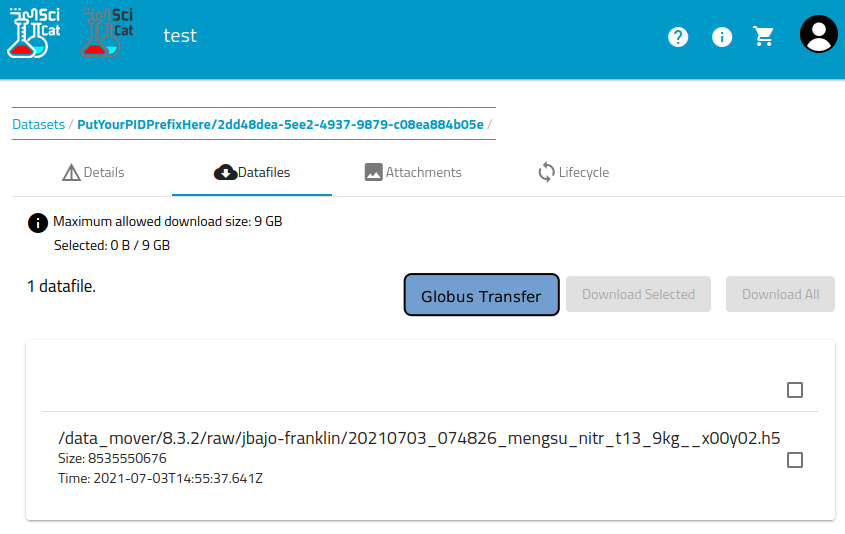
Design notes
Configurable button
Since this feature is site-specific, I imagine making this button configurable in the environment, to display the button or not. Additionally, if a data set does not have the Globus URL, the button should be disabled and maybe the label should say "Globus Unavailable"
URL Field
This probably involves a PR in Catamel too. Do we want to add an optional field to Dataset for "GlobusURL"? Without that, I could populate something into Scientific Metadata, but that's just wrong.
- Dominant language
- TypeScript
- Stars
- 29
- Forks
- 44
- Avg merge
- 20h 2m
- Merged PRs (30d)
- 20
Contributor guide
First steps
- Read the whole issue, then the project's contributing guide.
- Comment on the issue to say you are picking it up — it saves two people doing the same work.
- Fork the repository and make your change on a branch.
- Open a pull request that references the issue number.
More from SciCatProject/frontend
-
Difficulty 3/5 1-2 days Newbie friendliness 64/100
SciCatProject/frontend#2477 ·
-
bug
Difficulty 3/5 1-2 days Newbie friendliness 58/100
SciCatProject/frontend#2458 ·
-
Difficulty 4/5 3-5 days Newbie friendliness 35/100
SciCatProject/frontend#2451 ·
-
Improvement
SciCatProject/frontend#2417 · 1 assignee ·
-
bug
Difficulty 3/5 1-2 days Newbie friendliness 48/100
SciCatProject/frontend#2405 · 4 comments ·
All issues in SciCatProject/frontend
Similar issues
-
clawsweeper:fix-shape-clear clawsweeper:queueable-fix clawsweeper:source-repro impact:ux-friction issue-rating: 🦞 diamond lobster no-stale P3
Difficulty 2/5 1-3 hours Newbie friendliness 78/100
-
community first-timers-only good first issue hacktoberfest help wanted low hanging fruit up-for-grabs
Difficulty 1/5 Under an hour Newbie friendliness 76/100
-
code-quality refactoring
Difficulty 2/5 1-3 hours Newbie friendliness 84/100
github/gh-aw-firewall#8816 ·
-
integration:quickjs org:external priority:backlog topic:code-interpreter topic:middleware type:feature
Difficulty 2/5 1-3 hours Newbie friendliness 74/100
langchain-ai/deepagents#6450 ·
-
Difficulty 1/5 Under an hour Newbie friendliness 88/100
vercel/react-tweet#225 ·