SSWConsulting / SSWConsulting/SSW.Website
🐛 Bug - Mobile navigation missing 'View All Services' link
Nobody has claimed this yet.
- Dominant language
- HTML
- Stars
- 14
- Forks
- 10
- Avg merge
- 13h 51m
- Merged PRs (30d)
- 38
Description
Requested by: @0xharkirat via YakShaver.ai 🦬
cc: @0xharkirat, @isaaclombardssw, @babakamyljanovssw
Hi Team!
🟥 Watch the video (1 min 0 sec)
Url from screen share: https://ssw.com.au/consulting
Pain
On the ⭐ SSW Website (Dev - Next.js), the desktop navigation under the Services menu includes a 'View All SSW Services' link that navigates users to the full services page. In mobile responsive view, the Services navigation menu does not include this option, creating an inconsistent user experience between desktop and mobile navigation.
Acceptance Criteria
- The mobile navigation Services menu includes a 'View All Services' link.
- The 'View All Services' link is displayed at the end of the Services menu list on mobile devices.
- Selecting the 'View All Services' link navigates the user to the same page as the desktop 'View All SSW Services' link.
- The desktop navigation behavior remains unchanged.
- The link is visible and functional across supported mobile responsive breakpoints.
Reproduce Steps
- Open the ⭐ SSW Website (Dev - Next.js) in a desktop browser.
- Open the Services menu in the desktop navigation.
- Observe that a 'View All SSW Services' link is available.
- Open browser developer tools and switch to a mobile responsive view (e.g. iPhone 12 Pro).
- Open the mobile navigation menu.
- Select the Services menu.
- Observe that the 'View All Services' option is missing.
Screenshot
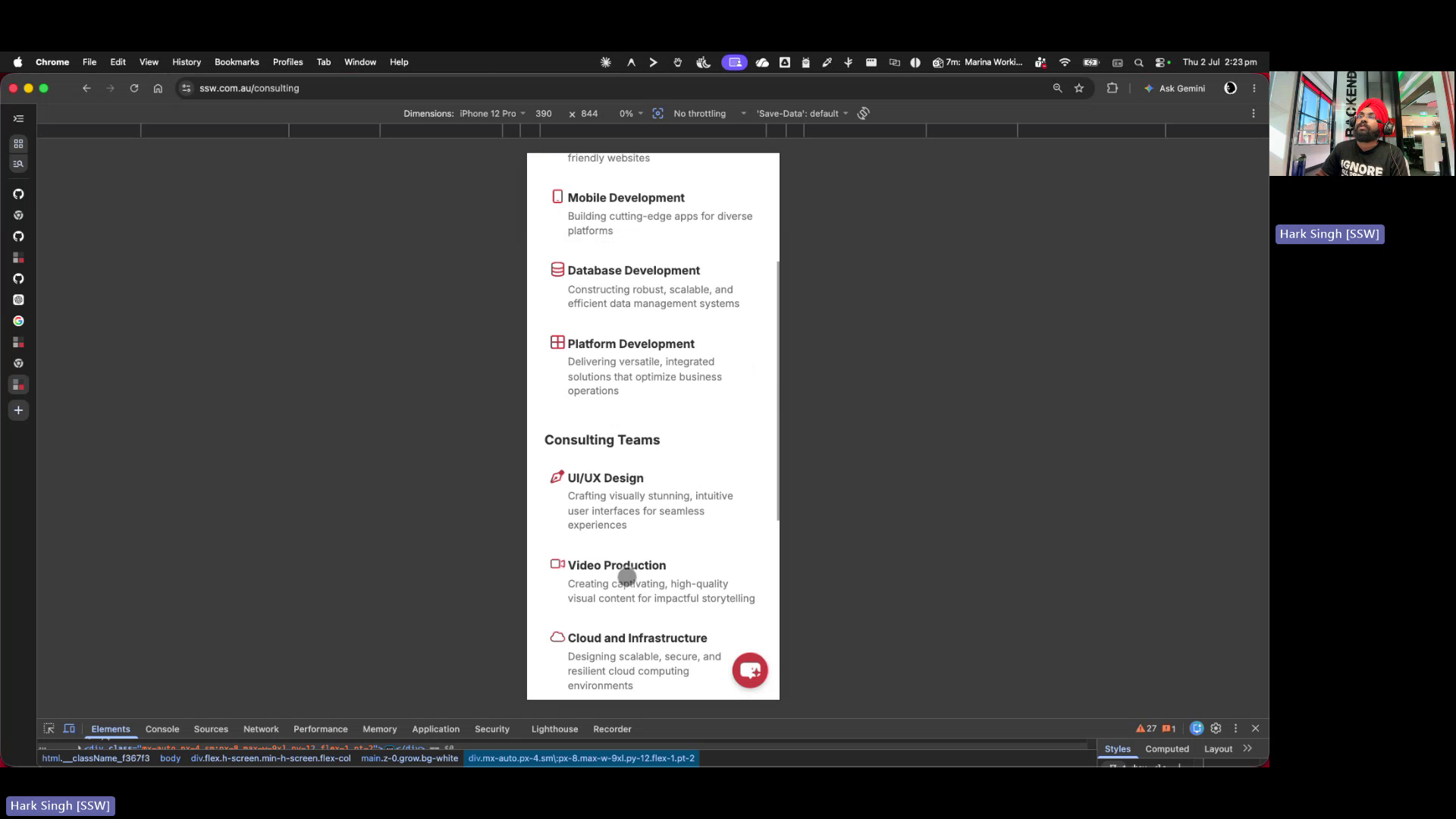
Figure: Mobile services menu missing "View all services" option
Contributor guide
No contributing guide indexed for this repository
First steps
- Read the whole issue, then the project's contributing guide.
- Comment on the issue to say you are picking it up — it saves two people doing the same work.
- Fork the repository and make your change on a branch.
- Open a pull request that references the issue number.
Research direction
Start by locating the mobile Services navigation entry point in the Next.js website and compare it with the desktop Services menu, especially the existing “View All SSW Services” destination. Add the mobile link at the end of the Services list, then verify its destination and visibility across supported mobile breakpoints without changing desktop behavior.
Written by the indexing model from the issue text.
Assessment
- Tech stack
- next.js
- Domain
- frontend
- Issue type
- Bug
- Difficulty
- 2/5
- Estimated time
- 1-3 hours
- Activity status
- Quiet
- Clarity
- Mostly clear
- Newbie friendliness
- 68/100