SSWConsulting / SSWConsulting/SSW.Website
🐛 Bug - V2 card carousel technology component is blank and errors when adding technology
@joshbermanssw is already working on this.
Since Jun 10, 2026.
- Dominant language
- HTML
- Stars
- 14
- Forks
- 10
- Avg merge
- 13h 51m
- Merged PRs (30d)
- 38
Description
Requested by: @StefStar via YakShaver.ai 🦬
cc: @StefStar, @joshbermanssw, @brookjeynes-ssw, @babakamyljanovssw
Hi Team!
Url from screen share: https://ssw.com.au/admin/index.html?consulting/chinafyv2
Pain
On the ⭐ SSW Website (Dev - Next.js), when editing or creating a Consulting V2 page, the V2 card carousel technology component loads as blank. Attempting to add a technology to this component results in an error, preventing configuration and use of the component. This blocks completion of the Consulting V2 page. Josh Berman has indicated this may be a website issue and is investigating. Relevant stakeholders (e.g. Tina and Josh Berman) should be CC’d.
Acceptance Criteria
- The V2 card carousel technology component displays correctly when selected on a Consulting V2 page.
- Users can add a technology to the V2 card carousel technology component without encountering an error.
- Added technologies are saved and persist after page refresh or reload.
- No console or UI errors occur when interacting with the component.
Reproduce Steps
- Navigate to the ⭐ SSW Website (Dev - Next.js) CMS/editor.
- Open an existing Consulting V2 page or duplicate one to create a new page.
- Locate and select the 'V2 card carousel technology' component.
- Observe that the component renders as blank.
- Attempt to add a technology to the component.
- Observe that an error is shown and the technology cannot be added.
Screenshot
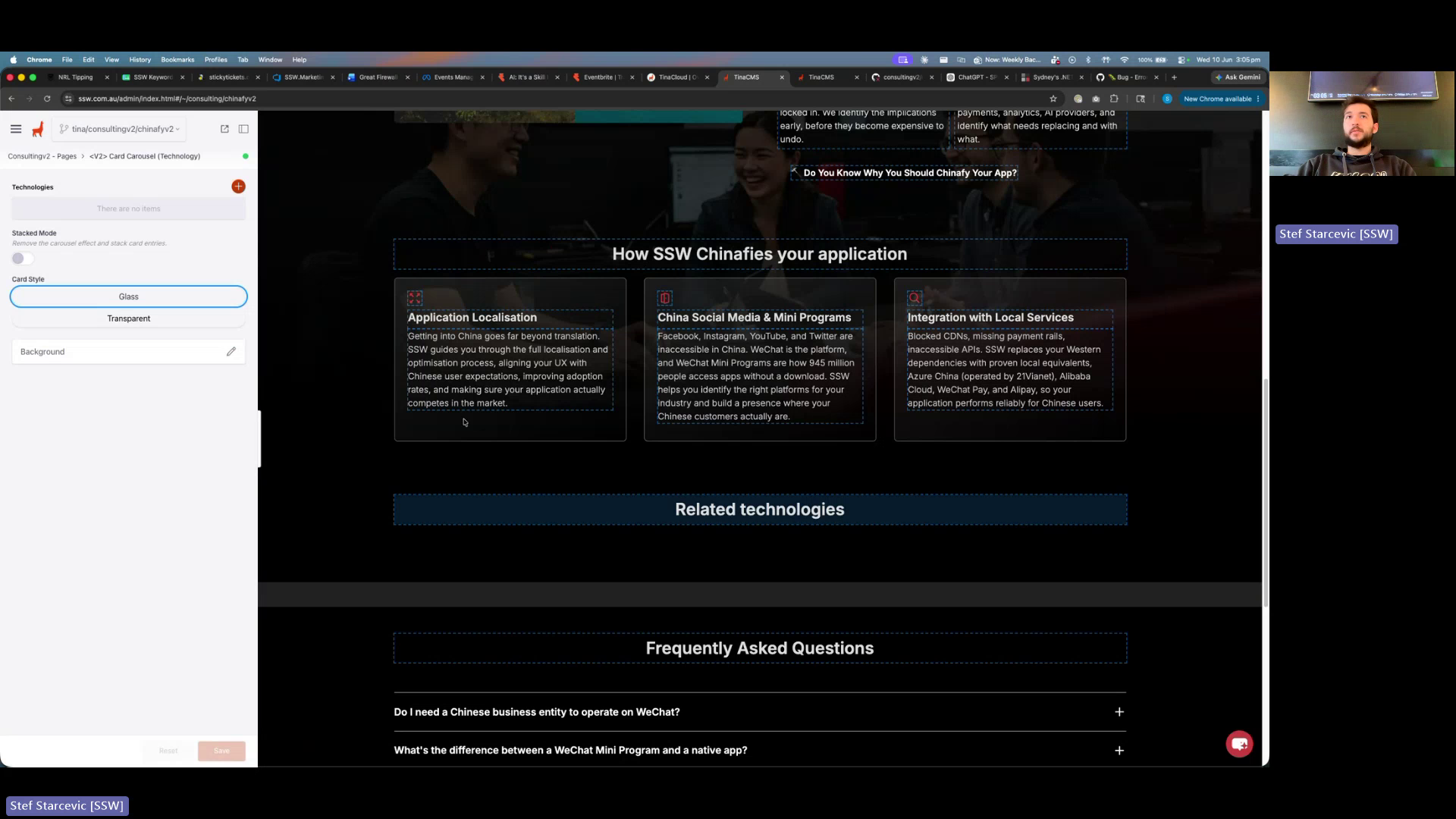
Figure: Component displays blank and errors when adding technology
Contributor guide
No contributing guide indexed for this repository
First steps
- Read the whole issue, then the project's contributing guide.
- Comment on the issue to say you are picking it up — it saves two people doing the same work.
- Fork the repository and make your change on a branch.
- Open a pull request that references the issue number.
Assessment
This issue has not been assessed yet.