SSWConsulting / SSWConsulting/SSW.Website
🐛 Bug - GitHub Copilot PR branches are not indexed in TinaCloud, preventing preview deployments
@uly1 is already working on this.
Since Jan 22, 2026.
- Dominant language
- HTML
- Stars
- 14
- Forks
- 10
- Avg merge
- 13h 51m
- Merged PRs (30d)
- 38
Description
cc: @wicksipedia, @uly1, @Calinator444, @brookjeynes-ssw, @adamcogan, @babakamyljanovssw
Hi Team!
🟥 Watch the video (1 min 2 sec)
Url from screen share: https://github.com/SSWConsulting/SSW.Website/actions/runs/2122952239/job/6108515029
Pain
In Rules V3 (TinaCMS), branches created by GitHub Copilot are not being indexed in TinaCloud when a pull request is opened. As a result, the CI build cannot find the branch in TinaCloud, causing the preview deployment to fail. Build logs show that TinaCloud has no record of the Copilot-created branch, even though it should be indexed automatically on PR creation.
Acceptance Criteria
- When a pull request is opened from a GitHub Copilot-created branch, the branch is automatically indexed in TinaCloud.
- TinaCloud contains an entry for the Copilot-created branch before or during the CI build process.
- Preview deployments succeed for pull requests created from GitHub Copilot branches.
- Build logs no longer show missing TinaCloud branch data for Copilot-created branches.
- Behavior is consistent with branches created manually by developers.
Reproduce Steps
- Create a new branch using GitHub Copilot.
- Open a pull request from the Copilot-created branch in the Rules V3 (TinaCMS) repository.
- Allow the CI pipeline to run and attempt a preview deployment.
- Review the build logs.
- Observe that TinaCloud does not have the branch indexed and the preview deployment fails.
Screenshot
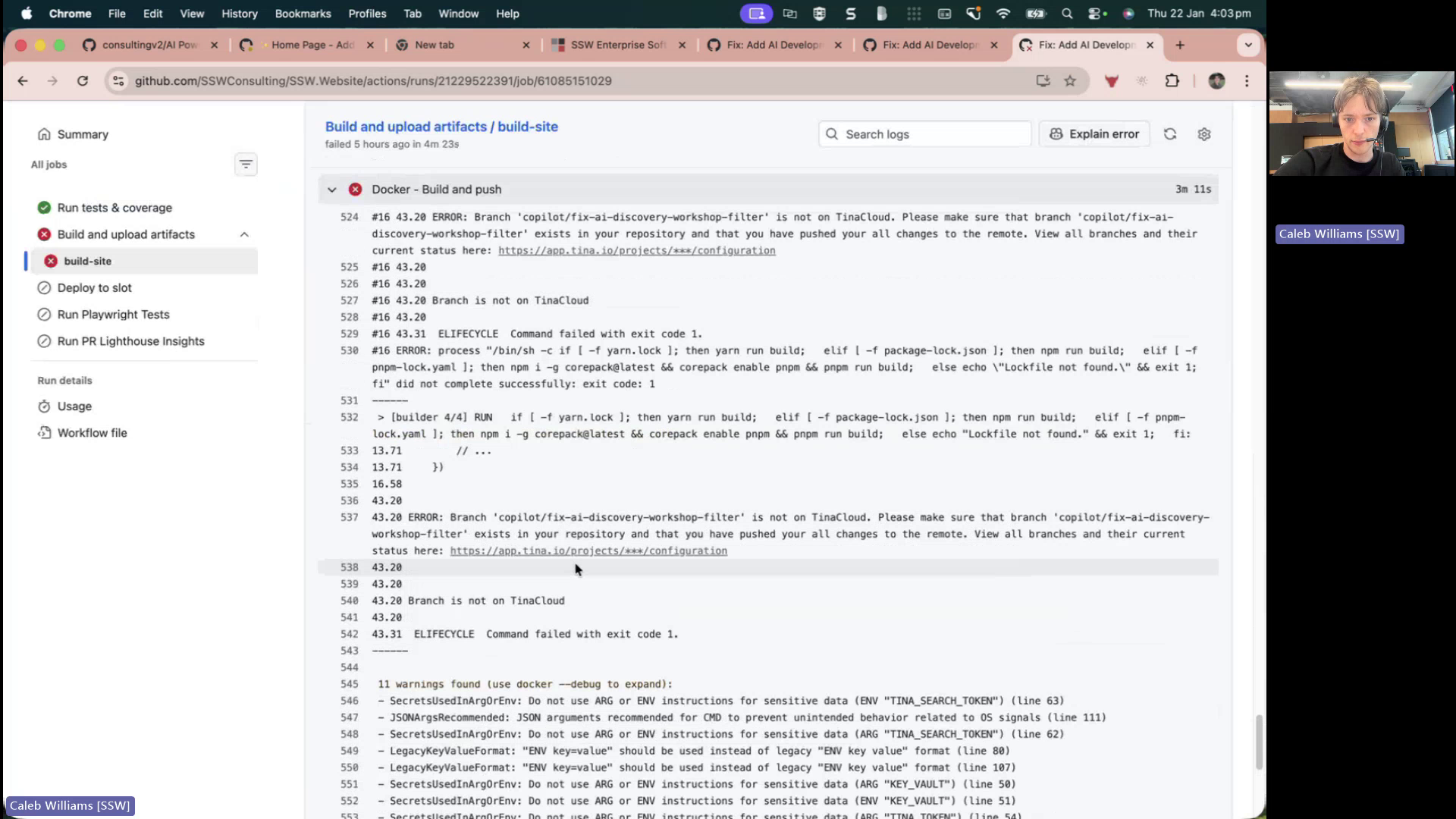
Figure: Branch build missing from TinaCloud indexing
Contributor guide
No contributing guide indexed for this repository
First steps
- Read the whole issue, then the project's contributing guide.
- Comment on the issue to say you are picking it up — it saves two people doing the same work.
- Fork the repository and make your change on a branch.
- Open a pull request that references the issue number.
Assessment
This issue has not been assessed yet.