SSWConsulting / SSWConsulting/SSW.Website
🐛 Bug - Event editing in TinaCMS has no preview and incorrect navigation/sorting
Nobody has claimed this yet.
- Dominant language
- HTML
- Stars
- 14
- Forks
- 10
- Avg merge
- 13h 51m
- Merged PRs (30d)
- 38
Description
Requested by: @0xharkirat via YakShaver.ai 🦬
cc: @0xharkirat, @bahjatalaadelssw, @brookjeynes-ssw, @adamcogan, @babakamyljanovssw @Calinator444
Hi Team!
🟥 Watch the video (3 min 45 sec)
Url from screen share: https://ssw.com.au/admin/index.html#/collections/edit/eventsCalendar/2026/Your-Niche-Your-AI-with-Jason-Tan
Pain
Reviewers cannot properly preview or validate changes when editing Events in the TinaCMS admin for the ⭐ SSW Website (Dev - Next.js). Opening an event from the admin interface shows only a full-width markdown editor with no working preview. The Preview button navigates to an about:blank page. Additionally, the Events Calendar navigation shows duplicate year folders (e.g. 2026 appears twice with identical contents), and sorting options are largely unusable for finding events chronologically, making event management and review error-prone and inefficient.
Acceptance Criteria
- When editing an Event in TinaCMS, a working preview is available that shows the rendered page as it would appear on the public website
- Clicking the Preview button from the Event editing page navigates to a valid preview URL instead of about:blank
- Events edited in TinaCMS correctly map to and are visible on their corresponding public event pages (e.g. Brisbane Full Stack User Group)
- The Events Calendar in the TinaCMS sidebar does not show duplicate year folders (e.g. 2026 appears only once)
- Event sorting supports a clear and useful chronological order by date without relying on non-relevant fields
- Non-useful or confusing sort options (e.g. URL, thumbnail description, YouTube ID) are removed or deprioritised
- A reviewer can easily locate, preview, and verify changes to an event without reading raw markdown
Reproduce Steps
- Open TinaCMS admin for the SSW Website
- Navigate to Events Calendar from the sidebar
- Observe that the same year (e.g. 2026) appears more than once with identical contents
- Open any event (e.g. Brisbane Full Stack User Group)
- Note that only a full-width editor is shown with no rendered preview
- Click the Preview button on the event editing page
- Observe that the browser navigates to about:blank and no preview is displayed
- Attempt to sort events using different sort options and note that most do not produce a useful chronological order
Screenshot
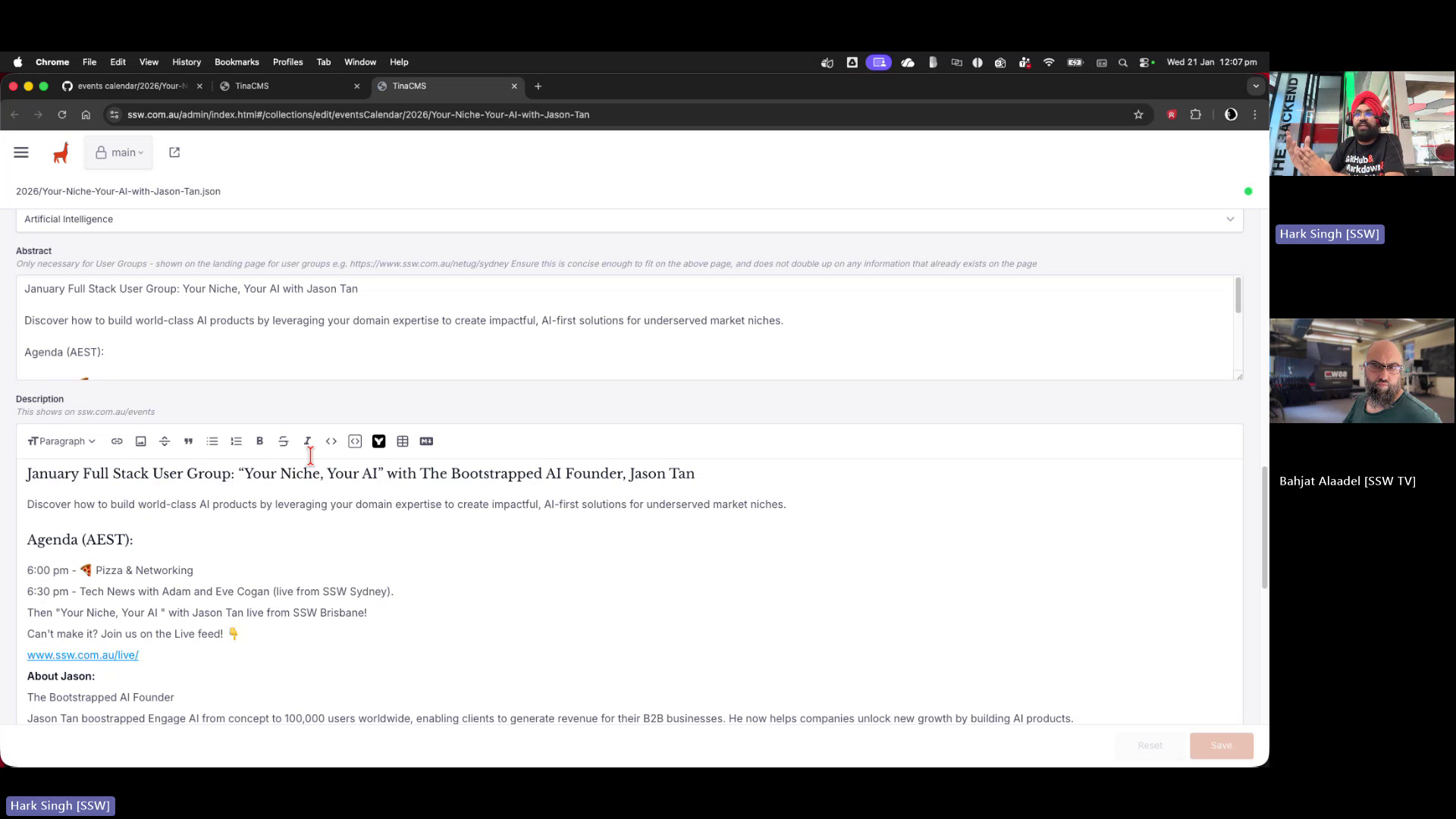
Figure: Event editor opens without any preview of content changes
Contributor guide
No contributing guide indexed for this repository
First steps
- Read the whole issue, then the project's contributing guide.
- Comment on the issue to say you are picking it up — it saves two people doing the same work.
- Fork the repository and make your change on a branch.
- Open a pull request that references the issue number.
Research direction
Start in the TinaCMS admin's Events Calendar and event editor, reproducing the missing preview, about:blank navigation, duplicate year folders, and ineffective sorting. Compare the edited event with its corresponding public event page; done means reviewers can locate an event, preview rendered changes at a valid URL, see the correct public page mapping, and sort events chronologically without confusing fields.
Written by the indexing model from the issue text.
Assessment
- Tech stack
- next.js
- Domain
- content, frontend, web-dev
- Issue type
- Bug
- Difficulty
- 4/5
- Estimated time
- 3-5 days
- Activity status
- Quiet
- Clarity
- Mostly clear
- Newbie friendliness
- 50/100