SSWConsulting / SSWConsulting/SSW.Website
🐛 Bug - Carousel Image Display Issue on SSW Website
Nobody has claimed this yet.
- Dominant language
- HTML
- Stars
- 14
- Forks
- 10
- Avg merge
- 13h 51m
- Merged PRs (30d)
- 38
Description
Requested by: @RobJT-wq via YakShaver.ai 🦬
cc: @RobJT-wq, @brookjeynes-ssw, @adamcogan, @babakamyljanovssw
Hi Team!
Url from screen share: https://www.ssw.com.au
Pain
There is an issue with the image carousel on the SSW Website where the third from the last image tab displays grey everywhere, breaking the carousel icons. This seems to be specifically related to the fifth image.
Acceptance Criteria
- The third from the last image tab in the carousel should display correctly without any grey overlay.
- Carousel icons should function properly and not break when navigating through images.
- The issue should be resolved specifically for the fifth image, ensuring it displays correctly.
Reproduce Steps
- Navigate to the SSW Website at www.ssw.com.au.
- Locate the image carousel on the page.
- Click through the images until reaching the third from the last image tab.
- Observe the display issue with grey overlay and broken carousel icons.
Screenshot
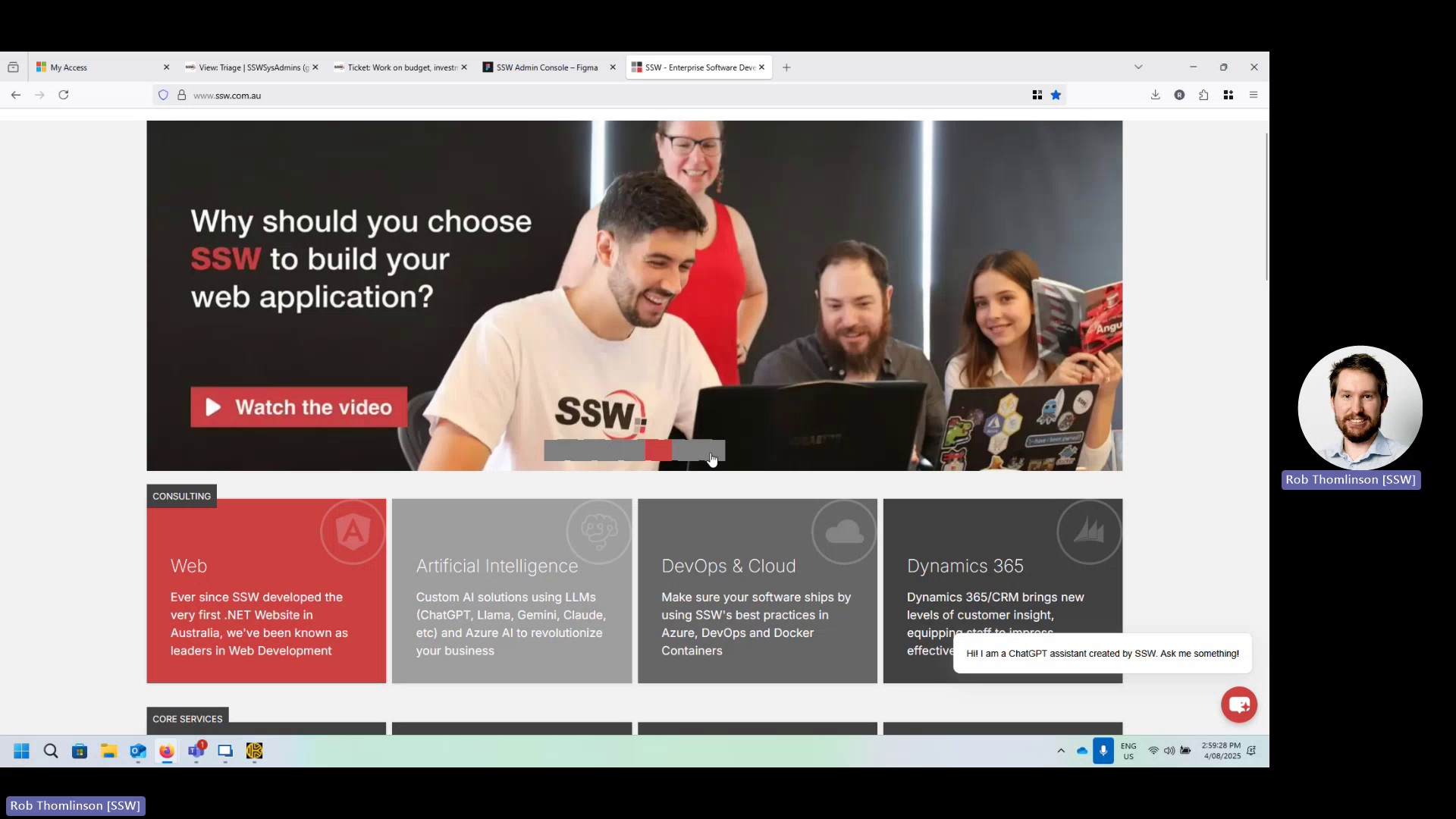
Figure: Grey overlay breaks carousel icons on third-to-last image tab
Contributor guide
No contributing guide indexed for this repository
First steps
- Read the whole issue, then the project's contributing guide.
- Comment on the issue to say you are picking it up — it saves two people doing the same work.
- Fork the repository and make your change on a branch.
- Open a pull request that references the issue number.
Research direction
Reproduce the carousel issue on ssw.com.au by navigating to the third-from-last image, with particular attention to the fifth image and the linked screenshot or video. No source file or test is identified in the issue, so trace the carousel implementation from the affected page. Done means the image has no grey overlay and the carousel icons work while navigating.
Written by the indexing model from the issue text.
Assessment
- Tech stack
- nextjs
- Domain
- frontend, web-dev
- Issue type
- Bug
- Difficulty
- 3/5
- Estimated time
- 1-2 days
- Activity status
- Stale
- Clarity
- Mostly clear
- Newbie friendliness
- 42/100