SSWConsulting / SSWConsulting/SSW.Website
🐛 Bug - Mega Navigation Links Not Displaying Correctly
Nobody has claimed this yet.
- Dominant language
- HTML
- Stars
- 14
- Forks
- 10
- Avg merge
- 13h 51m
- Merged PRs (30d)
- 38
Description
Requested by: @bettybondoc via YakShaver.ai 🦬
cc: @bettybondoc, @brookjeynes-ssw, @adamcogan, @babakamyljanovssw
Hi Team!
🟥 Watch the video (1 min 10 sec)
Url from screen share: https://ssw.com.au/company/about-us
Pain
Links in the mega navigation on the SSW Website do not appear clickable due to missing hover effects and cursor changes. Additionally, when clicking on a link that navigates internally, the mega navigation does not close, causing confusion about whether the navigation was successful.
Acceptance Criteria
- Links in the mega navigation should have a hover effect to indicate they are clickable.
- The cursor should change to a pointer when hovering over links in the mega navigation.
- When a link in the mega navigation is clicked and navigates internally, the mega navigation should close automatically.
Reproduce Steps
- Navigate to the SSW Website (www.ssw.com.au).
- Open the mega navigation from the main navigation bar.
- Hover over the links on the right-hand side and observe the lack of hover effect and cursor change.
- Click on the 'Newsletter' link and observe that the page reloads behind the mega navigation without closing it.
Screenshot
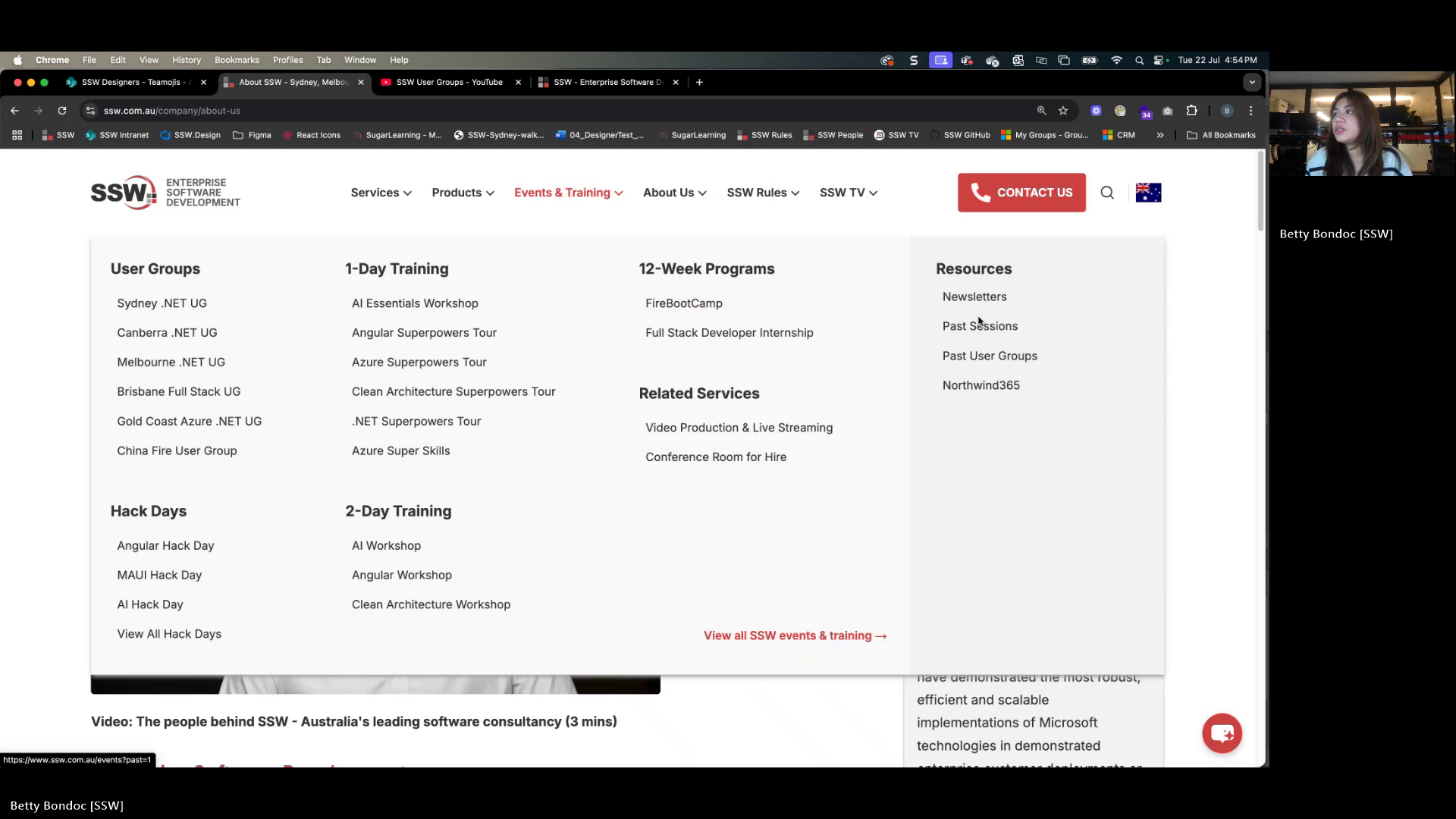
Figure: Links lack hover effect and appear unclickable.
Contributor guide
No contributing guide indexed for this repository
First steps
- Read the whole issue, then the project's contributing guide.
- Comment on the issue to say you are picking it up — it saves two people doing the same work.
- Fork the repository and make your change on a branch.
- Open a pull request that references the issue number.
Research direction
Start at the SSW Website mega navigation on the about-us page and trace the right-hand-side links and the internal Newsletter navigation. Verify the current hover and cursor behavior, then confirm that internal navigation closes the mega menu. Done means all three acceptance criteria are observable on the site.
Written by the indexing model from the issue text.
Assessment
- Tech stack
- nextjs
- Domain
- frontend, web-dev
- Issue type
- Bug
- Difficulty
- 3/5
- Estimated time
- 1-2 days
- Activity status
- Stale
- Clarity
- Clearly specified
- Newbie friendliness
- 35/100