SSWConsulting / SSWConsulting/SSW.Tiger
✨ Multilingual meetings - French content is missing from meeting summary when meeting language is set to English
@suiyangqiu is already working on this.
Since Mar 31, 2026.
- Dominant language
- JavaScript
- Stars
- 1
- Forks
- 1
- Avg merge
- 2d 12h
- Merged PRs (30d)
- 2
Description
Requested by: @PothieuG via YakShaver.ai 🦬
cc: @Aibono1225, @PothieuG, @suiyangqiu, @yaqi-lyu, @calumjs, @joshbermanssw
Hi Team!
🟥 Watch the video (1 min 33 sec)
Url from screen share: https://ssw-tiger-2026-03-31-183253.surge.sh
Pain
When a meeting is recorded in SSW.Tiger with the meeting language set to English, any portions of the conversation spoken in French are poorly transcribed and completely omitted from the generated summary. The UI indicates that French transcription is degraded, but the resulting summary does not reflect the French discussion at all. This causes loss of important meeting content in multilingual meetings.
Acceptance Criteria
- SSW.Tiger clearly handles meetings where speakers switch languages during the recording.
- If the meeting language is set to English and French is spoken, French speech is still transcribed and included in the meeting summary.
- If full transcription of a secondary language is not supported, the summary explicitly notes which parts of the discussion could not be summarized due to language limitations.
- The transcription quality warning (e.g., degraded language transcription) is clear and actionable for the user.
- No meeting content is silently omitted from the summary without explanation.
Reproduce Steps
- Start a meeting recording in SSW.Tiger.
- Set the meeting language to English.
- During the meeting, switch the spoken language to French for part of the discussion.
- End the meeting and allow SSW.Tiger to generate the transcription and summary.
- Review the summary and observe that the French discussion is missing or not represented.
Screenshot
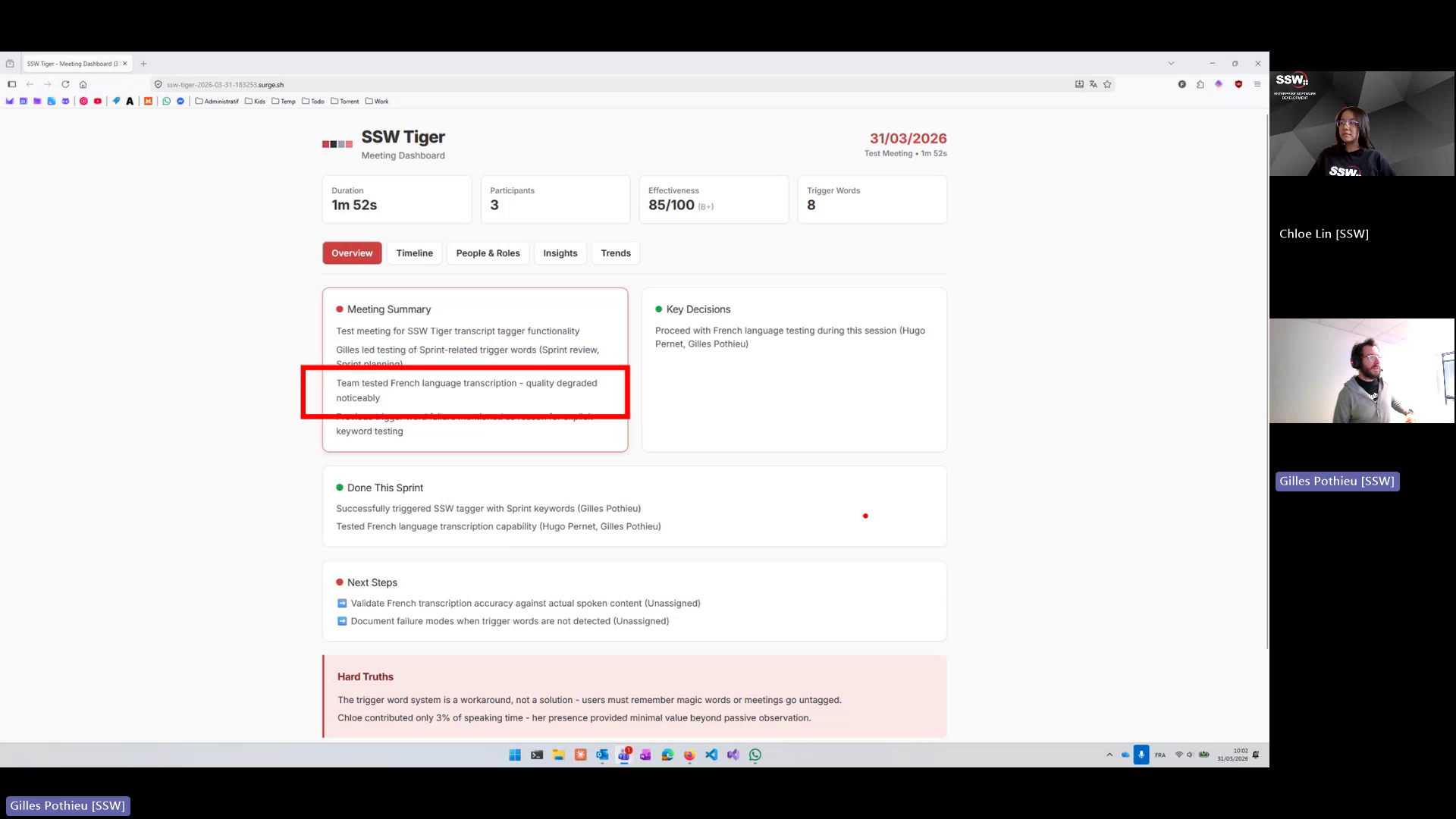
Figure: French discussion missing from meeting summary due to degraded transcription
Contributor guide
No contributing guide indexed for this repository
First steps
- Read the whole issue, then the project's contributing guide.
- Comment on the issue to say you are picking it up — it saves two people doing the same work.
- Fork the repository and make your change on a branch.
- Open a pull request that references the issue number.
Assessment
This issue has not been assessed yet.