SSWConsulting / SSWConsulting/SSW.Rules
UX - GitHub links on a rule
Open
Nobody has claimed this yet.
- Dominant language
- TypeScript
- Stars
- 26
- Forks
- 17
- Avg merge
- 14h 39m
- Merged PRs (30d)
- 2
Description
cc: @adamcogan @wicksipedia @calumjs
(copy of email from @pierssinclairssw)
Hi Brady,
As per our conversation please implement:
- See image - When I click on the “Last updated by” direct the user to the GitHub user page. E.g. Commits · SSWConsulting/SSW.Rules.Content · GitHub
- See image - When I click on the Last updated date, then direct the user to the commit diff E.g. Add language identifiers (#302) · SSWConsulting/SSW.Rules.Content@8496a3f · GitHub
- See image - When I click on “View History” direct the user to the folder history. E.g. History for rules/404-useful-error-page - SSWConsulting/SSW.Rules.Content · GitHub
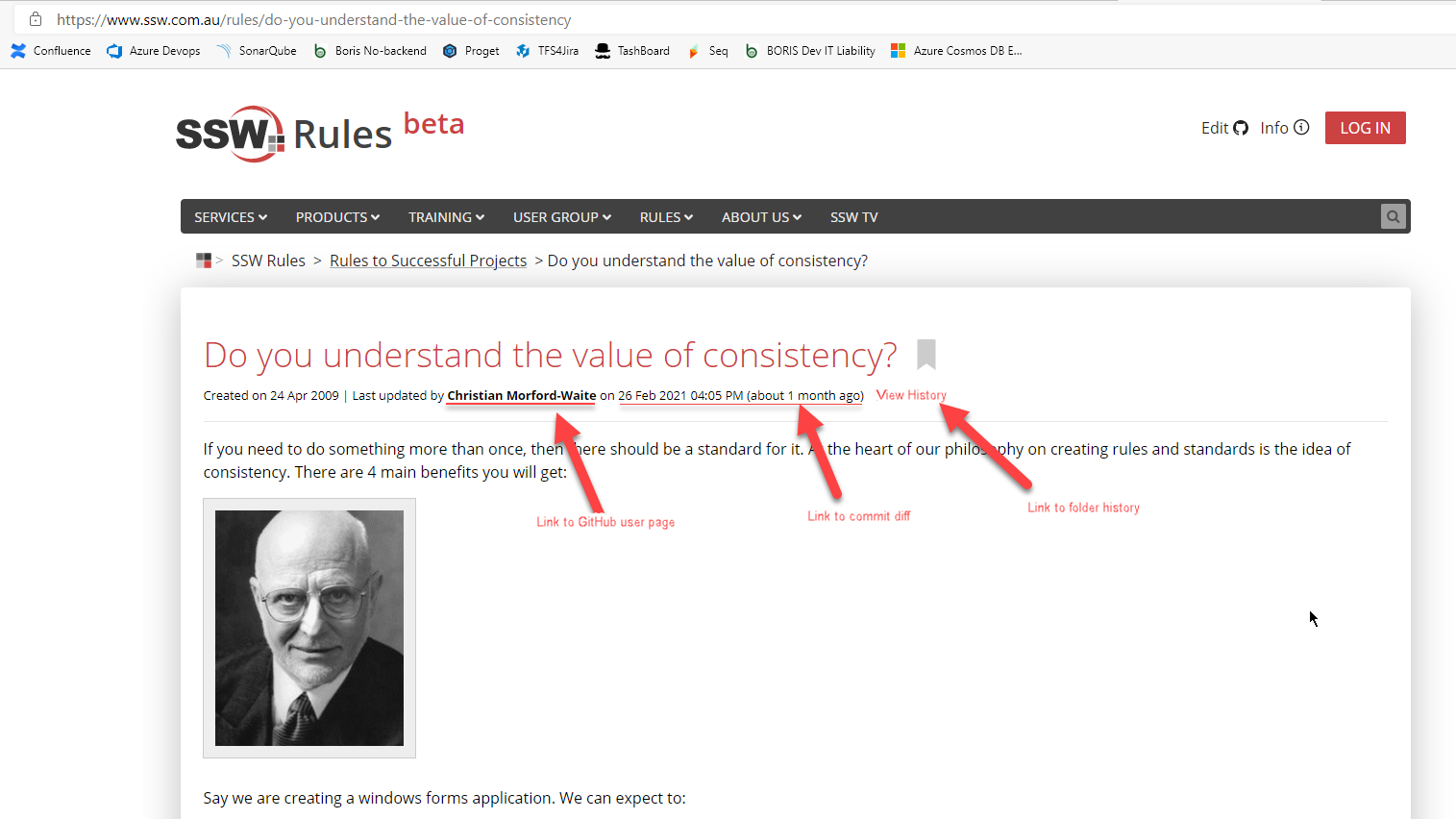
Figure: GitHub links need to be added
-Piers
Contributor guide
No contributing guide indexed for this repository
First steps
- Read the whole issue, then the project's contributing guide.
- Comment on the issue to say you are picking it up — it saves two people doing the same work.
- Fork the repository and make your change on a branch.
- Open a pull request that references the issue number.
Research direction
The issue provides no file or test path. Start by locating the rule view in SSW.Rules and tracing the displayed “Last updated by,” date, and “View History” elements. Done means each opens the corresponding GitHub user page, commit diff, or folder history described in the issue.
Written by the indexing model from the issue text.
Assessment
- Tech stack
- github, nextjs, typescript
- Domain
- frontend
- Issue type
- Feature
- Difficulty
- 3/5
- Estimated time
- 1-2 days
- Activity status
- Stale
- Clarity
- Mostly clear
- Newbie friendliness
- 35/100