SSWConsulting / SSWConsulting/SSW.Rules
💄 UI - Mobile 404 page
Open
Nobody has claimed this yet.
Area: Frontend
- Dominant language
- TypeScript
- Stars
- 26
- Forks
- 17
- Avg merge
- 14h 39m
- Merged PRs (30d)
- 2
Description
cc: @pierssinclairssw
(copy of email from @adamcogan)
https://ssw.com.au/rules/do-you-know-the-best-tools-to-manage-apis
- Left side - Ssw logo too close
- Right side - ‘log in’ too close
- Put ‘not found’ on a fresh line
- To the left of ‘log in’ can you have the judges icon
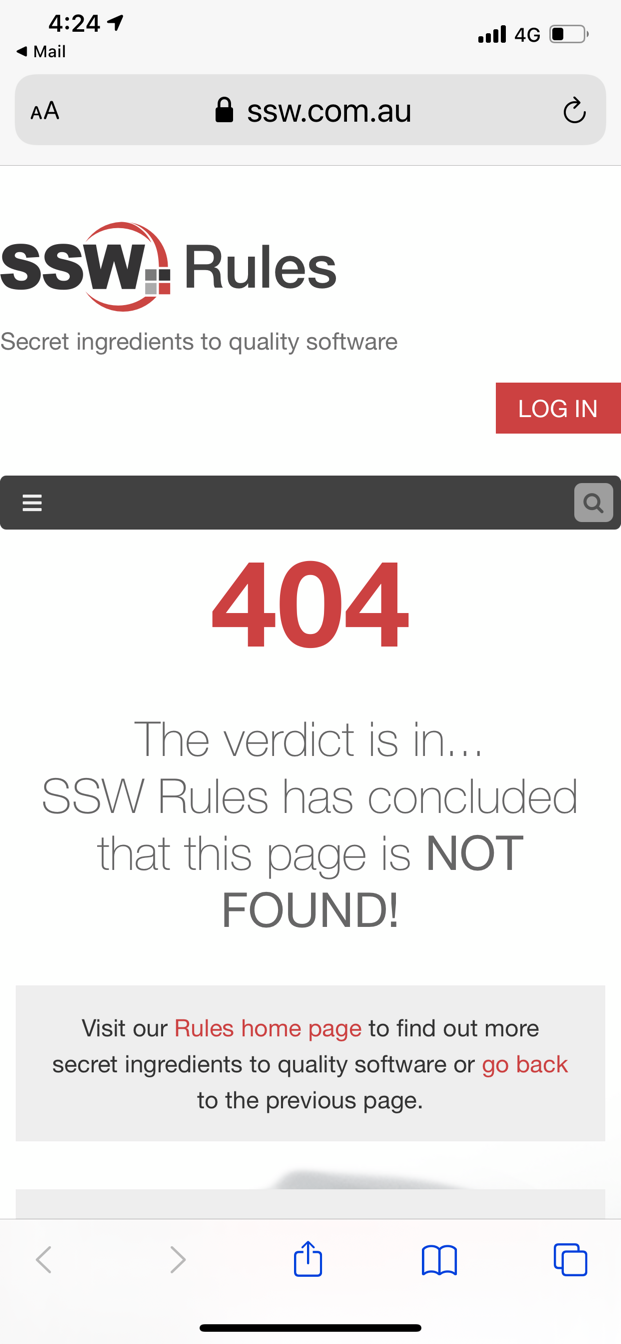
-a
Contributor guide
No contributing guide indexed for this repository
First steps
- Read the whole issue, then the project's contributing guide.
- Comment on the issue to say you are picking it up — it saves two people doing the same work.
- Fork the repository and make your change on a branch.
- Open a pull request that references the issue number.
Research direction
Open the linked mobile 404 page and compare it with the attached screenshot. Check the four requested UI changes: logo spacing, log-in spacing, a new line for “not found,” and the judges icon beside log in; the work is done when these adjustments match the request on mobile.
Written by the indexing model from the issue text.
Assessment
- Tech stack
- nextjs, typescript
- Domain
- frontend
- Issue type
- Bug
- Difficulty
- 2/5
- Estimated time
- 1-3 hours
- Activity status
- Stale
- Clarity
- Mostly clear
- Newbie friendliness
- 45/100