SSWConsulting / SSWConsulting/SSW.Rules
Netlify CMS - Investigate adding a ready section to the workflow screen
Nobody has claimed this yet.
- Dominant language
- TypeScript
- Stars
- 26
- Forks
- 17
- Avg merge
- 14h 39m
- Merged PRs (30d)
- 2
Description
@bradystroud @william-liebenberg @adamcogan
Currently the Netlify CMS workflow screen shows us a "draft" and "in review" column. It might be better UX if there was also a "ready" column which indicates the post has been approved and is ready to go live. This additional column is as per the Netlify CMS Demo site
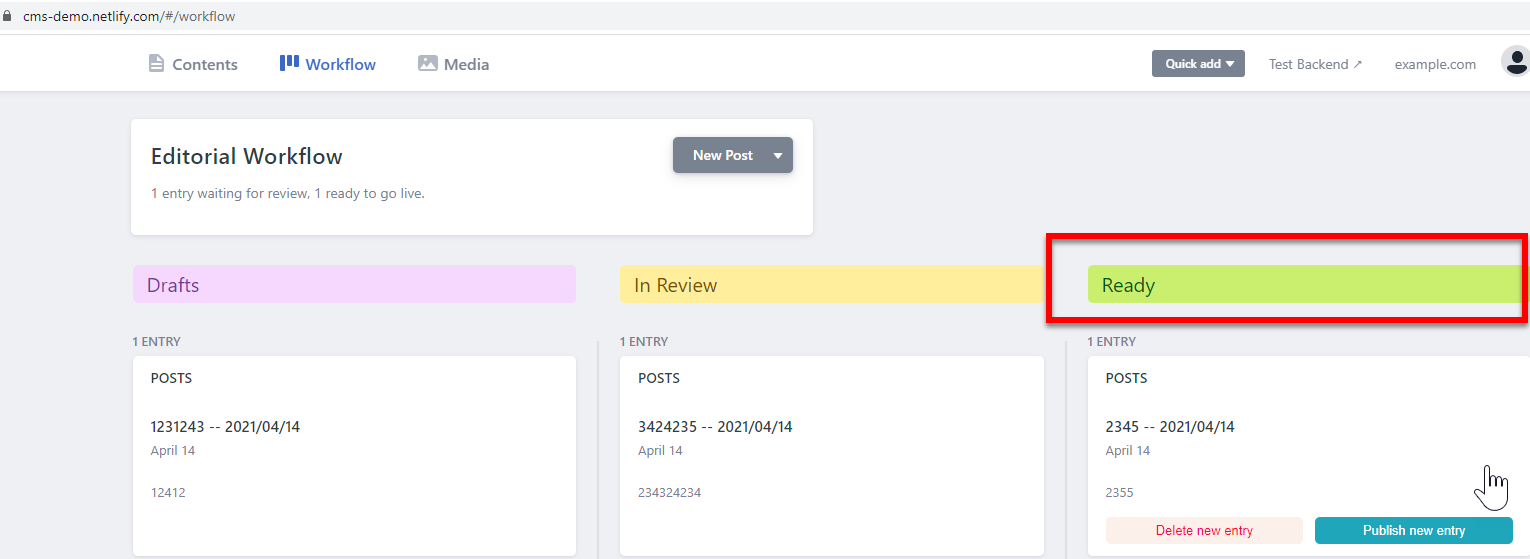
Figure: Approved rules shown in the "ready" column
- Investigate if it makes sense to add a ready column and how to handle this column. It likely doesn't make sense for users to have to publish because this adds extra steps but maybe we could have a column which shows the posts published in the last 14 days or something like that.
Contributor guide
No contributing guide indexed for this repository
First steps
- Read the whole issue, then the project's contributing guide.
- Comment on the issue to say you are picking it up — it saves two people doing the same work.
- Fork the repository and make your change on a branch.
- Open a pull request that references the issue number.
Research direction
Review the Netlify CMS workflow screen and the linked Netlify CMS Demo to understand the existing draft and in-review columns. The payload names no repository file or test, so first locate the workflow-screen implementation and its related tests. Done means documenting whether a ready column fits the publishing flow and defining how approved or recently published posts should appear.
Written by the indexing model from the issue text.
Assessment
- Tech stack
- typescript
- Domain
- frontend
- Issue type
- Feature
- Difficulty
- 5/5
- Estimated time
- Over a week
- Activity status
- Stale
- Clarity
- Needs clarification
- Newbie friendliness
- 25/100