SSWConsulting / SSWConsulting/SSW.Rules
🐛 Bug - Show co-author instead of TinaCloud bot as last updated author
Nobody has claimed this yet.
- Dominant language
- TypeScript
- Stars
- 26
- Forks
- 17
- Avg merge
- 14h 39m
- Merged PRs (30d)
- 2
Description
Requested by: @brookjeynes-ssw via YakShaver.ai 🦬
cc: @brookjeynes-ssw, @wicksipedia, @BenDunkerleySSW, @Marxoz, @PothieuG, @Freego1783
Hi Team!
🟥 Watch the video (1 min 34 sec)
Pain
In Rules V3 (TinaCMS), the rule details page incorrectly displays the "TinaCloud" bot as the last updated author when a commit contains a co-author. The UI should detect when the commit author is the TinaCloud app/bot and instead extract and display the human co-author from the commit message/history.
Acceptance Criteria
- When the latest commit author is the TinaCloud bot and the commit contains a co-author, the UI displays the human co-author as the last updated author.
- The system parses commit metadata or commit messages to identify co-authored-by entries.
- If no co-author exists, the TinaCloud bot continues to display as the author.
- The author displayed on the rule page matches the expected human contributor from the commit history.
- Existing author rendering behavior for non-TinaCloud commits is unchanged.
Reproduce Steps
- Open a rule in Rules V3 (TinaCMS) where the latest commit was authored by the TinaCloud bot with a co-author.
- Observe the "Last Updated By" section on the rule page.
- Open the Git history for the same rule.
- Verify that the commit contains both the TinaCloud bot and a human co-author.
- Notice that the UI only displays the TinaCloud bot instead of the human contributor.
Screenshot
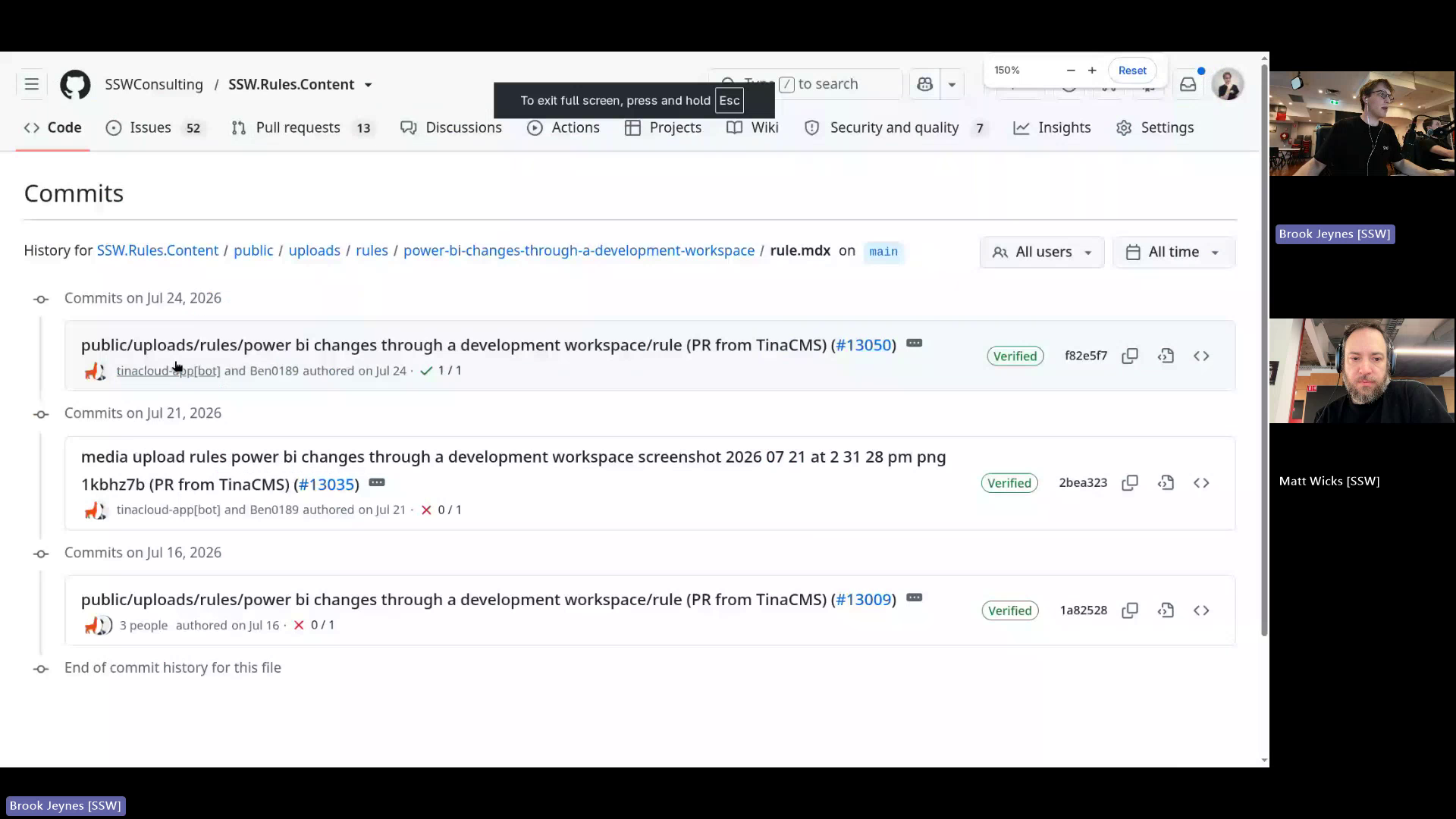
Figure: TinaCloud bot shown instead of actual last author
Contributor guide
No contributing guide indexed for this repository
First steps
- Read the whole issue, then the project's contributing guide.
- Comment on the issue to say you are picking it up — it saves two people doing the same work.
- Fork the repository and make your change on a branch.
- Open a pull request that references the issue number.
Research direction
Start at the Rules V3 rule details page and locate the "Last Updated By" rendering. Inspect the latest commit metadata and message for co-authored-by entries, then verify the display against Git history for both TinaCloud commits with and without a co-author, while preserving non-TinaCloud behavior.
Written by the indexing model from the issue text.
Assessment
- Tech stack
- nextjs, typescript
- Domain
- frontend, web-dev
- Issue type
- Bug
- Difficulty
- 3/5
- Estimated time
- 1-2 days
- Activity status
- Active
- Clarity
- Mostly clear
- Newbie friendliness
- 65/100