SSWConsulting / SSWConsulting/SSW.Rules
🎨 UI - Inline code styling blends into gray code block backgrounds
Nobody has claimed this yet.
- Dominant language
- TypeScript
- Stars
- 26
- Forks
- 17
- Avg merge
- 14h 39m
- Merged PRs (30d)
- 2
Description
Requested by: @tiagov8 via YakShaver.ai 🦬
cc: @tiagov8, @Marxoz, @PothieuG, @Freego1783 @Aibono1225 @designbyalex @hveraus @micsblank
Hi Team!
🟥 Watch the video (1 min 33 sec)
Url from screen share: https://ssw.com.au/rules/centralize-ai-workflows
Pain
In Rules V3 (TinaCMS), inline code styling becomes difficult to distinguish when displayed inside gray content boxes because the inline code background color blends into the surrounding container background. Update the inline code styling within gray boxes to improve contrast and readability. Suggested approaches include using a white background or a darker contrasting shade for inline code elements inside gray containers.
Acceptance Criteria
- Inline code inside gray content boxes is visually distinguishable from the surrounding background.
- Inline code styling maintains sufficient contrast and readability across supported themes and layouts.
- Standard inline code styling outside gray boxes remains unchanged.
- The updated styling is applied consistently across all SSW Rules pages containing inline code inside gray containers.
- The solution is visually validated against existing examples in Rules V3 (TinaCMS).
Reproduce Steps
- Open a rule page in Rules V3 (TinaCMS) that contains inline code within a gray content box.
- Observe the inline code styling inside the gray container.
- Notice that the inline code background blends with the gray box background, making the code harder to distinguish and read.
Screenshot
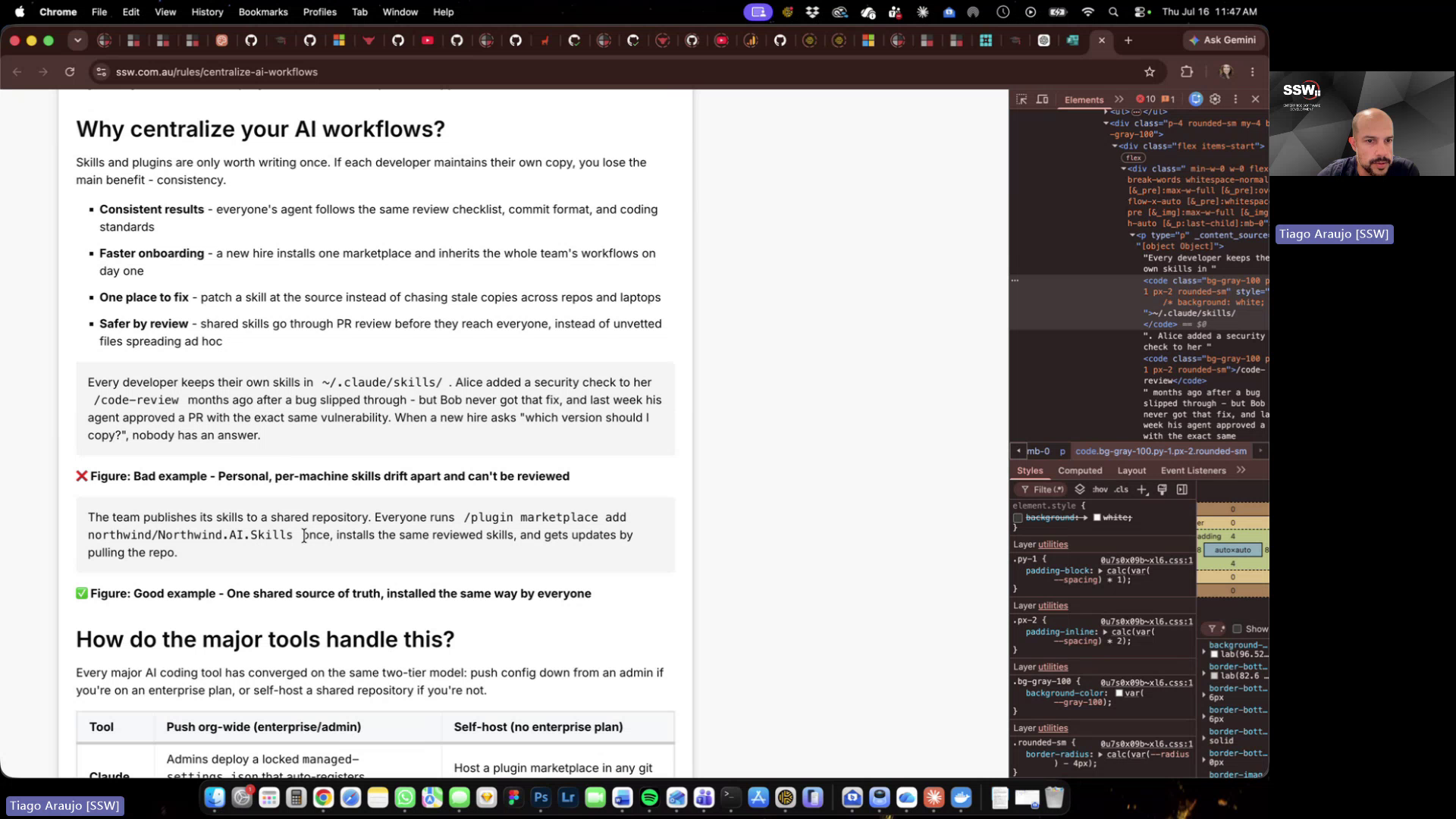
Figure: Inline code styling blends into gray box background
Contributor guide
No contributing guide indexed for this repository
First steps
- Read the whole issue, then the project's contributing guide.
- Comment on the issue to say you are picking it up — it saves two people doing the same work.
- Fork the repository and make your change on a branch.
- Open a pull request that references the issue number.
Research direction
Open the Rules V3 page linked in the issue and reproduce the inline-code contrast problem inside a gray content box, using the screenshot and video as visual references. Locate the styling entry point for those content boxes and verify that inline code inside them is distinguishable while inline code elsewhere remains unchanged across existing Rules pages and supported themes.
Written by the indexing model from the issue text.
Assessment
- Tech stack
- nextjs, typescript
- Domain
- accessibility, design, frontend
- Issue type
- Bug
- Difficulty
- 2/5
- Estimated time
- 1-3 hours
- Activity status
- Quiet
- Clarity
- Mostly clear
- Newbie friendliness
- 68/100