SSWConsulting / SSWConsulting/SSW.Rules
✨ Related Rules UX - Open selector immediately when adding a related rule
Nobody has claimed this yet.
- Dominant language
- TypeScript
- Stars
- 26
- Forks
- 17
- Avg merge
- 14h 39m
- Merged PRs (30d)
- 2
Description
Requested by: @tiagov8 via YakShaver.ai 🦬
cc: @tiagov8, @Marxoz, @PothieuG, @Freego1783 @Aibono1225
Hi Team!
🟥 Watch the video (1 min 36 sec)
Url from screen share: https://ssw.com.au/rules/admin/index.html#/-/rules/uri-url-slug
Pain
Improve the user experience when adding Related Rules in Rules V3 (TinaCMS). Currently, clicking the plus (+) button adds an empty related rule row and requires a second click to open the rule selector, resulting in unnecessary steps and unclear empty states. The interaction should be streamlined so that clicking the plus button opens the rule selection view immediately, with the selector open and ready for searching, and without displaying empty related rule placeholders.
Acceptance Criteria
- When the user clicks the plus (+) button in the Related Rules section, the rule selection view opens immediately without requiring a second click.
- The rule selector dropdown/search is automatically open and focused, allowing the user to start typing straight away.
- No empty related rule items are displayed in the Related Rules list before a rule is selected.
- If no rule is selected, no placeholder or empty rule entry is shown in the Related Rules section.
- The interaction removes at least two unnecessary user clicks compared to the current behavior.
- The overall behavior is consistent and intuitive across all instances of the Related Rules section in Rules V3 (TinaCMS).
Screenshot
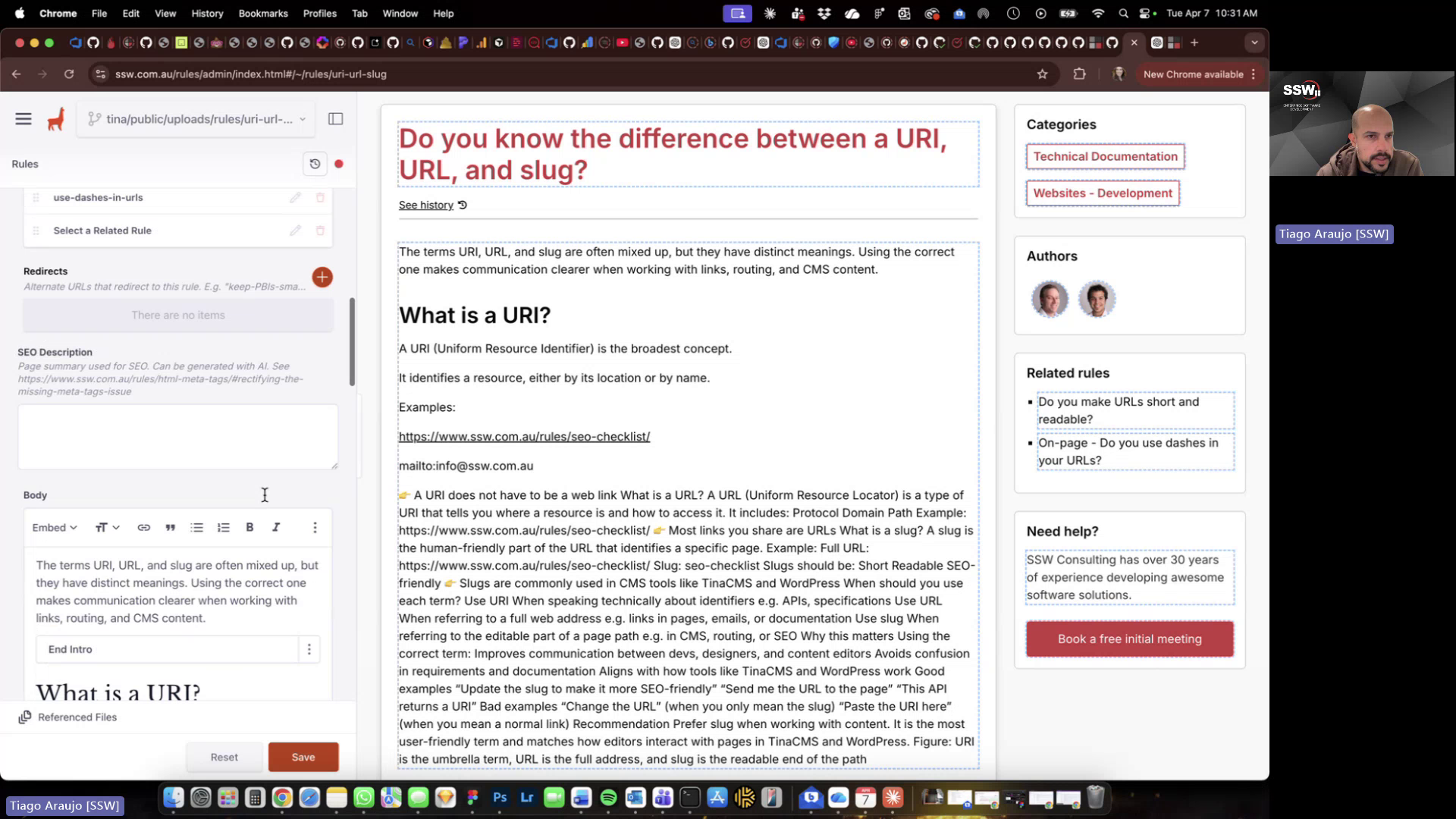
Figure: Adding a related rule requires an extra click and shows empty items; the plus action should open the selection view directly
Contributor guide
No contributing guide indexed for this repository
First steps
- Read the whole issue, then the project's contributing guide.
- Comment on the issue to say you are picking it up — it saves two people doing the same work.
- Fork the repository and make your change on a branch.
- Open a pull request that references the issue number.
Research direction
Start in the Rules V3 (TinaCMS) Related Rules section and reproduce the current behavior using the linked Rules URL or screen-share video. Trace the plus-button entry point and selector/search interaction; done means the selector opens and focuses immediately, no empty related-rule placeholder appears before selection, and the behavior is consistent across Related Rules instances.
Written by the indexing model from the issue text.
Assessment
- Tech stack
- nextjs, typescript
- Domain
- frontend, web-dev
- Issue type
- Feature
- Difficulty
- 3/5
- Estimated time
- 1-2 days
- Activity status
- Quiet
- Clarity
- Mostly clear
- Newbie friendliness
- 68/100