SSWConsulting / SSWConsulting/SSW.Rules
🦙 Bug - TinaCMS Dependency - Media Manager shows misleading upload and delete error messages
Nobody has claimed this yet.
- Dominant language
- TypeScript
- Stars
- 26
- Forks
- 17
- Avg merge
- 14h 39m
- Merged PRs (30d)
- 2
Description
Requested by: @tomek-i via YakShaver.ai 🦬
cc: @tomek-i, @Marxoz, @PothieuG, @Freego1783
Hi Team!
🟥 Watch the video (2 min 19 sec)
Url from screen share: https://www.ssw.com.au/rules/admin/index.html?rules/do-you-properly-resolve-code-review-comments
Pain
In Rules V3 (TinaCMS), the Media Manager displays error messages when uploading or deleting images, even though the operations actually succeed. During upload, the UI reports a failure, but after a page refresh the image is present. On retry, the user is told the image already exists. During deletion, the UI times out and shows a failure message, but after refresh the image has been deleted. These misleading error messages cause confusion and reduce trust in the Media Manager.
Acceptance Criteria
- When an image upload completes successfully, no error message is shown to the user.
- If an image upload fails, the error message accurately reflects the failure and the image is not uploaded.
- When an image is successfully uploaded, it is immediately visible in the Media Manager without requiring a page refresh.
- When an image deletion completes successfully, no error or timeout message is shown.
- If an image deletion fails, the error message accurately reflects the failure and the image remains in the Media Manager.
- Error handling and messaging in the Media Manager accurately reflects the actual backend result for upload and delete actions.
Reproduce Steps
- Go to Rules V3 (TinaCMS) and edit or create a rule.
- Open the Media Manager and attempt to upload an image.
- Observe that an error message is shown indicating the upload failed.
- Refresh the page and note that the image has actually been uploaded.
- Attempt to upload the same image again and observe the "image already exists" message.
- Delete the uploaded image from the Media Manager.
- Wait for the delete action to time out and show a failure message.
- Refresh the page and observe that the image has actually been deleted.
Screenshot
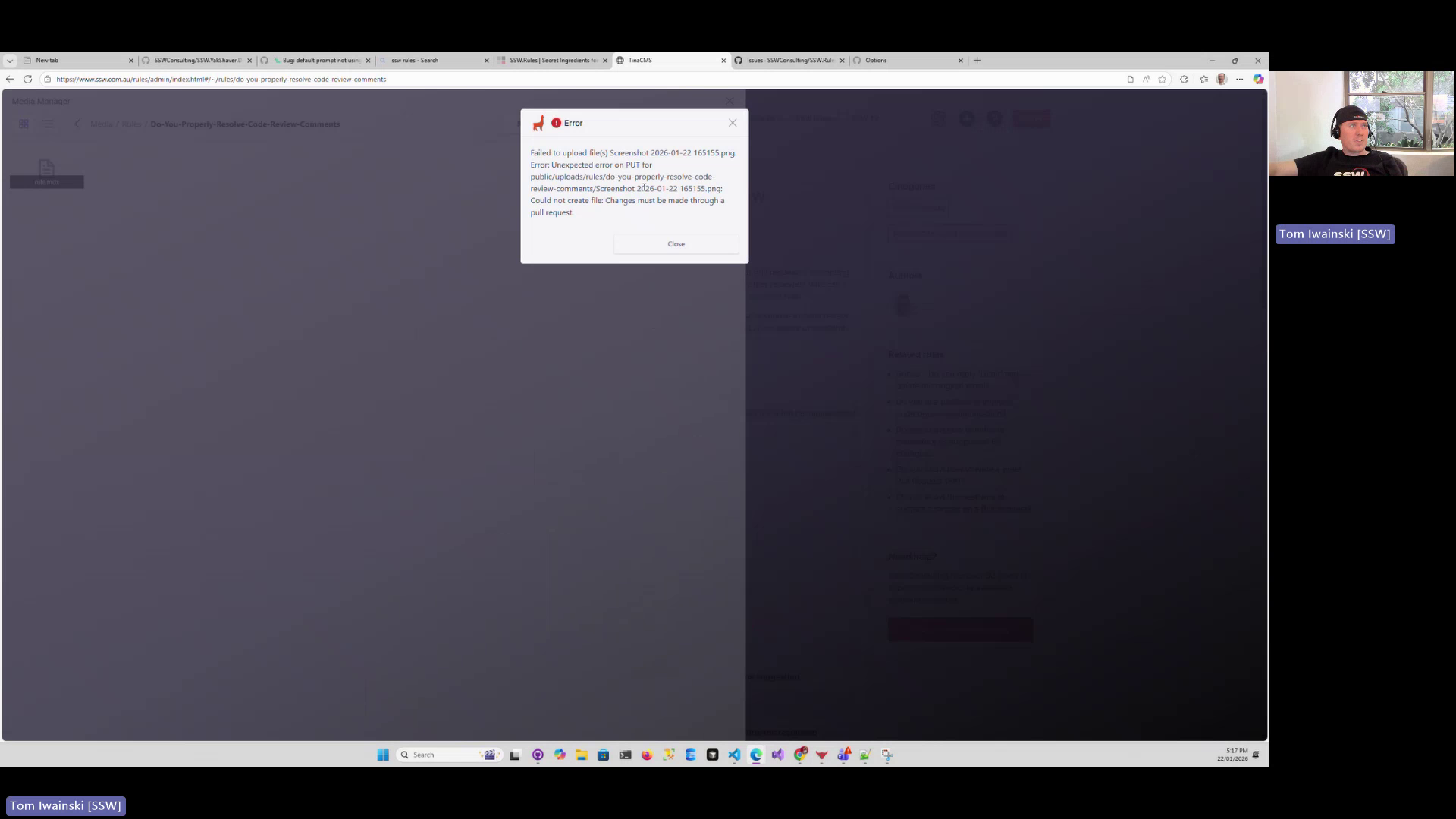
Figure: Media manager shows upload failure error even though image uploads successfully
Contributor guide
No contributing guide indexed for this repository
First steps
- Read the whole issue, then the project's contributing guide.
- Comment on the issue to say you are picking it up — it saves two people doing the same work.
- Fork the repository and make your change on a branch.
- Open a pull request that references the issue number.
Research direction
Start by reproducing the upload and deletion flows in the Rules V3 TinaCMS Media Manager using the listed steps, then trace how each action reports its backend result. Done means successful operations update the manager immediately without errors or timeouts, while failed operations leave the image state unchanged and show accurate messages.
Written by the indexing model from the issue text.
Assessment
- Tech stack
- nextjs, typescript
- Domain
- full-stack
- Issue type
- Bug
- Difficulty
- 4/5
- Estimated time
- 3-5 days
- Activity status
- Stale
- Clarity
- Mostly clear
- Newbie friendliness
- 35/100