SSWConsulting / SSWConsulting/SSW.Rules
🦙 TinaCMS Dependency - Pull Request - Show a clear call-to-action after saving additional changes on an existing branch
Nobody has claimed this yet.
- Dominant language
- TypeScript
- Stars
- 26
- Forks
- 17
- Avg merge
- 14h 39m
- Merged PRs (30d)
- 2
Description
Requested by: @GordonBeeming via YakShaver.ai 🦬
cc: @GordonBeeming, @Marxoz, @PothieuG, @Freego1783
Hi Team!
🟥 Watch the video (1 min 18 sec)
Url from screen share: https://www.ssw.com.au/rules/admin#/rules/use-github-copilot-cli-secure-environment
Pain
When a user saves additional changes to an existing branch in Rules V3 (TinaCMS), there is no obvious or prominent indication of how to return to or edit the related pull request. Unlike the initial edit, which shows a helpful popup with a direct link to the pull request, subsequent saves provide no clear feedback or next-step guidance. This creates confusion and a poor user experience. The system should display a clear, visible call-to-action after saving changes that guides the user to view, edit, or continue working on the pull request.
Acceptance Criteria
- After saving changes to an existing branch, the user is shown a clear and visible confirmation message.
- The confirmation message includes an explicit call-to-action (e.g., a button or link) to view or edit the associated pull request.
- The call-to-action is visually prominent and consistent with the initial branch creation experience.
- The user does not need to guess or explore unrelated UI elements to find the pull request.
- The behavior is consistent across Rules V3 (TinaCMS) editing workflows.
Screenshot
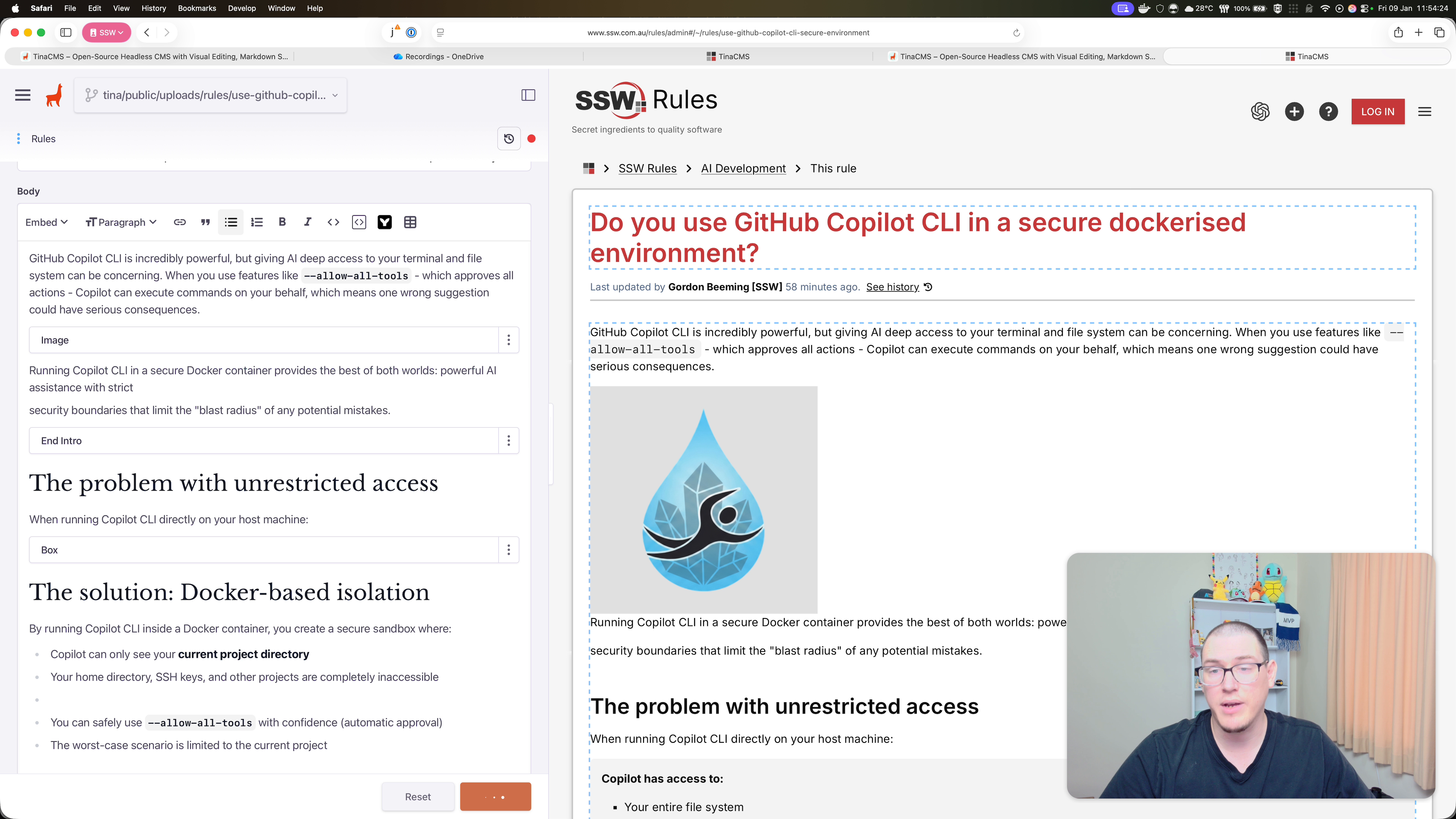
Figure: Missing prompt to navigate to pull request after saving changes
Contributor guide
No contributing guide indexed for this repository
First steps
- Read the whole issue, then the project's contributing guide.
- Comment on the issue to say you are picking it up — it saves two people doing the same work.
- Fork the repository and make your change on a branch.
- Open a pull request that references the issue number.
Research direction
Start with the Rules V3 (TinaCMS) existing-branch save flow and compare it with the initial branch creation experience described in the issue and screenshot. Done means saving additional changes shows a prominent confirmation with a link or button to view or edit the associated pull request consistently across Rules V3 editing workflows.
Written by the indexing model from the issue text.
Assessment
- Tech stack
- nextjs, typescript
- Domain
- content, frontend
- Issue type
- Feature
- Difficulty
- 3/5
- Estimated time
- 1-2 days
- Activity status
- Stale
- Clarity
- Mostly clear
- Newbie friendliness
- 38/100