SSWConsulting / SSWConsulting/SSW.Rules
🦙 Bug - TinaCMS Dependency - Unexpected dialog appears when opening editor in Rules V3
Nobody has claimed this yet.
- Dominant language
- TypeScript
- Stars
- 26
- Forks
- 17
- Avg merge
- 14h 39m
- Merged PRs (30d)
- 2
Description
Requested by: @GordonBeeming via YakShaver.ai 🦬
cc: @GordonBeeming, @Marxoz, @PothieuG, @Freego1783
Hi Team!
Url from screen share: https://www.ssw.com.au/rules/admin/#/rules/use-github-copilot-cli-secure-environment
Pain
Users intermittently see an unexpected dialog when opening the TinaCMS editor in Rules V3. The dialog is unclear, provides no guidance on whether editing is safe, and appears more frequently on non-owned sites. This causes confusion and uncertainty about whether content should be edited.
Acceptance Criteria
- The TinaCMS editor opens without showing an unexpected or unclear dialog.
- If a dialog is required, it clearly explains the reason, impact, and recommended user action.
- The behavior is consistent across owned and non-owned sites.
- No blocking or warning dialog appears unless there is a valid, actionable issue.
- The issue is verified as resolved in Rules V3 (TinaCMS).
Reproduce Steps
- Open a site in Rules V3 (TinaCMS).
- Attempt to open the TinaCMS editor to edit content.
- Observe that an unexpected dialog appears with unclear meaning.
- Note uncertainty about whether editing should continue.
- Compare behavior across different sites (owned vs. non-owned).
Screenshot
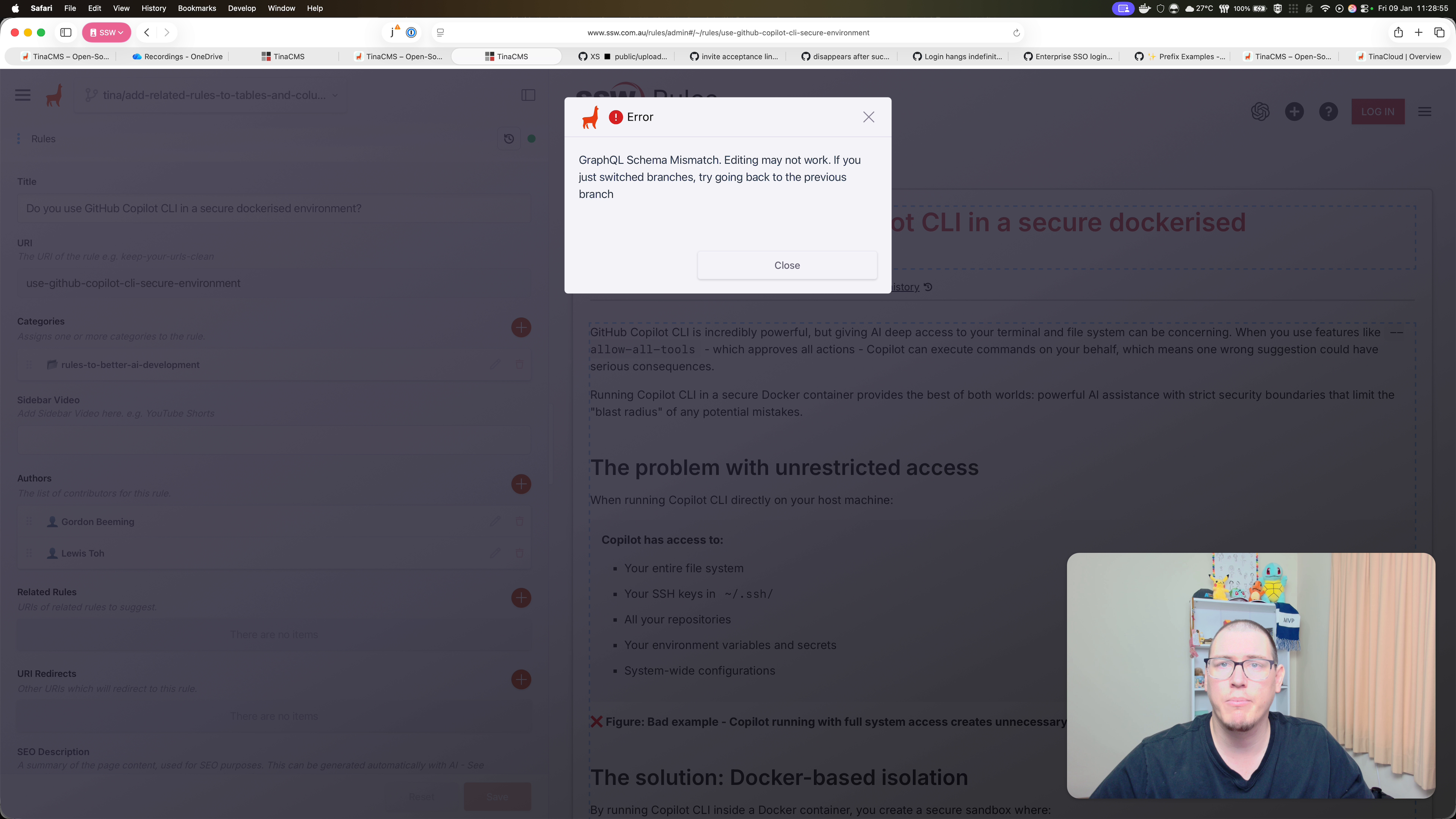
Figure: Unexpected dialog appears when opening Tina for editing
Contributor guide
No contributing guide indexed for this repository
First steps
- Read the whole issue, then the project's contributing guide.
- Comment on the issue to say you are picking it up — it saves two people doing the same work.
- Fork the repository and make your change on a branch.
- Open a pull request that references the issue number.
Research direction
Start by reproducing the dialog from the Rules V3 TinaCMS editor using the linked rules URL and the provided video or screenshot. Compare editor behavior on owned and non-owned sites, then trace the dialog's trigger and message. Done means the editor opens consistently without an unjustified warning, or any required dialog explains its reason, impact, and user action.
Written by the indexing model from the issue text.
Assessment
- Tech stack
- nextjs, typescript
- Domain
- content, frontend
- Issue type
- Bug
- Difficulty
- 4/5
- Estimated time
- 3-5 days
- Activity status
- Stale
- Clarity
- Mostly clear
- Newbie friendliness
- 35/100