SSWConsulting / SSWConsulting/SSW.Rules.Content
✨ Markdown Validation - detect and fix invalid bold markdown spacing
Nobody has claimed this yet.
- Dominant language
- MDX
- Stars
- 62
- Forks
- 196
- Avg merge
- 1d 4h
- Merged PRs (30d)
- 112
Description
Requested by: @tiagov8 via YakShaver.ai 🦬
cc: @Aibono1225, @tiagov8, @adamcogan
Hi Team!
🟥 Watch the video (2 min 1 sec)
Url from screen share: https://ssw.com.au/rules/standards-watchdog
Pain
Users can accidentally create invalid markdown bold formatting in Tina when selecting text that includes leading or trailing spaces before applying bold styling. The preview in Tina appears correct, but the saved markdown contains loose asterisks and broken bold formatting. Update the Rules (Content) repository to identify and fix all existing markdown files affected by this issue, and add automated validation through a GitHub Action to detect invalid bold markdown patterns in future pull requests.
Acceptance Criteria
- All existing Rules (Content) markdown/MDX files with invalid bold formatting caused by spaces around asterisks are identified and corrected.
- Bold markdown syntax is updated so that opening and closing asterisks are directly adjacent to the intended text with no leading or trailing spaces inside the bold markers.
- A GitHub Action validates markdown content during pull requests or commits and detects loose or invalid asterisk patterns that likely indicate broken bold formatting.
- The GitHub Action provides a clear warning or failure message identifying the affected file and invalid markdown pattern.
- Validation does not flag valid markdown bold formatting as errors.
- Changes are verified against the rendered output to confirm bold formatting displays correctly after saving and publishing.
Reproduce Steps
- Open a rule in Tina CMS.
- Select text including a leading or trailing space.
- Apply bold formatting to the selected text.
- Observe that the Tina preview appears visually correct.
- Save the rule and inspect the generated markdown.
- Notice that the markdown contains spaces inside the bold markers, resulting in invalid or broken bold formatting.
Screenshot
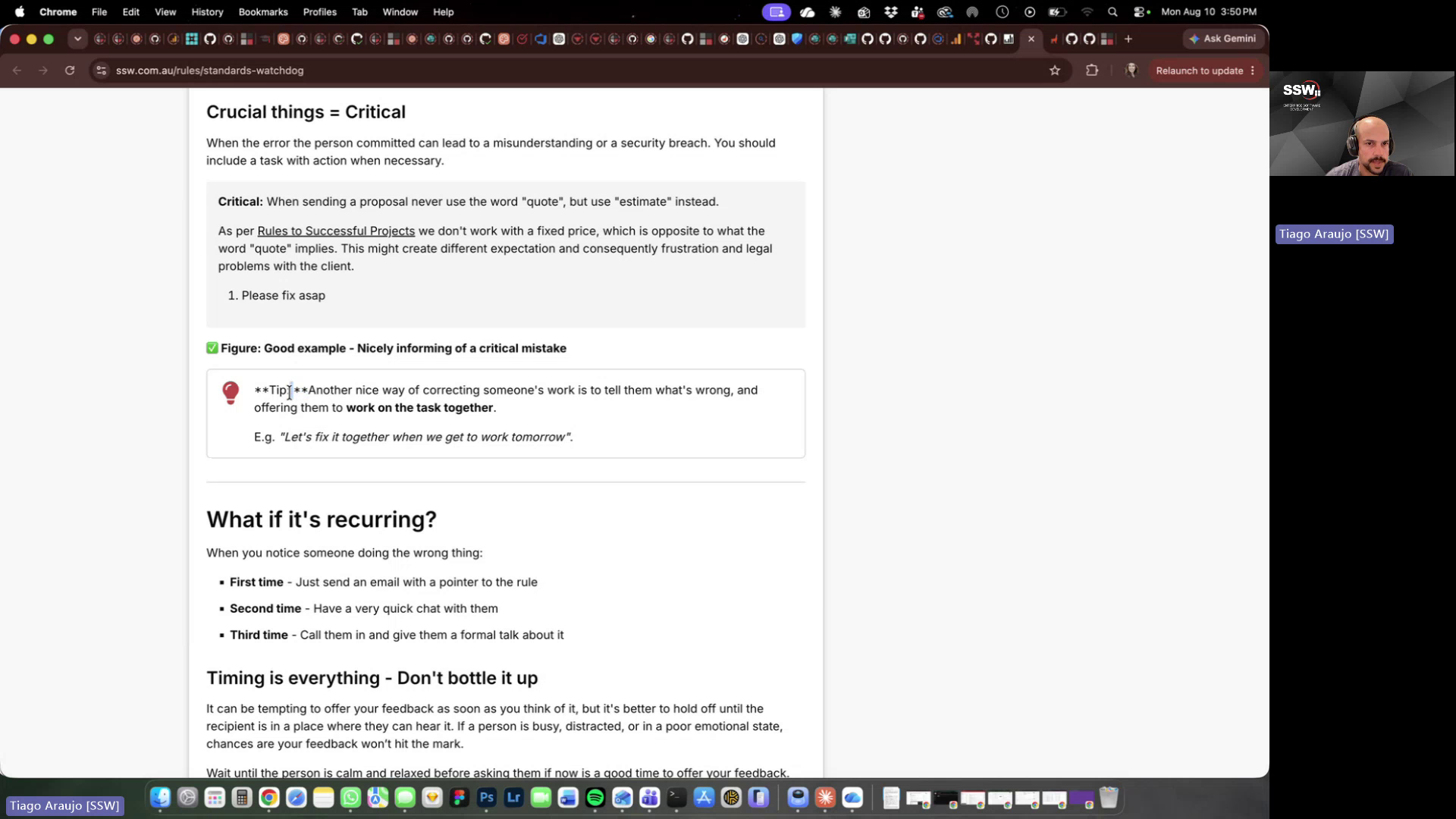
Figure: Markdown bold spacing bug
Contributor guide
No contributing guide indexed for this repository
First steps
- Read the whole issue, then the project's contributing guide.
- Comment on the issue to say you are picking it up — it saves two people doing the same work.
- Fork the repository and make your change on a branch.
- Open a pull request that references the issue number.
Research direction
Start by scanning the Rules repository's markdown and MDX files for bold markers with spaces inside them, then inspect the existing GitHub Actions configuration. Compare suspicious files with their rendered output and define validation around the stated acceptance criteria. Done means existing formatting is corrected, future pull requests identify invalid files and patterns, and valid bold syntax is not flagged.
Written by the indexing model from the issue text.
Assessment
- Tech stack
- github-actions, markdown
- Domain
- ci-cd, content, documentation
- Issue type
- Feature
- Difficulty
- 4/5
- Estimated time
- 3-5 days
- Activity status
- Quiet
- Clarity
- Mostly clear
- Newbie friendliness
- 55/100