SSWConsulting / SSWConsulting/SSW.Rules.Content
✨ Live Version - Add link to current live rule alongside PR preview
@Aibono1225 is already working on this.
Since Jun 5, 2026.
- Dominant language
- MDX
- Stars
- 62
- Forks
- 196
- Avg merge
- 1d 4h
- Merged PRs (30d)
- 112
Description
Requested by: @tiagov8 via YakShaver.ai 🦬
cc: @micsblank, @Aibono1225, @tiagov8, @adamcogan, @joshbermanssw
Hi Team!
🟥 Watch the video (1 min 43 sec)
Url from screen share: https://github.com/SSWConsulting/SSW.Rules.Content/pull/12841
Pain
Add an additional link in the GitHub Action for Rules (Content) pull requests that points to the current live (production) version of the rule. This link should appear alongside the existing PR preview link so reviewers can easily open both versions in separate tabs and compare changes without reading raw markdown or file diffs.
Acceptance Criteria
- Given a pull request in the Rules (Content) repository, when the GitHub Action runs, then it displays a link to the PR preview of the rule.
- Given a pull request in the Rules (Content) repository, when the GitHub Action runs, then it also displays a link labeled clearly as the current live (production) version of the rule.
- Both the PR preview link and the live version link are visible together in the GitHub Action output or PR comment.
- The live version link correctly points to the currently published rule in production.
- Users can open the PR preview and live version links in separate tabs to compare content easily.
- The change does not remove or break the existing PR preview functionality.
Screenshot
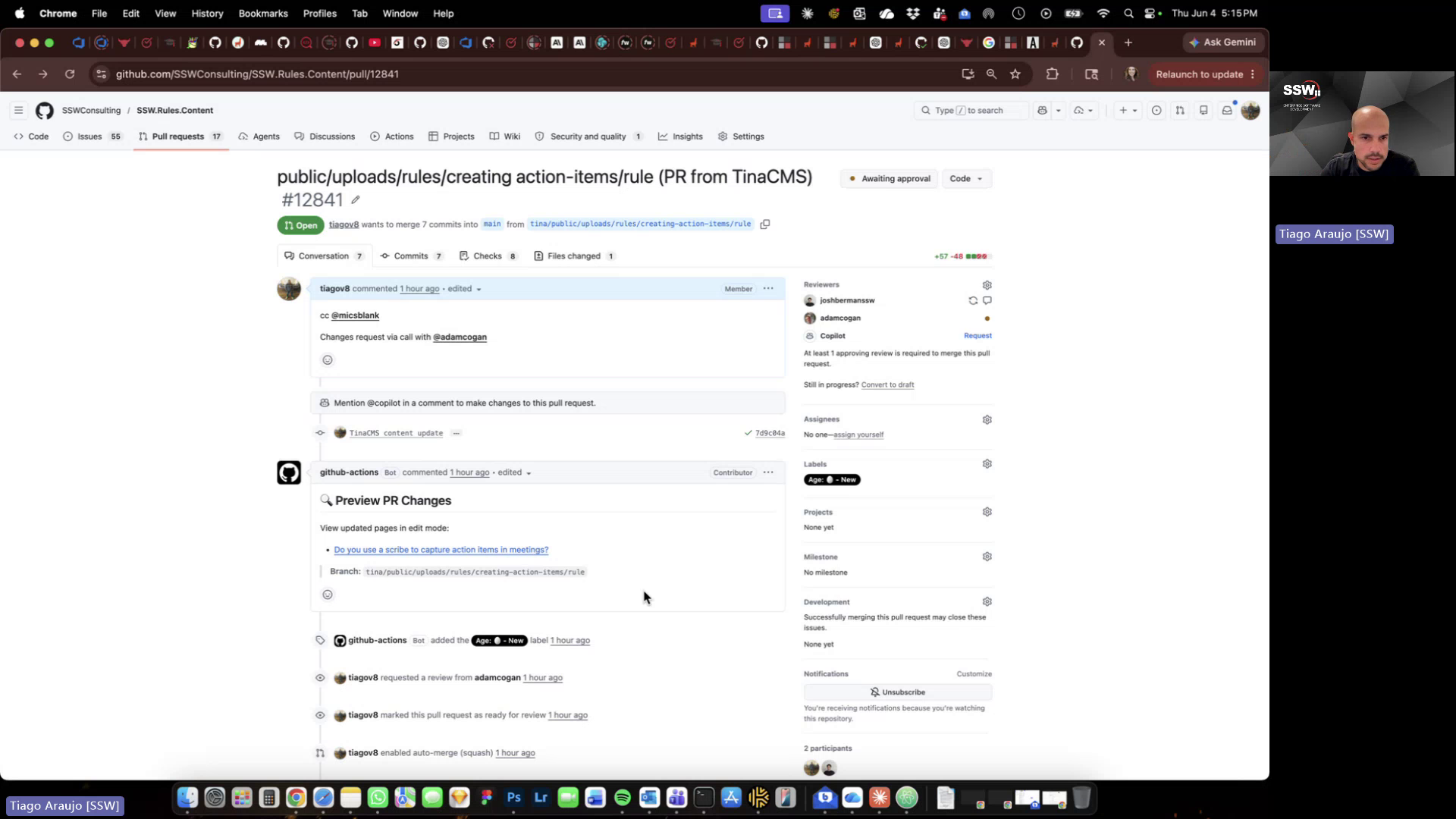
Figure: Missing link to current live version alongside PR preview
Contributor guide
No contributing guide indexed for this repository
First steps
- Read the whole issue, then the project's contributing guide.
- Comment on the issue to say you are picking it up — it saves two people doing the same work.
- Fork the repository and make your change on a branch.
- Open a pull request that references the issue number.
Assessment
This issue has not been assessed yet.