SSWConsulting / SSWConsulting/SSW.Rules.Content
🐛 Bug - Hashtag in comments auto-links to unrelated GitHub issue
Nobody has claimed this yet.
- Dominant language
- MDX
- Stars
- 62
- Forks
- 196
- Avg merge
- 1d 4h
- Merged PRs (30d)
- 112
Description
Requested by: @designbyalex via YakShaver.ai 🦬
cc: @designbyalex, @tiagov8, @adamcogan
Hi Team!
Url from screen share: https://ssw.com.au/rules/do-you-manage-clients-expectations
Pain
When a user types a hashtag followed by a number (e.g. #1) in the comments section of a rule in Rules (Content), the system automatically creates a hyperlink to an unrelated GitHub issue in the SSW Rules Content backlog. This behavior is unexpected when users are simply trying to create numbered lists in comments.
Acceptance Criteria
- Typing a hashtag followed by a number (e.g. #1, #2) in rule comments does not automatically create a hyperlink to a GitHub issue.
- Users can create numbered lists in comments without triggering external or internal links.
- Existing intentional GitHub issue linking (if supported) continues to work when using the correct, explicit syntax.
- The change applies to all comments within Rules (Content).
Reproduce Steps
- Navigate to a rule in Rules (Content).
- Scroll to the comments section.
- Add a new comment.
- Type '#1' as part of the comment text.
- Observe that the text is automatically converted into a link to a GitHub issue.
Screenshot
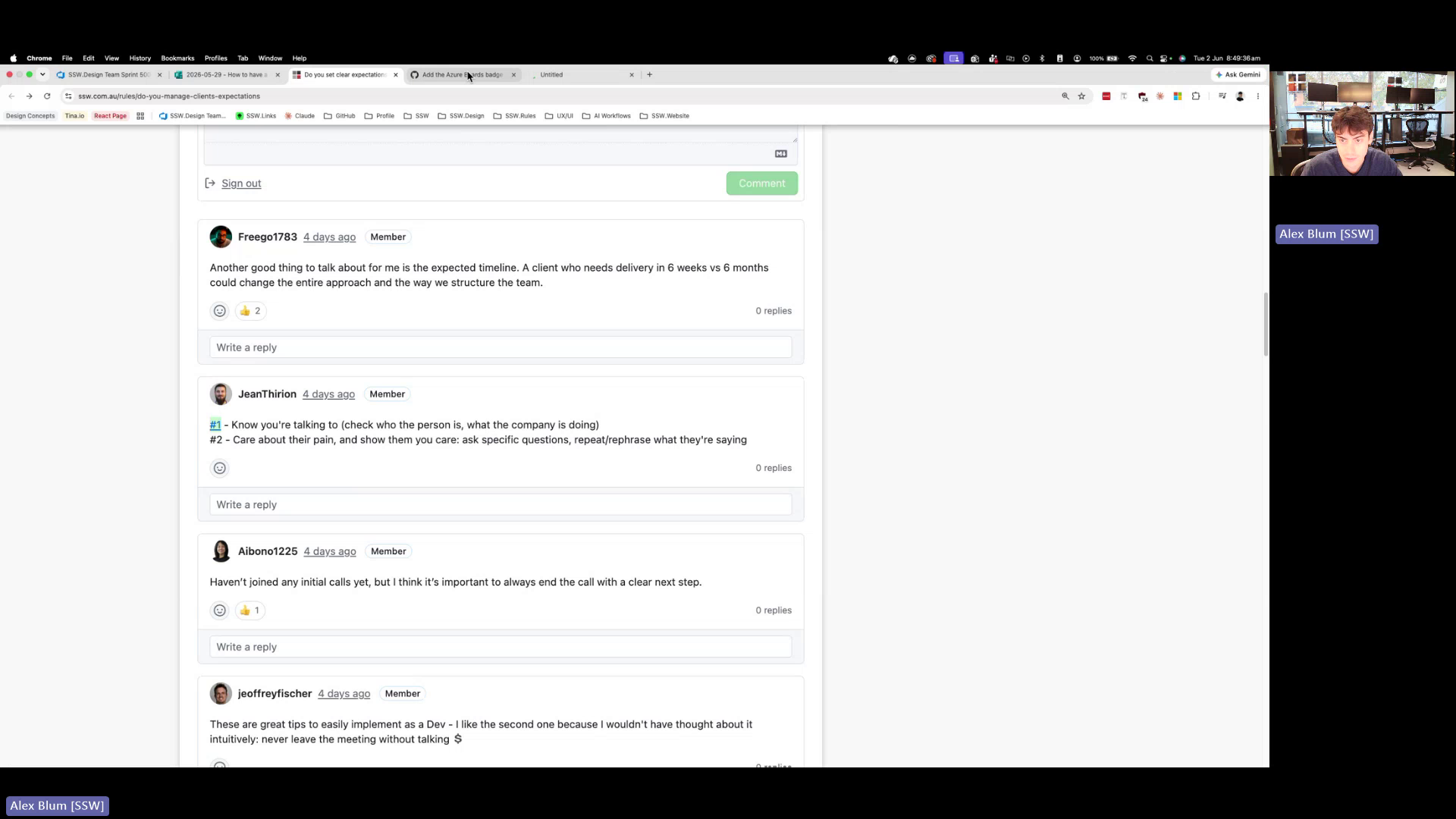
Figure: Comment list item '#1' auto-links to an unrelated GitHub issue
Contributor guide
No contributing guide indexed for this repository
First steps
- Read the whole issue, then the project's contributing guide.
- Comment on the issue to say you are picking it up — it saves two people doing the same work.
- Fork the repository and make your change on a branch.
- Open a pull request that references the issue number.
Research direction
No file or test is named. Reproduce the issue in a rule comment using “#1”, then locate the comment rendering or linkification entry point in the repository. Done means numbered-list text remains plain while intentional GitHub issue links using explicit syntax still work across Rules (Content) comments.
Written by the indexing model from the issue text.
Assessment
- Domain
- content
- Issue type
- Bug
- Difficulty
- 3/5
- Estimated time
- 1-2 days
- Activity status
- Quiet
- Clarity
- Mostly clear
- Newbie friendliness
- 55/100