SSWConsulting / SSWConsulting/SSW.Rules.Content
🐛 Bug - Rule editor preview shows incorrect validation error on non-main branches
Nobody has claimed this yet.
- Dominant language
- MDX
- Stars
- 62
- Forks
- 196
- Avg merge
- 1d 4h
- Merged PRs (30d)
- 112
Description
Requested by: @0xharkirat via YakShaver.ai 🦬
cc: @0xharkirat, @joshbermanssw, @adamcogan, @tiagov8
Hi Team!
🟥 Watch the video (1 min 18 sec)
Url from screen share: https://ssw.com.au/rules/admin#/-/rules/prefix-job-title
Pain
When editing a rule in the Rules (Content) project, the preview shows a validation error on non-main branches stating that an "End Intro Embed component" is missing, even though the component already exists. This issue does not occur on the main branch and appears when switching to another branch without making related content changes, suggesting the preview validation or branch-specific rendering is incorrect.
Acceptance Criteria
- Rule preview does not show a validation error when the End Intro Embed component already exists
- Behavior is consistent between main and non-main branches
- Validation messages accurately reflect the actual missing or misconfigured components
- Switching branches does not introduce false preview errors
Reproduce Steps
- Open the Rules (Content) project
- Navigate to the rule "Do you include the company name in your job title"
- Switch to a non-main branch
- Edit or open the rule in the editor
- Observe the preview showing an error about a missing End Intro Embed component
- Switch back to the main branch and confirm the error is no longer present
Screenshot
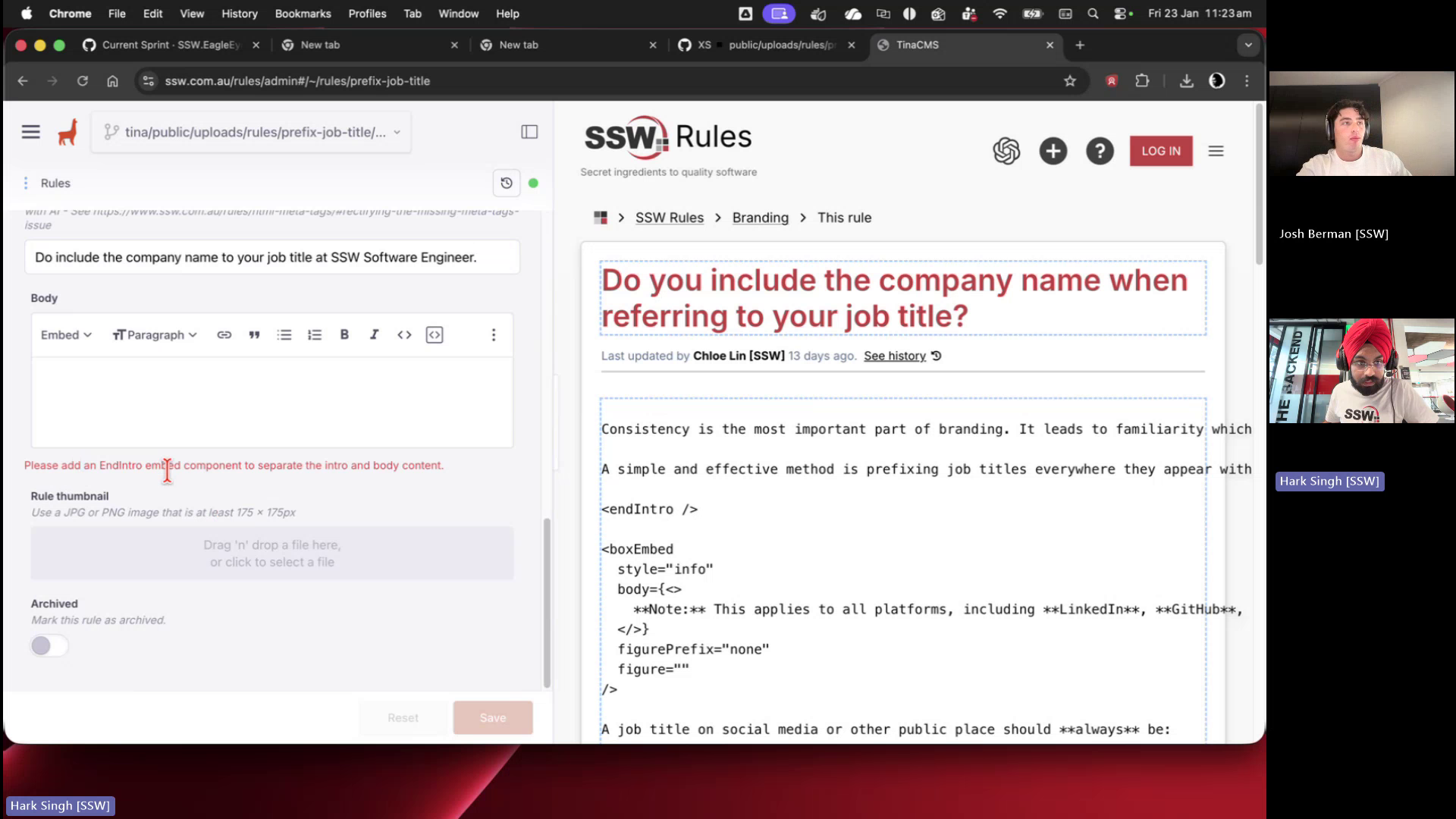
Figure: Preview error appears only on feature branch despite required component being present
Contributor guide
No contributing guide indexed for this repository
First steps
- Read the whole issue, then the project's contributing guide.
- Comment on the issue to say you are picking it up — it saves two people doing the same work.
- Fork the repository and make your change on a branch.
- Open a pull request that references the issue number.
Research direction
Open the Rules (Content) project at the linked rule URL and reproduce the preview behavior using the listed branch-switching steps. Compare the main and non-main branch previews; done means the existing End Intro Embed component no longer produces a false validation error and genuine validation messages remain accurate.
Written by the indexing model from the issue text.
Assessment
- Domain
- content
- Issue type
- Bug
- Difficulty
- 3/5
- Estimated time
- 1-2 days
- Activity status
- Stale
- Clarity
- Mostly clear
- Newbie friendliness
- 45/100