RocketChat / RocketChat/Rocket.Chat
[BUG] Direct Reply: content of HTML formatted emails are not displayed
Nobody has claimed this yet.
- Dominant language
- TypeScript
- Stars
- 46.1k
- Forks
- 13.9k
- Avg merge
- 3d 3h
- Merged PRs (30d)
- 130
Description
Description:
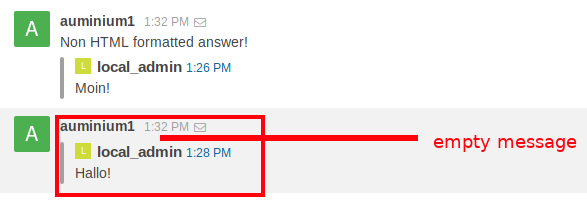
A HTML formatted Direct Reply email is not displayed in Rocket.Chat. The message is empty; the HTML content is eaten up. This is a kind of bizarre, because the offline email itself is created in HTML format and a lot of users create emails in HTML format by default. If those emails are eaten up, the feature is almost useless.
Same problem with attachments. Attachments are not support, as documented on
https://rocket.chat/docs/administrator-guides/email/direct-reply/
"Only text messages will be supported, attachments are not supported yet.". But to my mind this should not end up, in discarding the whole content of an email.
Currently - to my mind - the Direct Reply feature is completely buggy and a high risk in loosing messages as one can't handle in what format or way users reply to messages. I highly recommend to mark it as experimental.
Server Setup Information:
- Version of Rocket.Chat Server: 0.61.0, 0.69.2
- Operating System: Linux Ubuntu 16.04 LTS
- Deployment Method(snap/docker/tar/etc): self build bundle
- Number of Running Instances: 1
- DB Replicaset Oplog: yes
- Node Version: 8.9.4
Steps to Reproduce:
Direct Replymust be configured inAdministration- generate an "You have been direct messaged by" email by sending a direct message to an offline user
- the offline user answers with a HTML formatted email, e.g. a single line just marked bold.
- the content of that email is not displayed in Rocket.Chat, empty message content.
Expected behavior:
message must be displayed
Actual behavior:
message content is eaten up, message is empty.
Contributor guide
First steps
- Read the whole issue, then the project's contributing guide.
- Comment on the issue to say you are picking it up — it saves two people doing the same work.
- Fork the repository and make your change on a branch.
- Open a pull request that references the issue number.
Research direction
Start by tracing the Direct Reply email-processing path from its Administration configuration; the issue names no source file or test entry point. Reproduce the behavior with an HTML-formatted reply and compare it with the documented text-only behavior at the linked Direct Reply guide. Done means the reply is not silently empty and unsupported attachments are handled explicitly.
Written by the indexing model from the issue text.
Assessment
- Tech stack
- html
- Domain
- backend
- Issue type
- Bug
- Difficulty
- 4/5
- Estimated time
- 3-5 days
- Activity status
- Stale
- Clarity
- Mostly clear
- Newbie friendliness
- 45/100