RocketChat / RocketChat/Rocket.Chat
Delay by changing the avatar
Nobody has claimed this yet.
- Dominant language
- TypeScript
- Stars
- 46.1k
- Forks
- 13.9k
- Avg merge
- 3d 3h
- Merged PRs (30d)
- 130
Description
Description:
The old avatar is shown next to my written messages after i changed my avatar. Clearing the cache, refreshing the site or a logout didn't help. After an hour and many refreshers the new avatar appears. The problem occurs at the browser and desktop version.
Steps to reproduce:
- Change the avatar.
- Go to a chat.
- Look at your avatar.
- Wait.
Expected behavior:
The avatar next to my written messages should be immediately the new avatar and not the old one.
Actual behavior:
My avatar changes everywhere to the new one but not next to my old/new messages.
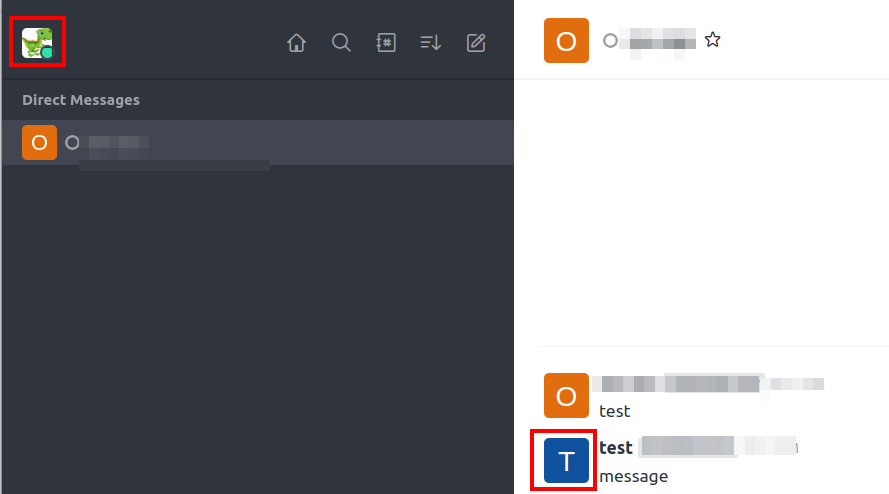
After a time the new avatar appears next to all my messages.
Server Setup Information:
- Version of Rocket.Chat Server: 5.3.1
- Operating System: Ubuntu 20.04
- Deployment Method: docker
- Number of Running Instances: 1
- DB Replicaset Oplog: Enabled
- NodeJS Version: v14.19.3
- MongoDB Version: 5.0.13
Client Setup Information
- Desktop Browser Version: Google Chrome (107.0.5304.110-1), Mozilla Firefox (106.0.5)
- Operating System: Ubuntu 22.04.1 LTS
Contributor guide
First steps
- Read the whole issue, then the project's contributing guide.
- Comment on the issue to say you are picking it up — it saves two people doing the same work.
- Fork the repository and make your change on a branch.
- Open a pull request that references the issue number.
Research direction
Start by reproducing the avatar change in both the browser and desktop client, then trace the message avatar rendering and the update path described in the issue. Done means newly sent and existing messages show the new avatar immediately after the avatar is changed, without waiting or clearing the cache.
Written by the indexing model from the issue text.
Assessment
- Tech stack
- typescript
- Domain
- frontend
- Issue type
- Bug
- Difficulty
- 3/5
- Estimated time
- 1-2 days
- Activity status
- Stale
- Clarity
- Mostly clear
- Newbie friendliness
- 30/100