RocketChat / RocketChat/Rocket.Chat
Multi user direct messages are not properly handled after deleting one of those users from Rocket Chat.
Nobody has claimed this yet.
- Dominant language
- TypeScript
- Stars
- 46.1k
- Forks
- 13.9k
- Avg merge
- 3d 3h
- Merged PRs (30d)
- 130
Description
Description:
Many of our employees have been complaining that they have duplicates of certain users in their user listing on the left side of Rocket Chat. After researching this, we have come to the conclusion that these are people who have multi-user chats, but when certain users are removed from Rocket Chat, the multi user session becomes a duplicate two person chat.
Steps to reproduce:
- Create a multi user chat session with three users (yourself, user A, and user B)
- Send some test messages between the three users.
- Delete user B.
- Now, when you search for user A, you will find two of them. One is a direct message window to that user. The other is a multi-user direct message session where the third user no longer exists. But to the eye of the Rocket Chat user, they look the same.
Expected behavior:
Not sure the best way to handle this. Probably when a user is deleted, it should delete the multi-user direct message session, since at least one user no longer exists.
Actual behavior:
I have two screenshots here. The first shows the search box returning the same user, twice:
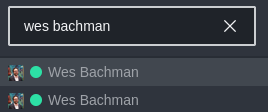
The second screenshot shows the administration area of Rocket Chat. It shows the duplicate. As you can see, both are "bwalton x wbachman", but one has three users. It seems clear to me that there should never be a two person session that says it has three users. Incidentally, we also have observed larger multi-user direct messages with this same issue, where the admin display lists three or more user names for a multi-user direct message, but the number of users, is still larger.

Server Setup Information:
- Version of Rocket.Chat Server: 4.6.3
- Operating System: CentOS 7.9
- Deployment Method: tar
- Number of Running Instances: 2
- DB Replicaset Oplog: enabled
- NodeJS Version: 4.18.3
- MongoDB Version: 4.2.19
Client Setup Information
- Desktop App or Browser Version: happens in all browsers and in the desktop client
- Operating System: all operating systems
Contributor guide
First steps
- Read the whole issue, then the project's contributing guide.
- Comment on the issue to say you are picking it up — it saves two people doing the same work.
- Fork the repository and make your change on a branch.
- Open a pull request that references the issue number.
Research direction
The issue provides reproduction steps for duplicate multi-user direct messages after deleting a user, but names no files, tests, or entry points. Start by tracing the user-deletion and multi-user direct-message handling described in the steps. Done should prevent a deleted participant from leaving a misleading duplicate session, with coverage for the reported scenario.
Written by the indexing model from the issue text.
Assessment
- Tech stack
- typescript
- Domain
- backend
- Issue type
- Bug
- Difficulty
- 4/5
- Estimated time
- 3-5 days
- Activity status
- Stale
- Clarity
- Mostly clear
- Newbie friendliness
- 38/100