RocketChat / RocketChat/Rocket.Chat
Message counter isn't disappearing after reading the message
Nobody has claimed this yet.
- Dominant language
- TypeScript
- Stars
- 46.1k
- Forks
- 13.9k
- Avg merge
- 3d 3h
- Merged PRs (30d)
- 130
Description
Description:
I faced a annoying bug. A notification counter appeared when somebody chatted to me. After reading the message, the counter didn't disappear, and even right-clicking and marking as read, the counter still is there.
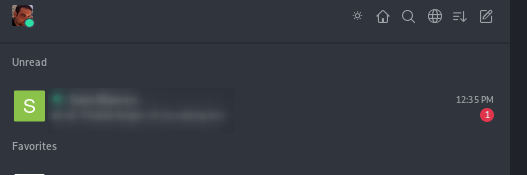
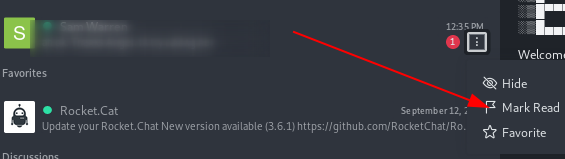
If that person speaks to me, the counter increases, but when I enter the conversation, the counter sets to "1" again.
If tried to reload server, reload page without cache, and opened desktop and other browsers, that counter is on everywhere.
Steps to reproduce:
There is no way to reproduce it, is just this conversation what remains as unread
Expected behavior:
The counter should disappear, or at least, when I mark the conversation as read, it should force counter to be reset.
Actual behavior:
Counter stays at "1"
Server Setup Information:
- Version of Rocket.Chat Server: 3.11.0
- Operating System: Debian 10
- Deployment Method: source
- Number of Running Instances: 1
- NodeJS Version: 12.18.2
- MongoDB Version: 4.0.19
Client Setup Information
- Desktop App or Browser Version: all versions
- Operating System: all OSes
Relevant logs:
I20210209-14:01:11.896(1) server.js:204 Meteor ➔ method readMessages -> userId: Qjvc83g9tPWkS4fti, arguments: ["NuXEcqxXRkwwwMzxAQjvc83g9tPWkS4fti"]
I20210209-14:01:14.192(1) server.js:204 Meteor ➔ method readMessages -> userId: Qjvc83g9tPWkS4fti, arguments: ["NuXEcqxXRkwwwMzxAQjvc83g9tPWkS4fti"]
I20210209-14:01:15.708(1) server.js:204 Meteor ➔ method readMessages -> userId: Qjvc83g9tPWkS4fti, arguments: ["NuXEcqxXRkwwwMzxAQjvc83g9tPWkS4fti"]
Contributor guide
First steps
- Read the whole issue, then the project's contributing guide.
- Comment on the issue to say you are picking it up — it saves two people doing the same work.
- Fork the repository and make your change on a branch.
- Open a pull request that references the issue number.
Research direction
Start with the readMessages method shown in the logs and trace how marking the conversation read updates the notification counter across the server and client. Confirm the behavior with the reported conversation or a comparable unread conversation, then verify that opening or explicitly marking it read removes the counter and that new messages increment it normally.
Written by the indexing model from the issue text.
Assessment
- Tech stack
- javascript, mongodb, node.js, typescript
- Domain
- backend, frontend
- Issue type
- Bug
- Difficulty
- 4/5
- Estimated time
- 3-5 days
- Activity status
- Stale
- Clarity
- Needs clarification
- Newbie friendliness
- 30/100