RocketChat / RocketChat/Rocket.Chat
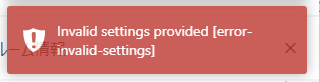
Archiving a channel/room shows error-invalid-settings
Open
Nobody has claimed this yet.
- Dominant language
- TypeScript
- Stars
- 46.1k
- Forks
- 13.9k
- Avg merge
- 3d 3h
- Merged PRs (30d)
- 130
Description
Description:
Steps to reproduce:
- Go to Channel > Info > Archive
- Click on Save
- The Channel is Archived but it also shows an error prompt as below:
Expected behavior:
There should be no error message
Actual behavior:
This is shown below Preferences saved.
Server Setup Information:
- Version of Rocket.Chat Server:
- Operating System:
- Deployment Method:
- Number of Running Instances:
- DB Replicaset Oplog:
- NodeJS Version:
- MongoDB Version:
Client Setup Information
- Desktop App or Browser Version:
- Operating System:
Additional context
Relevant logs:
Contributor guide
First steps
- Read the whole issue, then the project's contributing guide.
- Comment on the issue to say you are picking it up — it saves two people doing the same work.
- Fork the repository and make your change on a branch.
- Open a pull request that references the issue number.
Research direction
Reproduce the issue through Channel > Info > Archive and click Save, then inspect the client-side handling of the archive action and the error prompt shown afterward. Done means the channel is archived and no error message appears alongside the successful save confirmation.
Written by the indexing model from the issue text.
Assessment
- Tech stack
- typescript
- Domain
- frontend
- Issue type
- Bug
- Difficulty
- 2/5
- Estimated time
- 1-3 hours
- Activity status
- Stale
- Clarity
- Clearly specified
- Newbie friendliness
- 48/100