RocketChat / RocketChat/Rocket.Chat
The timestamp value in my Prometheus alertmanager is not sent to rocket chat webhook
Nobody has claimed this yet.
- Dominant language
- TypeScript
- Stars
- 46.1k
- Forks
- 13.9k
- Avg merge
- 3d 3h
- Merged PRs (30d)
- 130
Description
Description:
I send alerts from prometheus to rocketchat webhook. This is the configuration of one of my alert rule:
- alert: HighCpuLoad
expr: 100 - (avg by (instance, group, host) (irate(node_cpu_seconds_total{mode="idle"}[5m])) * 100) > 81
for: 5m
labels:
severity: warning
annotations:
timestamp: "{{ with query "time()" }}{{ . | first | value | humanizeTimestamp }}{{ end }}"
description: "Check CPU load on host {{ $labels.host }}"
firing_text: "CPU load on host {{ $labels.host }} is > 80%\n VALUE = {{ humanize $value }}"
resolved_text: "High CPU load on host {{ $labels.host }} is resolved"
All parameters that I have defined in annotation (description, firing_text and resolved_text) are sent to alertmanager. But I don't receive the "timestamp" in rocketchat alert.
This is the alert in alertmanager UI:
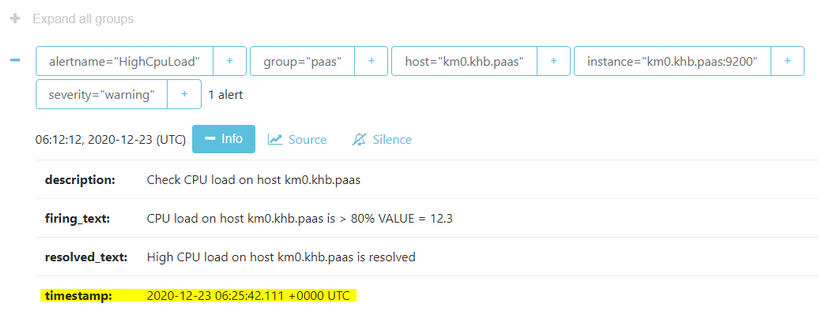
This is the alert message that is appear in rocketchat webhook:
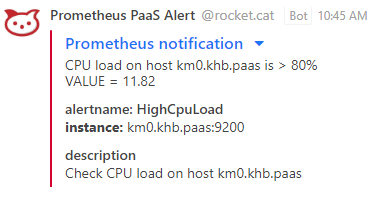
As you can see the timestamp is not shown in alert message.
How can I make it appear in webhook alert messages?
Steps to reproduce:
- create a webhook channel in rocketchat
- send alerts from alertmanager to rocketchat webhook
Expected behavior:
The timestamp field should be shown in rocketchat message.
Actual behavior:
Although the timestamp is shown in alertmanager, It is not shown in rocketchat message.
Server Setup Information:
- Version of Rocket.Chat Server:
- Operating System:
- Deployment Method:
- Number of Running Instances:
- DB Replicaset Oplog:
- NodeJS Version:
- MongoDB Version:
Client Setup Information
- Desktop App or Browser Version:
- Operating System:
Additional context
Relevant logs:
Contributor guide
First steps
- Read the whole issue, then the project's contributing guide.
- Comment on the issue to say you are picking it up — it saves two people doing the same work.
- Fork the repository and make your change on a branch.
- Open a pull request that references the issue number.
Research direction
No source file or test is named. Start by reproducing the Prometheus Alertmanager webhook flow and trace how alert annotations are converted into the Rocket.Chat message; done means the configured timestamp annotation appears in the delivered alert message, with a regression test covering it.
Written by the indexing model from the issue text.
Assessment
- Tech stack
- prometheus
- Domain
- api
- Issue type
- Bug
- Difficulty
- 3/5
- Estimated time
- 1-2 days
- Activity status
- Stale
- Clarity
- Mostly clear
- Newbie friendliness
- 42/100