RocketChat / RocketChat/Rocket.Chat
Reactions imported from Slack do not show correct user names initially
Open
Nobody has claimed this yet.
feat: import
- Dominant language
- TypeScript
- Stars
- 46.1k
- Forks
- 13.9k
- Avg merge
- 3d 3h
- Merged PRs (30d)
- 130
Description
Description:
When I import messages from Slack, imported reactions show empty and/or null names of its authors unless I change reactions
Steps to reproduce:
- Import Slack messages with reactions
- Mouseover reaction
- Empty and/or null names are present
- Add a reaction myself
- Reaction authors' names are now present
Expected behavior:
Names of authors of reactions are available directly after import
Actual behavior:
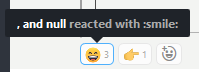
Server Setup Information:
- Version of Rocket.Chat Server: 3.0.1
- Operating System: Debian 8
- Deployment Method: tar
- Number of Running Instances: 1
- DB Replicaset Oplog: –
- NodeJS Version: 12.6
- MongoDB Version: 4.x latest
Client Setup Information
- Desktop App or Browser Version: Chromium (Rambox)
- Operating System: Win 10
Relevant logs:
No relevant logs found either in browser or on the server.
Contributor guide
First steps
- Read the whole issue, then the project's contributing guide.
- Comment on the issue to say you are picking it up — it saves two people doing the same work.
- Fork the repository and make your change on a branch.
- Open a pull request that references the issue number.
Research direction
No files or tests are named in the issue. Start by tracing the Slack message-import path for reaction authors and compare it with the update triggered when a new reaction is added. Done means imported reactions show their authors' names immediately, without requiring another reaction.
Written by the indexing model from the issue text.
Assessment
- Tech stack
- typescript
- Domain
- backend
- Issue type
- Bug
- Difficulty
- 3/5
- Estimated time
- 1-2 days
- Activity status
- Stale
- Clarity
- Mostly clear
- Newbie friendliness
- 42/100