RocketChat / RocketChat/Rocket.Chat
LDAP InsufficientAccessRightsError when syncing groups/roles upon user login
Nobody has claimed this yet.
- Dominant language
- TypeScript
- Stars
- 46.1k
- Forks
- 13.9k
- Avg merge
- 3d 3h
- Merged PRs (30d)
- 130
Description
Description:
We are trying to use the new(ish) LDAP group, roles and channel synchronization feature (#14278) with Rocket.Chat 2.3.0 on Ubuntu 18.04. Our LDAP server (OpenLDAP 2.4.42) requires bind authentication to connect to the directory so we enable LDAP Authentication and specify a User DN that has permissions to authenticate and search the directory. Regular users can authenticate against the directory but are not allowed to search it globally; they are restricted to to their own DN entry object. This has worked (and continues to work) fine, users can authenticate and log into our Rocket.Chat instance, as long as Sync LDAP Groups is disabled.
Now we enable Sync LDAP Groups, specify a user group filter, an LDAP group base DN and a group/role mapping. Syncing LDAP groups to Rocketchat roles works when executing background synchronization manually or triggered by the background sync interval, because this process uses the User DN specified in LDAP Authentication.
But it falls apart when a user is trying to log in. Apparently once the user is authenticated any LDAP directory operations (like searching) are carried out as that user instead of the LDAP bind authentication user specified above. The regular user has no permissions to look or search in the LDAP Group BaseDN directory subtree, or any other parts of the directory for that matter.
Now once https://github.com/RocketChat/Rocket.Chat/blob/2.3.0/app/ldap/server/sync.js#L34 is called RocketChat fails to retrieve the groups where the user is a member because OpenLDAP turns the user away with an Insufficient access (50) error, resulting in an InsufficientAccessRightsError: Insufficient Access Rights error from ldapjs.
Even if the regular user were allowed to use the LDAP Group BaseDN subtree as search base it would not find any group memberships, because the user has no permissions to look in the group objects.
This results in login failure with "User not found or incorrect password".
I suspect the solution to this problem is to perform user data synchronization against the LDAP directory not as the logged in user but as the LDAP authentication user specified for this purpose.
Steps to reproduce:
This assumes an LDAP directory that requires authenticated binds (LDAP authentication) and restricts regular users from searching or browsing the entire directory.
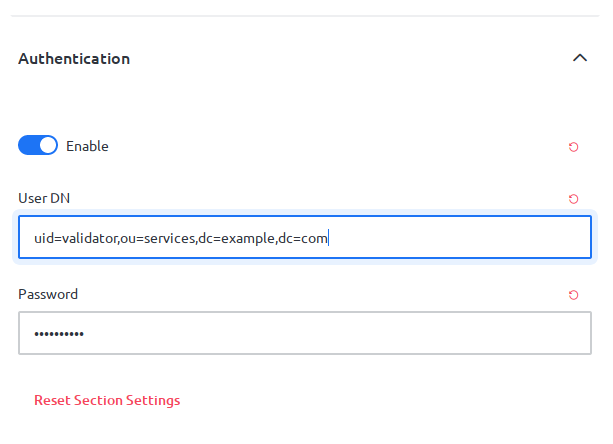
- Enable LDAP authentication and specify User DN and Password
- Enable LDAP group sync with a user group filter, an LDAP group base DN and a user data group mapping
- Try to log in to RocketChat
Expected behavior:
User login succeeds and mappings of LDAP groups to RocketChat roles are updated and honored.
Actual behavior:
Login fails with "User not found or incorrect password" and RocketChat logs an exception InsufficientAccessRightsError: Insufficient Access Rights from ldapjs
Server Setup Information:
- Version of Rocket.Chat Server: 2.3.0
- Operating System: Ubuntu 18.04
- Deployment Method: tar (https://rocket.chat/docs/installation/manual-installation/ubuntu/)
- Number of Running Instances: 1
- DB Replicaset Oplog:
- NodeJS Version: 8.11.4
- MongoDB Version: 4.0.13
Client Setup Information
- Desktop App or Browser Version: Firefox 70.0.1
- Operating System: Ubuntu 18.04
Additional context
Screenshots of LDAP configuration settings attached
LDAP authentication enabled:
LDAP group sync enabled and configured:

LDAP user search with memberOf filters (not directly relevant but visible in the attached logs so included for the sake of completeness):

Relevant logs:
Contributor guide
First steps
- Read the whole issue, then the project's contributing guide.
- Comment on the issue to say you are picking it up — it saves two people doing the same work.
- Fork the repository and make your change on a branch.
- Open a pull request that references the issue number.
Research direction
Start by reading app/ldap/server/sync.js at line 34 and reproduce the login flow with authenticated LDAP binds, restricted user search permissions, and group synchronization enabled. Use the linked logs and the listed reproduction steps to trace the InsufficientAccessRightsError. Done means login succeeds and LDAP group-to-role mappings are updated and honored.
Written by the indexing model from the issue text.
Assessment
- Tech stack
- javascript, node.js
- Domain
- authentication, authorization, backend
- Issue type
- Bug
- Difficulty
- 4/5
- Estimated time
- 3-5 days
- Activity status
- Stale
- Clarity
- Mostly clear
- Newbie friendliness
- 45/100