RocketChat / RocketChat/Rocket.Chat
Chime notification sound missing from per channel settings
Nobody has claimed this yet.
- Dominant language
- TypeScript
- Stars
- 46.1k
- Forks
- 13.9k
- Avg merge
- 3d 3h
- Merged PRs (30d)
- 130
Description
Description:
In the per channel notification settings, there's no way to select the "Chime" sound. It can only be selected if the "default" option is selected and the default, global account setting, is set to Chime. If a different sound is set in the account preferences, there no way to select back "chime" for a specific channel (for example, you want "Ding" by default, except one channel).
I'm also having an issue when no sound is played with the notification (MacOS electron app) when "default", or "Use Account Preference", is set in the channel notification setting. Changing the sound in the channel setting (while keeping Chime the default one), produce sound. I believe both issue could be linked, or at lest this second issue could be fixed if there was a way to specifically define "Chime" as the per channel notification sound.
Steps to reproduce:
- Go to account preferences
- Set "New Message Notification" to something other than "Chime (Default)"
- Go to channel "Notifications Preferences"
- Chime not in "sound" dropdown ("Default" uses the account preference defined sound)
Expected behavior:
Chime should be a choice in "sound" dropdown.
Actual behavior:
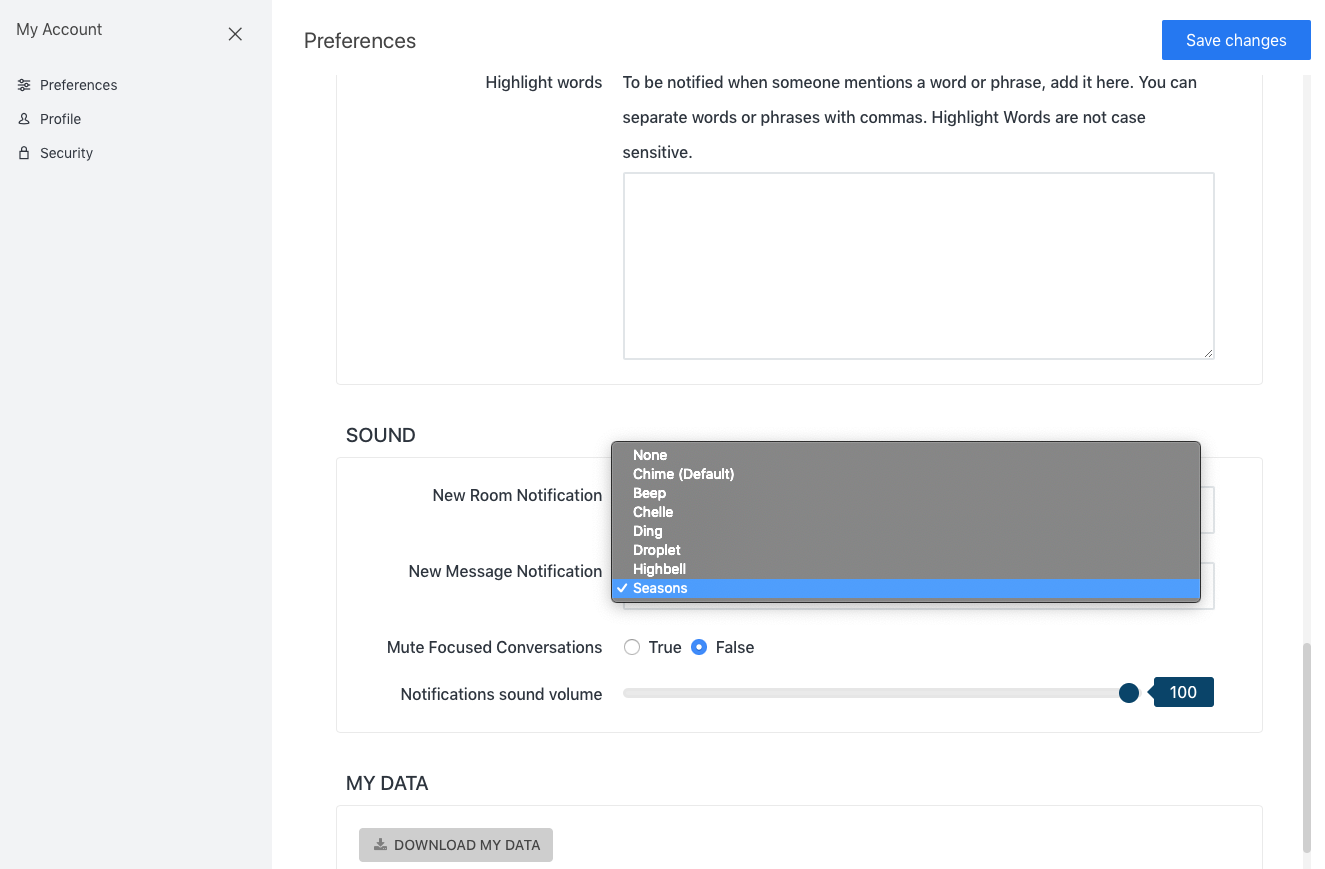
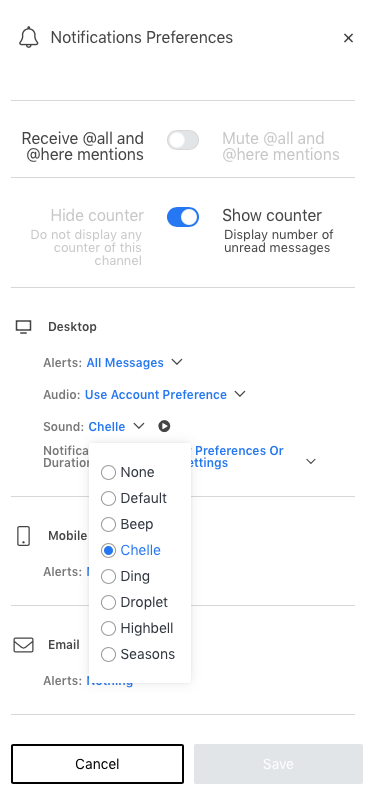
Server Setup Information:
- Version of Rocket.Chat Server: 0.69.2 (Asked sysadmin to update to 0.70. Will report back after if it's still present)
- Operating System: Linux
- Deployment Method: snap
- Number of Running Instances:
- DB Replicaset Oplog:
- NodeJS Version: 8.11.3
- MongoDB Version:
Additional context
Relevant logs:
Contributor guide
First steps
- Read the whole issue, then the project's contributing guide.
- Comment on the issue to say you are picking it up — it saves two people doing the same work.
- Fork the repository and make your change on a branch.
- Open a pull request that references the issue number.
Research direction
Start at the per-channel notification settings UI and its sound dropdown, then compare its options with the account preference setting. Done when Chime can be selected independently for a channel and the reported default or Use Account Preference notification behavior is verified.
Written by the indexing model from the issue text.
Assessment
- Tech stack
- typescript
- Domain
- frontend
- Issue type
- Bug
- Difficulty
- 3/5
- Estimated time
- 1-2 days
- Activity status
- Stale
- Clarity
- Mostly clear
- Newbie friendliness
- 35/100