RocketChat / RocketChat/Rocket.Chat
Jitsi video call applet button crowding
Open
Nobody has claimed this yet.
area: ui/ux
type: bug
- Dominant language
- TypeScript
- Stars
- 46.1k
- Forks
- 13.9k
- Avg merge
- 3d 3h
- Merged PRs (30d)
- 130
Description
Description:
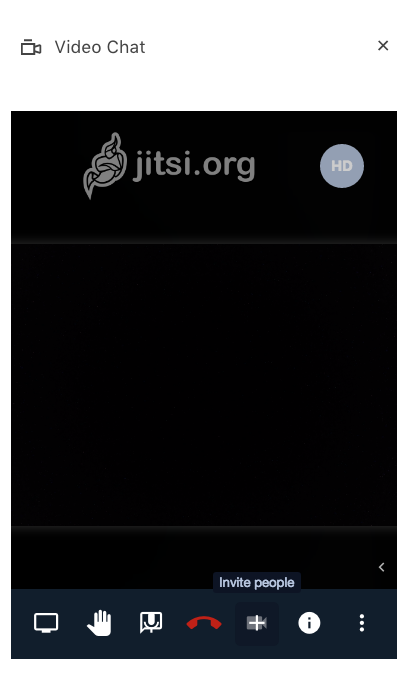
Microphone and Camera buttons inaccessible in Jitsi call applet
Server Setup Information:
- Version of Rocket.Chat Server: 0.63.3
- Operating System: Ubuntu 16.04 LTS
- Deployment Method(snap/docker/tar/etc): snap
- Number of Running Instances: 1
- DB Replicaset Oplog: Enabled
- Node Version: 8.11.1
- mongoDB Version: 3.2.7
- Rocket.chat macOS app v.2.10.5
- macOS 10.13.4
Steps to Reproduce:
- Launch Rocket.chat macOS app & go to a channel
- More menu => Video chat => Yes to join
- Observe crowded buttons in Jitsi applet on right navigation bar.
- Resizing or maximizing application window does not resolve.
Expected behavior:
User can see and click all Jitsi applet call buttons or resize nav bar or applet to make it so.
Actual behavior:
Button are crowded with microphone and camera button inaccessible
Relevant logs
Contributor guide
First steps
- Read the whole issue, then the project's contributing guide.
- Comment on the issue to say you are picking it up — it saves two people doing the same work.
- Fork the repository and make your change on a branch.
- Open a pull request that references the issue number.
Research direction
Start by reproducing the issue in the Rocket.Chat macOS app by joining a video call from a channel and inspecting the Jitsi applet in the right navigation bar. The work is done when the microphone and camera buttons are visible and clickable, or the applet or navigation bar can be resized to make them accessible.
Written by the indexing model from the issue text.
Assessment
- Tech stack
- macos, typescript
- Domain
- audio-video-rtc, frontend
- Issue type
- Bug
- Difficulty
- 3/5
- Estimated time
- 1-2 days
- Activity status
- Stale
- Clarity
- Mostly clear
- Newbie friendliness
- 35/100