Theme doesn't cover all colors
Nobody has claimed this yet.
- Dominant language
- TypeScript
- Stars
- 25.9k
- Forks
- 2.4k
- Avg merge
- 13h 10m
- Merged PRs (30d)
- 4
Description
Hello,
I played with Theme settings in order to set custom color scheme. While it worked perfectly for objects, that you could configure, some of them seem to be not configurable.
I took the default theme object from https://github.com/Rebilly/ReDoc/blob/master/src/theme.ts, and changed all colors to blue and yellow (so that it is contrast) like below:
{
    colors: {
        main: '#DFC350',
        success: '#DFC350',
        redirect: '#DFC350',
        error: '#DFC350',
        info: '#DFC350',
        text: '#DFC350',
        code: '#DFC350',
        codeBg: 'rgba(223, 195, 80, 1)',
        warning: '#DFC350',
        http: {
            get: '#DFC350',
            post: '#DFC350',
            put: '#DFC350',
            options: '#DFC350',
            patch: '#DFC350',
            delete: '#DFC350',
            basic: '#DFC350',
            link: '#DFC350',
            head: '#DFC350'
        }
    },
    schemaView: {
        linesColor: '#DFC350',
        typeNameColor: '#DFC350',
        typeTitleColor: '#DFC350',
        requireLabelColor: '#DFC350',
        nestingSpacing: '#DFC350'
    },
    links: {
        color: '#DFC350',
        visited: '#DFC350',
        hover: '#DFC350'
    },
    menu: {
        backgroundColor: '#445AFF'
    },
    rightPanel: {
        backgroundColor: '#DFC350',
        textColor: '#445AFF'
    }
}
On the screenshots below you can see a lot of changed colors, but things that were not configurable remained in default colors and are marked with arrows.
Could you please add options to set colors for those objects?
Thanks!
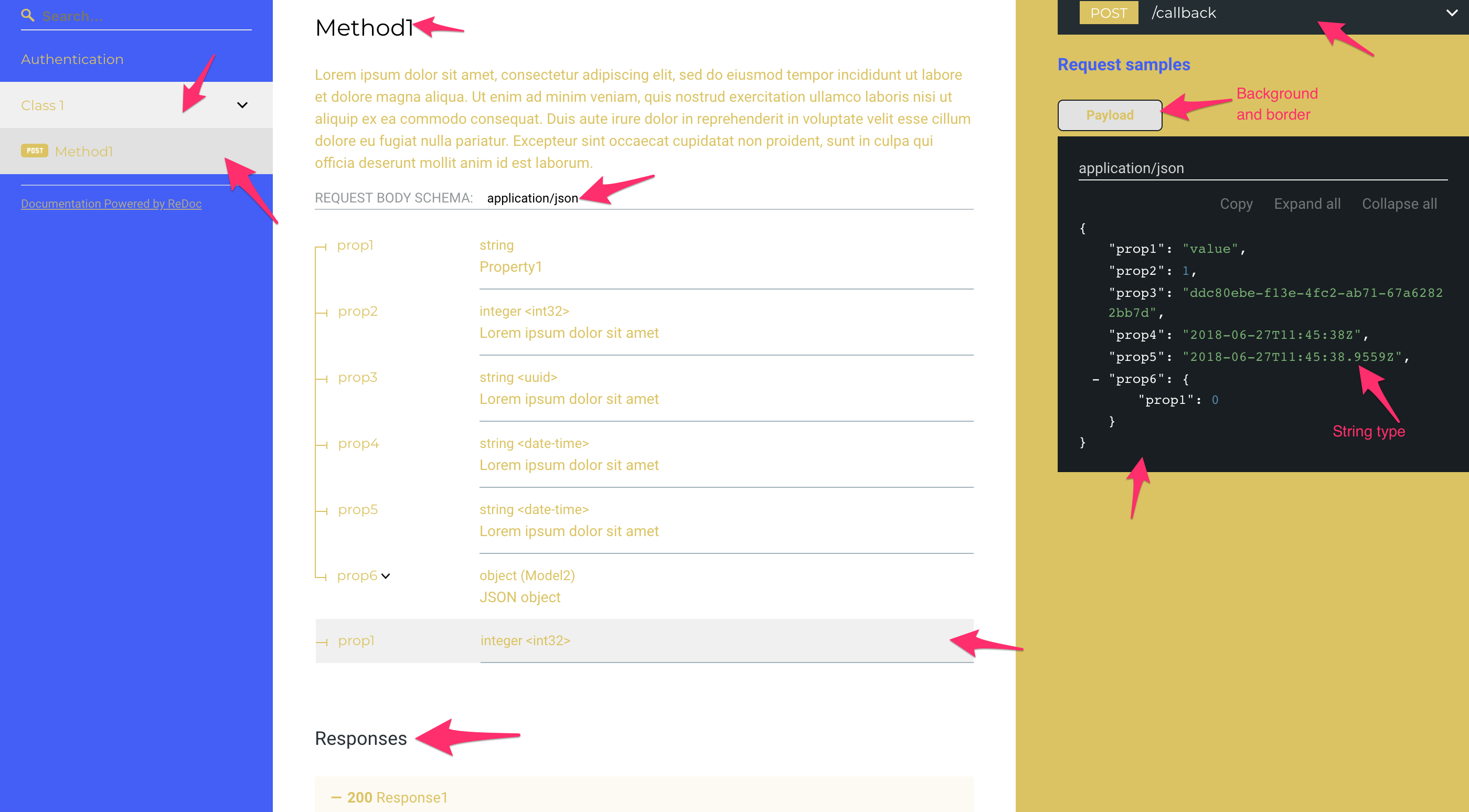

Api Spec in case you need to see what are the defined elements:
api_spec.txt
Contributor guide
First steps
- Read the whole issue, then the project's contributing guide.
- Comment on the issue to say you are picking it up — it saves two people doing the same work.
- Fork the repository and make your change on a branch.
- Open a pull request that references the issue number.
Research direction
Start with the default theme object in src/theme.ts and compare its configurable colors with the elements marked by arrows in the attached screenshots. Trace where those remaining default-colored objects are rendered, then expose matching theme options and verify that the affected elements follow the custom color scheme.
Written by the indexing model from the issue text.
Assessment
- Tech stack
- typescript
- Domain
- design, frontend
- Issue type
- Feature
- Difficulty
- 4/5
- Estimated time
- 3-5 days
- Activity status
- Stale
- Clarity
- Needs clarification
- Newbie friendliness
- 35/100