RealDevSquad / RealDevSquad/website-backend
Improvement of task assignment feature
Open
@vinayak-trivedi is already working on this.
Since Oct 26, 2022.
- Dominant language
- JavaScript
- Stars
- 74
- Forks
- 276
- Avg merge
- 1d 26m
- Merged PRs (30d)
- 14
Description
- Current task assignment flow
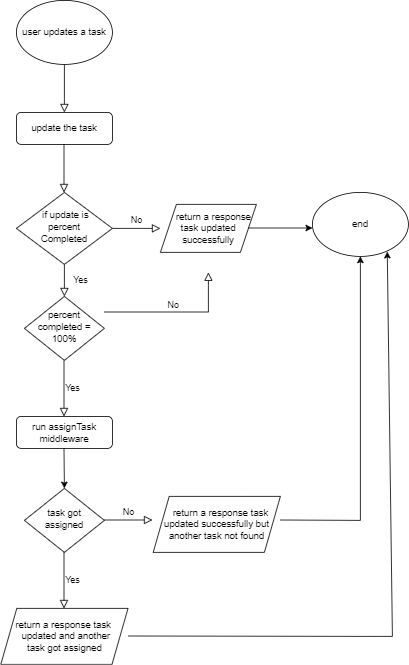
- There are certain limitations in assigning the tasks in this way, which are listed below:
- it runs only when the user completes a task, so if a user is not assigned a task, the task will not be automatically assigned to them
- and even if they are assigned a task then also there is no guarantee that they will be assigned a task once they complete the given task, as there might be no task matching their skill level
- one more thing is that the user might not want a task to get assigned to them immediately, so there should be an option provided to the user that will allow them to choose if they want to get assigned a task or not
Suggested solutions
- For the assignment of task, we give the user an option when they are marking the task as completed by making it 100% completed, we show them a modal which tells them that
You are marking this task as 100% completed and a new task will be assigned to you, there will be two buttons available, one will beProceed, the other one will beDo not assign me a task and proceed - If they click on proceed then the
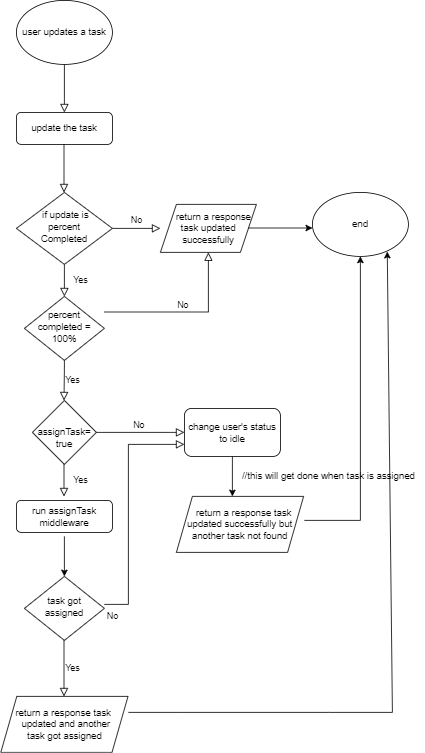
assignTaskmiddleware will run and a task will get assigned to them on the basis of their skill if it's available, if the task is not assigned to them, then we change the status of those users toidle - Next time when the superuser is creating a task, they get those users as suggested user in the assignee if their skill level matches the task. issue for this: https://github.com/Real-Dev-Squad/website-dashboard/issues/241
- There should be a fetch task button available for the users always, so that if they have chosen the option to not get a task before but now want a task they can get assigned a new task automatically, if there is any, by clicking on that button
The new flow would look something like the following
Contributor guide
First steps
- Read the whole issue, then the project's contributing guide.
- Comment on the issue to say you are picking it up — it saves two people doing the same work.
- Fork the repository and make your change on a branch.
- Open a pull request that references the issue number.
Assessment
This issue has not been assessed yet.