Marble diagrams for display in inline JsDocs are missing from npm package
@jakovljevic-mladen is already working on this.
Since Feb 8, 2023.
- Dominant language
- TypeScript
- Stars
- 31.7k
- Forks
- 3k
- PR merge metrics
- No merged PRs in 30d
Description
Bug Report
Current Behavior
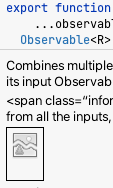
The inline JsDoc/TypeDoc often make reference to images using relative paths, but those images aren't part of the npm bundle (for as far as I can tell), and thus the Inline docs, when rendered in my IDE, are missing those images.
For example, see the docs for combineLatest:
/**
* Combines multiple Observables to create an Observable whose values are
* calculated from the latest values of each of its input Observables.
*
* <span class="informal">Whenever any input Observable emits a value, it
* computes a formula using the latest values from all the inputs, then emits
* the output of that formula.</span>
*
* 
Expected behavior
I'd expect the images to be displayed.
Reproduction
For example, in IntelliJ, open a rxjs ts file (e.g. node_modules/rxjs/src/internal/observable/combineLatest.ts), click into a method definition (with extensive comment that makes use of an image, e.g. around line 226 there), and choose View > Quick Documentation.
Please provide repro code does not involves framework, or other setups to address this bug is specific to rxjs core
n/a
Environment
n/a
Possible Solution
Not sure how this can be achieved with npm, but the images could potentially be shipped in a way that they don't get redistributed to end users and are available in IDEs only. Alternatively, URLs to the rxjs webserver could potentially be used (instead of relative paths).
Additional context/Screenshots
Contributor guide
First steps
- Read the whole issue, then the project's contributing guide.
- Comment on the issue to say you are picking it up — it saves two people doing the same work.
- Fork the repository and make your change on a branch.
- Open a pull request that references the issue number.
Assessment
This issue has not been assessed yet.