VoidTools Everything Copying Text with QL Bug
Nobody has claimed this yet.
- Dominant language
- C#
- Stars
- 24.7k
- Forks
- 1.3k
- Avg merge
- 4d 7h
- Merged PRs (30d)
- 1
Description
For all's convenience, please use English to fill this issue.
Please search within existing issues before the submission. Has this issue already been reported?
Searched this TIme around Am pretty sure there it's not been reported
Describe the bug
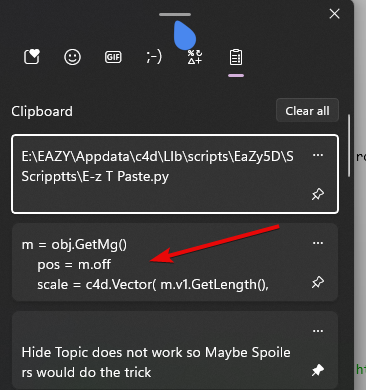
- When copying from a text file using the CTRL+C CMD it does not copy the text instead it copies the path from everything
- When you use right click then click Copy it does copy this time But then it copies Path from Everything I verify using clipboard
To Reproduce
Steps to reproduce the behavior:
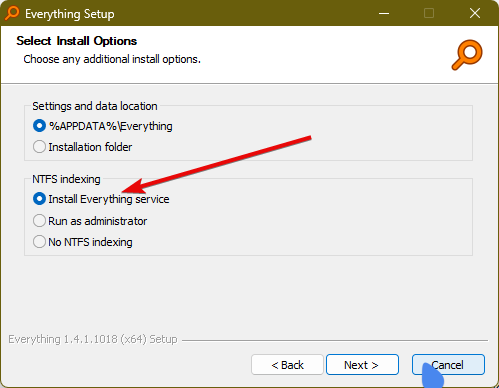
- Install Void tools Everything
- Make Sure to Use Everything service when installing if not Quicklook will not work
-
Now search for any text file ".txt, .py, .whatever"
-
Press Spacebar
-
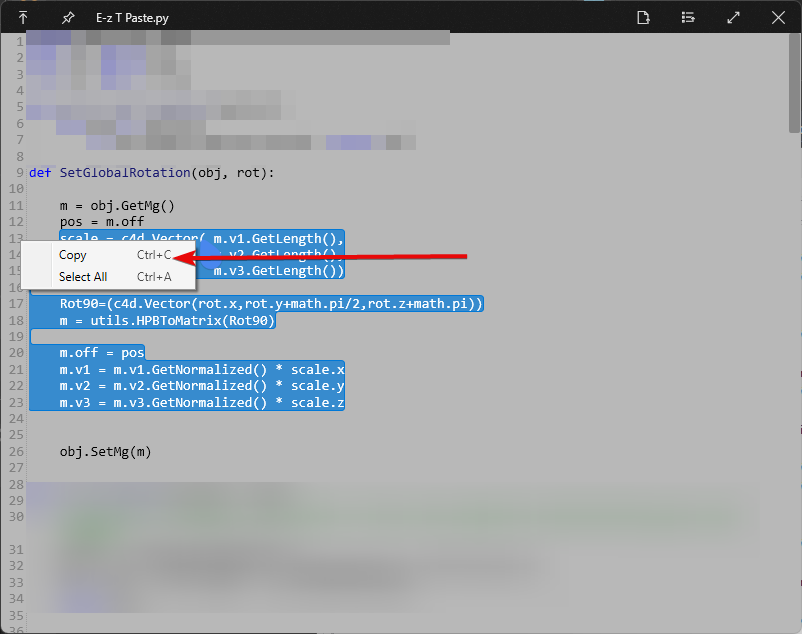
Try copying using Right Click Copy
-
Then you can also try CTRL+C
Expected behavior
A seamless copy and paste
I should say when testing out now, I realized when everything is in the background "Minimized" Copy and Paste does work seemlessly
Desktop (please complete the following information):
- OS Version: Windows 22H2
- QuickLook Version: 3.7.1 GitHub
Screenshots and Exception Log
If applicable, add screenshots and logs to help explain your problem. The log file is located in one of several locations.
Contributor guide
No contributing guide indexed for this repository
First steps
- Read the whole issue, then the project's contributing guide.
- Comment on the issue to say you are picking it up — it saves two people doing the same work.
- Fork the repository and make your change on a branch.
- Open a pull request that references the issue number.
Research direction
Reproduce the issue in QuickLook 3.7.1 on Windows 22H2 with VoidTools Everything enabled, using both right-click Copy and Ctrl+C on a searched text file while QuickLook is focused or minimized. Check the available exception log locations linked in the report and trace the clipboard behavior; done means both copy methods place the file text rather than its path on the clipboard.
Written by the indexing model from the issue text.
Assessment
- Tech stack
- csharp
- Domain
- desktop
- Issue type
- Bug
- Difficulty
- 4/5
- Estimated time
- 3-5 days
- Activity status
- Stale
- Clarity
- Mostly clear
- Newbie friendliness
- 35/100