The app often run out of memory when preview a big file
Nobody has claimed this yet.
- Dominant language
- C#
- Stars
- 24.7k
- Forks
- 1.3k
- Avg merge
- 4d 7h
- Merged PRs (30d)
- 1
Description
Describe the bug
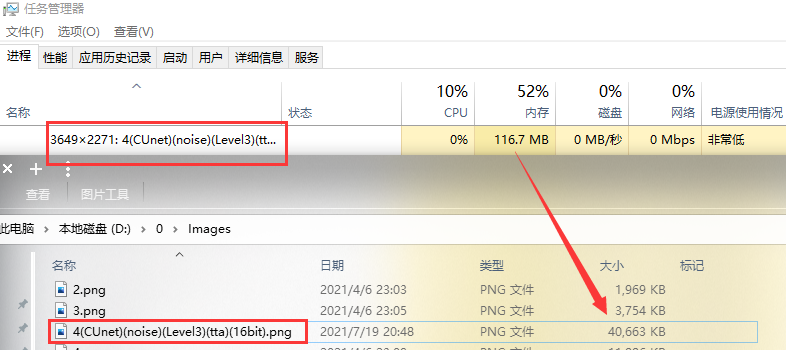
As the title, when previewing a big files (not including images or videos), the program will use tons of memory much larger than the file, and even I close the preview window, it also occupy the memory.
To Reproduce
Steps to reproduce the behavior:
1.Preview a big file (Image bigger than 3 MB, video bigger than 200MB)
2.Open the taskmgr
3.You can see the yellow line highlighted by taskmgr.
Expected behavior
When user close the window, the memory will be released in a time(5s for etc.).
Desktop (please complete the following information):
- OS Version: Windows 10 21H2
- QuickLook Version: 3.7.1 from github
Screenshots and Exception Log
Contributor guide
No contributing guide indexed for this repository
First steps
- Read the whole issue, then the project's contributing guide.
- Comment on the issue to say you are picking it up — it saves two people doing the same work.
- Fork the repository and make your change on a branch.
- Open a pull request that references the issue number.
Research direction
Reproduce the issue by previewing a large non-image or non-video file on Windows 10 and monitoring memory in Task Manager. Check whether memory remains occupied after closing the preview window; done means memory usage is released within a reasonable period without regressing large-file previews.
Written by the indexing model from the issue text.
Assessment
- Tech stack
- csharp
- Domain
- desktop, performance
- Issue type
- Bug
- Difficulty
- 4/5
- Estimated time
- 3-5 days
- Activity status
- Stale
- Clarity
- Mostly clear
- Newbie friendliness
- 35/100