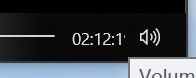
Time display of video progress bar has been partial occluded
Nobody has claimed this yet.
- Dominant language
- C#
- Stars
- 24.7k
- Forks
- 1.3k
- Avg merge
- 4d 7h
- Merged PRs (30d)
- 1
Description
Describe the bug
The 'Time Elapsed/Remaining' of the vedio progress bar cannot fully display, the second time has been occluded.
To Reproduce
Steps to reproduce the behavior:
- Select a .mp4 vedio
- Press the Space and start preview
- the time display of video progress bar has been partial occluded
Expected behavior
Time display of video progress bar can fully display.
Desktop (please complete the following information):
- OS Version: Windows 10 21H2
- Screen Resolution: 4K, 150% zoom
- QuickLook Version: 3.7.1 from Github Release
Screenshots and Exception Log
Contributor guide
No contributing guide indexed for this repository
First steps
- Read the whole issue, then the project's contributing guide.
- Comment on the issue to say you are picking it up — it saves two people doing the same work.
- Fork the repository and make your change on a branch.
- Open a pull request that references the issue number.
Research direction
Reproduce the issue in QuickLook with an .mp4 video on Windows 10 at 4K resolution and 150% scaling, following the listed Space-bar preview steps. Locate the video progress bar implementation, then verify that both elapsed and remaining times are fully visible; confirm the fix under the reported display conditions.
Written by the indexing model from the issue text.
Assessment
- Tech stack
- csharp
- Domain
- desktop
- Issue type
- Bug
- Difficulty
- 3/5
- Estimated time
- 1-2 days
- Activity status
- Stale
- Clarity
- Mostly clear
- Newbie friendliness
- 38/100