PySimpleGUI / PySimpleGUI/PySimpleGUI
[Enhancement ] popup enhancement so that titles are fully shown when windows are small
Nobody has claimed this yet.
- Dominant language
- Python
- Stars
- 13.8k
- Forks
- 1.8k
- PR merge metrics
- No merged PRs in 30d
Description
Type of Issue (Enhancement, Error, Bug, Question)
Question, maybe an enchancement?
Operating System
All
PySimpleGUI Port (tkinter, Qt, Wx, Web)
tkinter
Versions
Python version (sg.sys.version)
3.9.7
PySimpleGUI Version (sg.__version__)
4.59.0
Your Experience In Months or Years
Years Python programming experience
2
Years Programming experience overall
4
Have used another Python GUI Framework? (tkinter, Qt, etc) (yes/no is fine)
no
Anything else you think would be helpful?
no
Troubleshooting
These items may solve your problem. Please check those you've done by changing - [ ] to - [X]
- Searched main docs for your problem www.PySimpleGUI.org
- Looked for Demo Programs that are similar to your goal Demos.PySimpleGUI.org
- If not tkinter - looked for Demo Programs for specific port
- For non tkinter - Looked at readme for your specific port if not PySimpleGUI (Qt, WX, Remi)
- Run your program outside of your debugger (from a command line)
- Searched through Issues (open and closed) to see if already reported Issues.PySimpleGUI.org
- Tried using the PySimpleGUI.py file on GitHub. Your problem may have already been fixed but not released
Detailed Description
Firstly, I love psg!
So the thing is: Popups are building a Window with every arg each popup have, it builds it in line ~18634 of PySimpleGUI.py, and Window does have an size(x, y) argument, so not using it in popups are a design choice?
I'm messing around with some popups and if I print something really small, the title bar hides, if I could set the size to be a bit bigger, the popup would look nicer.
I know it's easy to create a popup using the same method as the popup function does, but I was wondering why it does not have the size arg.
Ty!
Code To Duplicate
from PySimpleGUI import popup_ok
popup_ok('Done', title="My app title") # does not show title :(
popup_ok(f'Done\n{"."*50}', title="My app title") # the title shows :)
Screenshot, Sketch, or Drawing
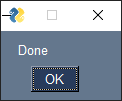

forcing a size arg in popup function:

Watcha Makin?
I'm migrating some popups from pymsgbox to PySimpleGUI popups, and some texts are so small that the popup not shows the title.
Contributor guide
First steps
- Read the whole issue, then the project's contributing guide.
- Comment on the issue to say you are picking it up — it saves two people doing the same work.
- Fork the repository and make your change on a branch.
- Open a pull request that references the issue number.
Research direction
Start in PySimpleGUI.py around line ~18634, where popups build their Window, and trace the popup_ok entry point. Reproduce the two popup_ok examples from the issue, then verify that short messages still show the full title while existing popup behavior remains intact.
Written by the indexing model from the issue text.
Assessment
- Tech stack
- python
- Domain
- desktop
- Issue type
- Feature
- Difficulty
- 2/5
- Estimated time
- 1-3 hours
- Activity status
- Stale
- Clarity
- Mostly clear
- Newbie friendliness
- 48/100