PySimpleGUI / PySimpleGUI/PySimpleGUI
[ Enhancement] ProgressBar length size
Nobody has claimed this yet.
- Dominant language
- Python
- Stars
- 13.8k
- Forks
- 1.8k
- PR merge metrics
- No merged PRs in 30d
Description
Type of Issue (Enhancement, Error, Bug, Question)
Enhancement
Operating System
Windows version 10
PySimpleGUI Port (tkinter, Qt, Wx, Web)
tkinter
Versions
Version information can be obtained by calling sg.main_get_debug_data()
Or you can print each version shown in ()
Python version (sg.sys.version)
3.8.6 (tags/v3.8.6:db45529, Sep 23 2020, 15:52:53) [MSC v.1927 64 bit (AMD64)]
PySimpleGUI Version (sg.__version__)
4.39.1
GUI Version (tkinter (sg.tclversion_detailed), PySide2, WxPython, Remi)
8.6.9
Your Experience In Months or Years (optional)
5 Years Python programming experience
35 Years Programming experience overall
Yes Have used another Python GUI Framework? (tkinter, Qt, etc) (yes/no is fine)
Troubleshooting
These items may solve your problem. Please check those you've done by changing - [ ] to - [X]
- Searched main docs for your problem www.PySimpleGUI.org
- Looked for Demo Programs that are similar to your goal Demos.PySimpleGUI.org
- If not tkinter - looked for Demo Programs for specific port
- For non tkinter - Looked at readme for your specific port if not PySimpleGUI (Qt, WX, Remi)
- Run your program outside of your debugger (from a command line)
- Searched through Issues (open and closed) to see if already reported Issues.PySimpleGUI.org
- Tried using the PySimpleGUI.py file on GitHub. Your problem may have already been fixed but not released
Detailed Description
I used a horizontal ProgressBar with some difficulty in obtaining a well aligned layout.
It was because I wanted to place it in a Column with two Combo elements, but the ProgressBar didn't match the char width of the other elements in the same column.
I ended in a trial-and-error loop without understanding the correlation between the declared length in characters and the real size in pixel of the resulting ProgressBar.
After undestanding other issues related to fonts, I'm now reconsidering this topic.
I've found other very similar issues from the past #1089 #1654 #2651.
Here is my contribution, hoping it could lead to an enhancement to ease the usability of this Element.
I attached a simple test case and an image screenshot.
On purpose I'm not declaring a font, therefore it is using PySimpleGUI defaults.
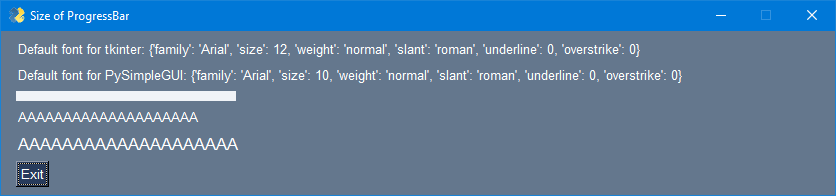
The bar has a nominal length of 20 characters, but it is way longer than a sequence of 20 "A" characters of Text using default font.
This is because the sizing of ProgressBar is operated using tkinter default font that corresponds to ("Arial", 12), while instead PySimpleGUI default font is ("Helvetica", 10) that is translated by tkinter to ("Arial", 10).
For comparison I added also a sequence of 20 "A" characters of Text using font ("Any", 12) that is translated by tkinter to ("Arial", 12).
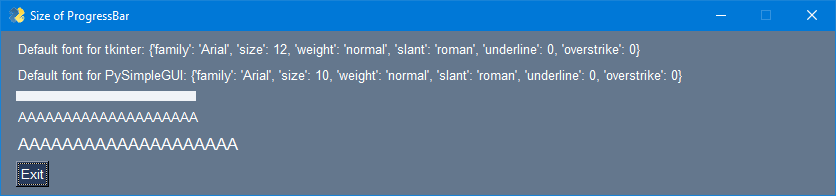
It is evident that the ProgressBar size matches the lenght of the "A" sequence in ("Arial", 12).
My point is that the computation of ProgressBar leght should be coherent with the default font used by PySimpleGUI for all other elements, not the tkinter default (that could depend from specific system and display scaling).
I therefore propose to modify line 13055 as follows
fnt = tkinter.font.Font(font=font)
Regards.
Code To Duplicate
import PySimpleGUI as sg
import tkinter

BAR_LENGTH = 20
BAR_HEIGTH = 10

layout = [
    [sg.Text('', key='-TEXT1-', size=(100,1) ),],
    [sg.Text('', key='-TEXT2-', size=(100,1)  ),],
    [sg.ProgressBar(100, size=(BAR_LENGTH,BAR_HEIGTH))],
    [sg.Text('A'*BAR_LENGTH, key='-TEXT3-')],
    [sg.Text('A'*BAR_LENGTH, key='-TEXT4-', font='Any 12')],
    [sg.Button('Exit')],
]

window = sg.Window('Size of ProgressBar', layout, finalize=True)

font1 = tkinter.font.Font().actual()
window['-TEXT1-'].update('Default font for tkinter: '+str(font1))

widget = window['-TEXT3-'].Widget
font2 = tkinter.font.Font(font=widget["font"]).actual()
window['-TEXT2-'].update('Default font for PySimpleGUI: '+str(font2))

while True:
    event, values = window.read()
    if event == 'Exit' or sg.WIN_CLOSED:
        break
window.close()
Section of PySimpleGUI.py v4.39.1 with change
            # -------------------------  PROGRESS placement element  ------------------------- #
            elif element_type == ELEM_TYPE_PROGRESS_BAR:
                element = element  # type: ProgressBar
                # save this form because it must be 'updated' (refreshed) solely for the purpose of updating bar
                width = element_size[0]
                ##!fnt = tkinter.font.Font()
                fnt = tkinter.font.Font(font=font)
                char_width = fnt.measure('A')  # single character width
                progress_length = width * char_width
Screenshot, Sketch, or Drawing
Screenshot BEFORE the proposed change:
Screenshot AFTER the proposed change:
Contributor guide
First steps
- Read the whole issue, then the project's contributing guide.
- Comment on the issue to say you are picking it up — it saves two people doing the same work.
- Fork the repository and make your change on a branch.
- Open a pull request that references the issue number.
Research direction
Start in PySimpleGUI.py around the ProgressBar placement code near line 13055, then run the attached reproduction on the tkinter port. Compare ProgressBar sizing with the surrounding Text elements under the default font; done means the declared character length produces consistent alignment without regressing explicitly configured fonts.
Written by the indexing model from the issue text.
Assessment
- Tech stack
- python
- Domain
- desktop
- Issue type
- Feature
- Difficulty
- 2/5
- Estimated time
- 1-3 hours
- Activity status
- Stale
- Clarity
- Clearly specified
- Newbie friendliness
- 45/100