ProxymanApp / ProxymanApp/Proxyman
Script export includes all imported datafiles, not just the ones required by the scripts being exported.
@NghiaTranUIT is already working on this.
Since Feb 20, 2021.
- Dominant language
- No language data
- Stars
- 7k
- Forks
- 237
- PR merge metrics
- No merged PRs in 30d
Description
Proxyman version? (Ex. Proxyman 1.4.3)
2.17
macOS Version? (Ex. mac 10.14)
10.15.6
Notes
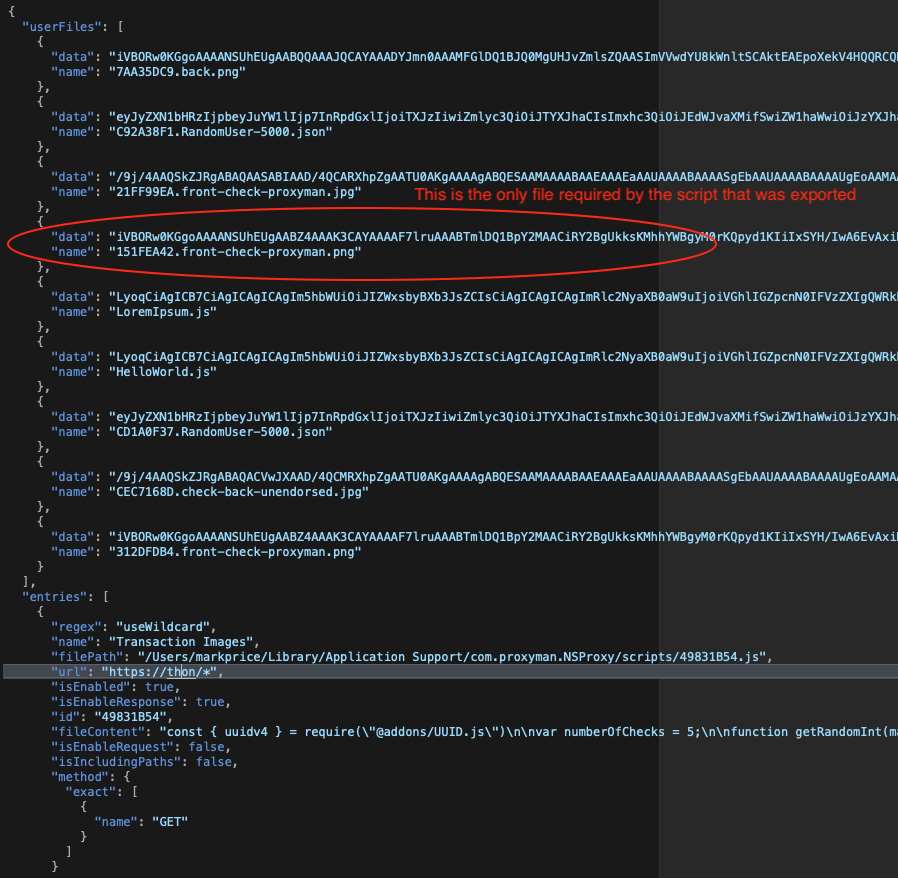
If you have imported files into various scripts, and then are exporting a script to share, the exported config file includes all the data files you have ever imported. Although this does match the "Export Scripts and All Imported Files" This leads to two issues, potentially very large exported config files, and sharing files that you didn't intend or want to.
I would expect that only the data files that are references via a require() would be exported. So for example, if I am exporting two scripts, and each script references a unique data file, only those two data files would be included in the export.
Another option is to have the user decide which data files they want to include in the export, although doing it automatically based on the require() would be ideal.
This is probably more of a feature request than a bug, although I think people wouldn't expect all the data files to be exported.
Steps to reproduce
- Add several scripts and require (import) a different data file into each script.
- Select one, or two, scripts for export and select "Export Scripts and All Imported Files"
Unzip and look at the exported config file, and you'll see that all the imported files have been included,
Expected behavior
Only the ones referenced by the exported scripts should be in the config file.
Screenshots (optional)
Contributor guide
No contributing guide indexed for this repository
First steps
- Read the whole issue, then the project's contributing guide.
- Comment on the issue to say you are picking it up — it saves two people doing the same work.
- Fork the repository and make your change on a branch.
- Open a pull request that references the issue number.
Assessment
This issue has not been assessed yet.