ProxymanApp / ProxymanApp/Proxyman
Show elapsed time while a long-running request is happening
Open
@NghiaTranUIT is already working on this.
Since Aug 11, 2020.
Feature request
- Dominant language
- No language data
- Stars
- 7k
- Forks
- 237
- PR merge metrics
- No merged PRs in 30d
Description
Proxyman version? (Ex. Proxyman 1.4.3)
Version 2.4.0 (20400)
macOS Version? (Ex. mac 10.14)
10.15
Steps to reproduce
Create a long-running request
Note in the Duration column the duration is "-"
Expected behavior
Show the time elapsed every 10 seconds or at whatever interval
Screenshots (optional)
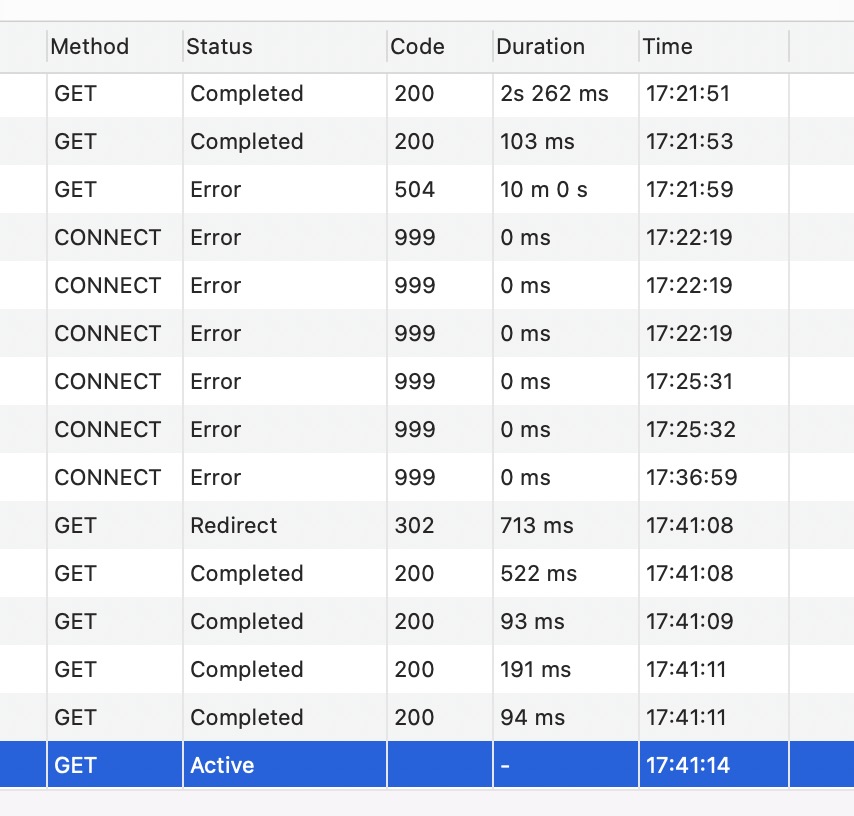
If a long-running request is in process, it's nice to see that it's been running for 20s, then 30s, then 1m, then 1m30s, etc
Contributor guide
No contributing guide indexed for this repository
First steps
- Read the whole issue, then the project's contributing guide.
- Comment on the issue to say you are picking it up — it saves two people doing the same work.
- Fork the repository and make your change on a branch.
- Open a pull request that references the issue number.
Assessment
This issue has not been assessed yet.