PowerShell / PowerShell/Win32-OpenSSH
"client_loop: send disconnect: Connection reset" on Windows 11 when Mobile Hotspot is enabled
Nobody has claimed this yet.
- Dominant language
- No language data
- Stars
- 8.3k
- Forks
- 819
- PR merge metrics
- No merged PRs in 30d
Description
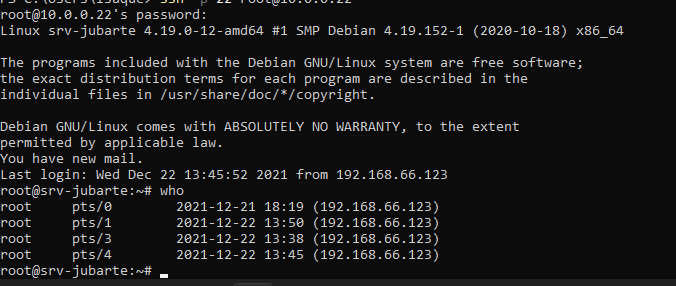
I'm having this problem on Windows 11 when Mobile Hotspot is enabled, it seems there's a bug, when Mobile Hotspot is enabled, I keep losing the connection all the time intermittently, sometimes I can't even authenticate, sometimes it takes 30 to 50 seconds to lose connection. The connection remains open on the server.
It's impossible to work in the terminal via SSH, because the connection drops before you do anything.
"Write Failed: broken pipe" or "client_loop: send disconnect: Connection reset" on SSH connection.
64 bytes from 192.168.66.123: icmp_seq=21 ttl=126 time=0.922 ms
64 bytes from 192.168.66.123: icmp_seq=22 ttl=126 time=1.12 ms
64 bytes from 192.168.66.123: icmp_seq=23 ttl=126 time=0.976 ms
64 bytes from 192.168.66.123: icmp_seq=24 ttl=126 time=0.843 ms
64 bytes from 192.168.66.123: icmp_seq=25 ttl=126 time=1.14 ms
64 bytes from 192.168.66.123: icmp_seq=26 ttl=126 time=1.15 ms
64 bytes from 192.168.66.123: icmp_seq=27 ttl=126 time=1.12 ms
64 bytes from 192.168.66.123: icmp_seq=28 ttl=126 time=1.13 ms
client_loop: send disconnect: Connection reset
PS C:\Users\isaque> ssh -p 22 root@10.0.0.22
root@10.0.0.22's password:
Linux srv-jubarte 4.19.0-12-amd64 #1 SMP Debian 4.19.152-1 (2020-10-18) x86_64

The programs included with the Debian GNU/Linux system are free software;
the exact distribution terms for each program are described in the
individual files in /usr/share/doc/*/copyright.

Debian GNU/Linux comes with ABSOLUTELY NO WARRANTY, to the extent
permitted by applicable law.
You have new mail.
Last login: Wed Dec 22 13:30:51 2021 from 192.168.66.123
root@srv-jubarte:~# ping 192.168.66.123
PING 192.168.66.123 (192.168.66.123) 56(84) bytes of data.
64 bytes from 192.168.66.123: icmp_seq=1 ttl=126 time=1.12 ms
64 bytes from 192.168.66.123: icmp_seq=2 ttl=126 time=1.12 ms
64 bytes from 192.168.66.123: icmp_seq=3 ttl=126 time=1.96 ms
64 bytes from 192.168.66.123: icmp_seq=4 ttl=126 time=0.911 ms
64 bytes from 192.168.66.123: icmp_seq=5 ttl=126 time=0.924 ms
64 bytes from 192.168.66.123: icmp_seq=6 ttl=126 time=1.09 ms
64 bytes from 192.168.66.123: icmp_seq=7 ttl=126 time=1.04 ms
64 bytes from 192.168.66.123: icmp_seq=8 ttl=126 time=1.12 ms
64 bytes from 192.168.66.123: icmp_seq=9 ttl=126 time=1.05 ms
64 bytes from 192.168.66.123: icmp_seq=10 ttl=126 time=1.05 ms
64 bytes from 192.168.66.123: icmp_seq=11 ttl=126 time=0.900 ms
64 bytes from 192.168.66.123: icmp_seq=12 ttl=126 time=0.945 ms
64 bytes from 192.168.66.123: icmp_seq=13 ttl=126 time=3.46 ms
64 bytes from 192.168.66.123: icmp_seq=14 ttl=126 time=0.886 ms
64 bytes from 192.168.66.123: icmp_seq=15 ttl=126 time=1.58 ms
64 bytes from 192.168.66.123: icmp_seq=16 ttl=126 time=0.969 ms
64 bytes from 192.168.66.123: icmp_seq=17 ttl=126 time=1.10 ms
64 bytes from 192.168.66.123: icmp_seq=18 ttl=126 time=1.08 ms
64 bytes from 192.168.66.123: icmp_seq=19 ttl=126 time=2.41 ms
64 bytes from 192.168.66.123: icmp_seq=20 ttl=126 time=0.750 ms
64 bytes from 192.168.66.123: icmp_seq=21 ttl=126 time=0.877 ms
64 bytes from 192.168.66.123: icmp_seq=22 ttl=126 time=1.01 ms
64 bytes from 192.168.66.123: icmp_seq=23 ttl=126 time=0.961 ms
64 bytes from 192.168.66.123: icmp_seq=24 ttl=126 time=1.02 ms
64 bytes from 192.168.66.123: icmp_seq=25 ttl=126 time=1.09 ms
client_loop: send disconnect: Connection reset
PS C:\Users\isaque>
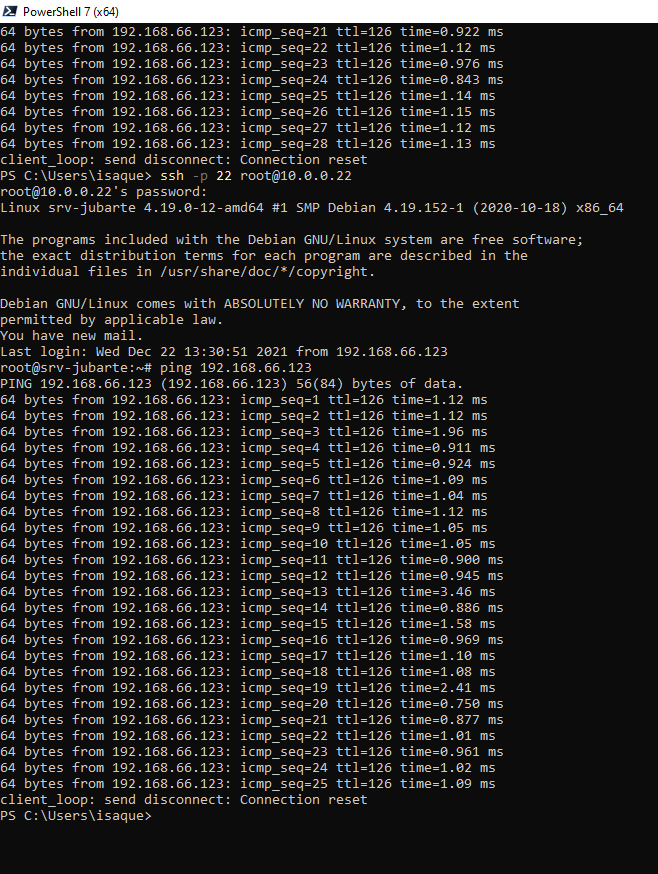


No ping loss occurs

Contributor guide
First steps
- Read the whole issue, then the project's contributing guide.
- Comment on the issue to say you are picking it up — it saves two people doing the same work.
- Fork the repository and make your change on a branch.
- Open a pull request that references the issue number.
Research direction
Start by reproducing the SSH client disconnect on Windows 11 with Mobile Hotspot enabled, using the provided ping and SSH command examples. Compare the connection behavior when the hotspot is disabled; done means identifying and fixing the cause of SSH resets that occur despite continued ping responses.
Written by the indexing model from the issue text.
Assessment
- Tech stack
- c
- Domain
- cli, networking, operating-systems
- Issue type
- Bug
- Difficulty
- 4/5
- Estimated time
- 3-5 days
- Activity status
- Stale
- Clarity
- Needs clarification
- Newbie friendliness
- 25/100