PowerShell / PowerShell/PowerShell
Error on $schema property when casting from json to PSObject
Open
Nobody has claimed this yet.
Needs-Triage
WG-Engine
- Dominant language
- C#
- Stars
- 55.5k
- Forks
- 8.5k
- Avg merge
- 1d 2h
- Merged PRs (30d)
- 88
Description
Prerequisites
- Write a descriptive title.
- Make sure you are able to repro it on the latest released version
- Search the existing issues.
- Refer to the FAQ.
- Refer to Differences between Windows PowerShell 5.1 and PowerShell.
Steps to reproduce
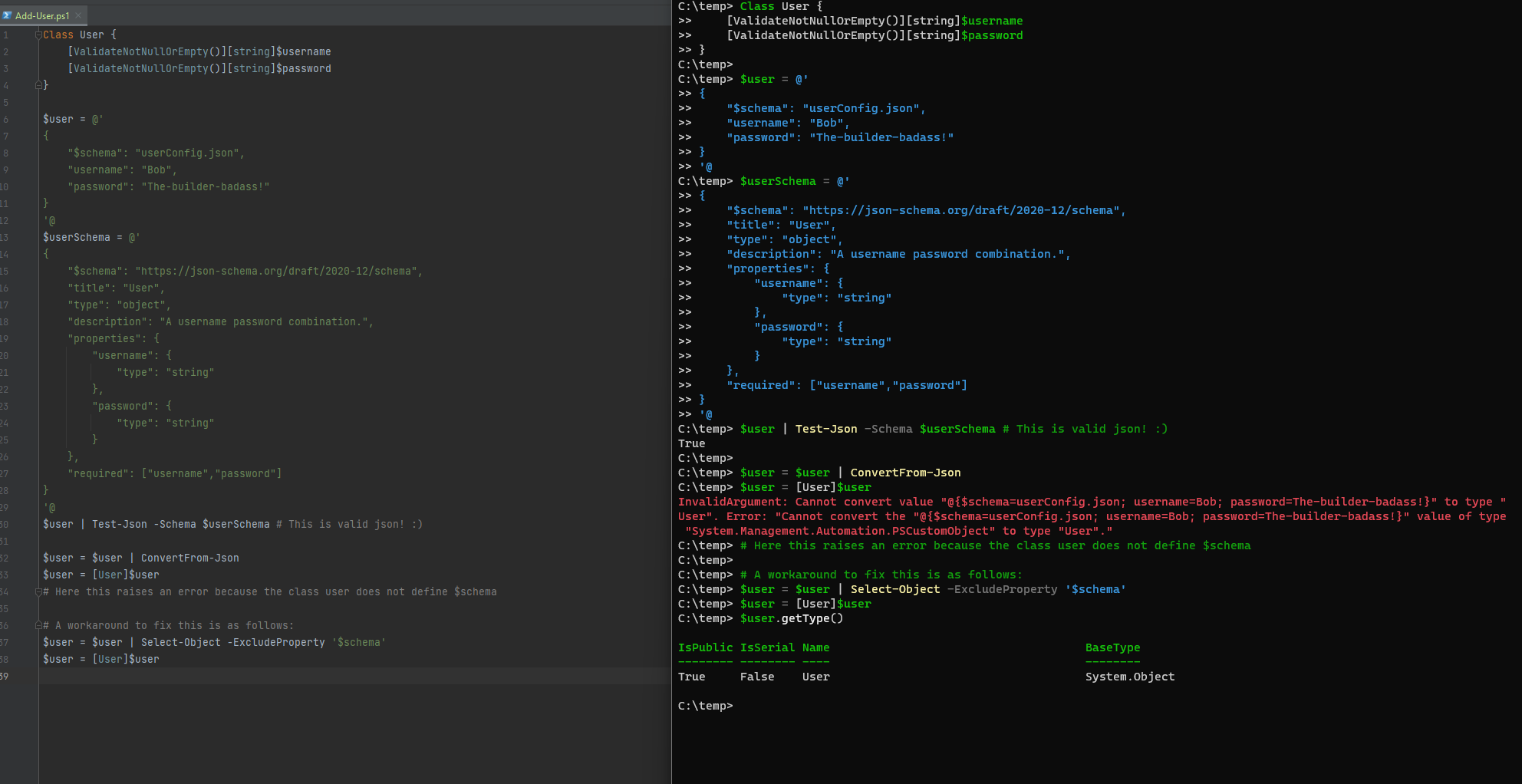
When i try to typecast a converted json string (using ConvertFrom-Json) to a specific PsObject the json string's $schema property interfers with the class definition.
Below i set up a sample of the issue using a sample user object that has been serialised from a json file.
Expected behavior
I expect typecasting any successfull `ConvertFrom-Json $string` to be type-castable into the actual object.


Class User {
    [ValidateNotNullOrEmpty()][string]$username
    [ValidateNotNullOrEmpty()][string]$password
}

$user = @'
{
    "$schema": "userConfig.json",
    "username": "Bob",
    "password": "The-builder-badass!"
}
'@
$userSchema = @'
{
    "$schema": "https://json-schema.org/draft/2020-12/schema",
    "title": "User",
    "type": "object",
    "description": "A username password combination.",
    "properties": {
        "username": {
            "type": "string"
        },
        "password": {
            "type": "string"
        }
    },
    "required": ["username","password"]
}
'@
$user | Test-Json -Schema $userSchema # This is valid json! :)

$user = $user | ConvertFrom-Json
$user = [User]$user
# Here this raises an error because the class user does not define $schema
Actual behavior
To get the typecast to work one needs to manually drop the `$schema` property.


Class User {
    [ValidateNotNullOrEmpty()][string]$username
    [ValidateNotNullOrEmpty()][string]$password
}

$user = @'
{
    "$schema": "userConfig.json",
    "username": "Bob",
    "password": "The-builder-badass!"
}
'@
$userSchema = @'
{
    "$schema": "https://json-schema.org/draft/2020-12/schema",
    "title": "User",
    "type": "object",
    "description": "A username password combination.",
    "properties": {
        "username": {
            "type": "string"
        },
        "password": {
            "type": "string"
        }
    },
    "required": ["username","password"]
}
'@
$user | Test-Json -Schema $userSchema # This is valid json! :)

$user = $user | ConvertFrom-Json
$user = [User]$user
# Here this raises an error because the class user does not define $schema

# A workaround to fix this is as follows:
$user = $user | Select-Object -ExcludeProperty '$schema'
$user = [User]$user
Error details
Type           : System.Management.Automation.RuntimeException
ErrorRecord    :
    Exception             :
        Type    : System.Management.Automation.ParentContainsErrorRecordException
        Message : Cannot convert value "@{$schema=userConfig.json; username=Bob; password=The-builder-badass!}" to
type "User". Error: "Cannot convert the "@{$schema=userConfig.json; username=Bob; password=The-builder-badass!}" value
of type "System.Management.Automation.PSCustomObject" to type "User"."
        HResult : -2146233087
    CategoryInfo          : InvalidArgument: (:) [], ParentContainsErrorRecordException
    FullyQualifiedErrorId : InvalidCastConstructorException
    InvocationInfo        :
        ScriptLineNumber : 1
        OffsetInLine     : 1
        HistoryId        : -1
        Line             : $user = [User]$user
        PositionMessage  : At line:1 char:1
                           + $user = [User]$user
                           + ~~~~~~~~~~~~~~~~~~~
        CommandOrigin    : Internal
    ScriptStackTrace      : at <ScriptBlock>, <No file>: line 1
TargetSite     :
    Name          : Invoke
    DeclaringType : System.Management.Automation.Runspaces.PipelineBase, System.Management.Automation,
Version=7.2.7.500, Culture=neutral, PublicKeyToken=31bf3856ad364e35
    MemberType    : Method
    Module        : System.Management.Automation.dll
Message        : Cannot convert value "@{$schema=userConfig.json; username=Bob; password=The-builder-badass!}" to type
"User". Error: "Cannot convert the "@{$schema=userConfig.json; username=Bob; password=The-builder-badass!}" value of
type "System.Management.Automation.PSCustomObject" to type "User"."
Data           : System.Collections.ListDictionaryInternal
InnerException :
    Type           : System.Management.Automation.PSInvalidCastException
    ErrorRecord    :
        Exception             :
            Type    : System.Management.Automation.ParentContainsErrorRecordException
            Message : Cannot convert value "@{$schema=userConfig.json; username=Bob; password=The-builder-badass!}" to
type "User". Error: "Cannot convert the "@{$schema=userConfig.json; username=Bob; password=The-builder-badass!}" value
of type "System.Management.Automation.PSCustomObject" to type "User"."
            HResult : -2146233087
        CategoryInfo          : InvalidArgument: (:) [], ParentContainsErrorRecordException
        FullyQualifiedErrorId : InvalidCastConstructorException
        InvocationInfo        :
            ScriptLineNumber : 1
            OffsetInLine     : 1
            HistoryId        : -1
            Line             : $user = [User]$user
            PositionMessage  : At line:1 char:1
                               + $user = [User]$user
                               + ~~~~~~~~~~~~~~~~~~~
            CommandOrigin    : Internal
        ScriptStackTrace      : at <ScriptBlock>, <No file>: line 1
    TargetSite     :
        Name          : Convert
        DeclaringType : System.Management.Automation.LanguagePrimitives+ConvertViaNoArgumentConstructor,
System.Management.Automation, Version=7.2.7.500, Culture=neutral, PublicKeyToken=31bf3856ad364e35
        MemberType    : Method
        Module        : System.Management.Automation.dll
    Message        : Cannot convert value "@{$schema=userConfig.json; username=Bob; password=The-builder-badass!}" to
type "User". Error: "Cannot convert the "@{$schema=userConfig.json; username=Bob; password=The-builder-badass!}" value
of type "System.Management.Automation.PSCustomObject" to type "User"."
    Data           : System.Collections.ListDictionaryInternal
    InnerException :
        Type           : System.Management.Automation.PSInvalidCastException
        ErrorRecord    :
            Exception             :
                Type    : System.Management.Automation.ParentContainsErrorRecordException
                Message : Cannot convert the "@{$schema=userConfig.json; username=Bob; password=The-builder-badass!}"
value of type "System.Management.Automation.PSCustomObject" to type "User".
                HResult : -2146233087
            CategoryInfo          : InvalidArgument: (:) [], ParentContainsErrorRecordException
            FullyQualifiedErrorId : ConvertToFinalInvalidCastException
        TargetSite     :
            Name          : SetObjectProperties
            DeclaringType : System.Management.Automation.LanguagePrimitives
            MemberType    : Method
            Module        : System.Management.Automation.dll
        Message        : Cannot convert the "@{$schema=userConfig.json; username=Bob; password=The-builder-badass!}"
value of type "System.Management.Automation.PSCustomObject" to type "User".
        InnerException :
            Type       : System.InvalidOperationException
            TargetSite :
                Name          : CreateMemberNotFoundError
                DeclaringType : System.Management.Automation.LanguagePrimitives
                MemberType    : Method
                Module        : System.Management.Automation.dll
            Message    : The $schema property was not found for the User object. The available property is: [username
<System.String>] , [password <System.String>]
            Source     : System.Management.Automation
            HResult    : -2146233079
            StackTrace :
   at System.Management.Automation.LanguagePrimitives.CreateMemberNotFoundError(PSObject pso, DictionaryEntry
property, Type resultType)
   at System.Management.Automation.LanguagePrimitives.SetObjectProperties(Object o, IDictionary properties, Type
resultType, MemberNotFoundError memberNotFoundErrorAction, MemberSetValueError memberSetValueErrorAction, Boolean
enableMethodCall, IFormatProvider formatProvider, Boolean recursion, Boolean ignoreUnknownMembers)
   at System.Management.Automation.LanguagePrimitives.SetObjectProperties(Object o, PSObject psObject, Type
resultType, MemberNotFoundError memberNotFoundErrorAction, MemberSetValueError memberSetValueErrorAction,
IFormatProvider formatProvider, Boolean recursion, Boolean ignoreUnknownMembers)
        Source         : System.Management.Automation
        HResult        : -2147467262
        StackTrace     :
   at System.Management.Automation.LanguagePrimitives.SetObjectProperties(Object o, PSObject psObject, Type
resultType, MemberNotFoundError memberNotFoundErrorAction, MemberSetValueError memberSetValueErrorAction,
IFormatProvider formatProvider, Boolean recursion, Boolean ignoreUnknownMembers)
   at System.Management.Automation.LanguagePrimitives.ConvertViaNoArgumentConstructor.Convert(Object valueToConvert,
Type resultType, Boolean recursion, PSObject originalValueToConvert, IFormatProvider formatProvider, TypeTable
backupTable, Boolean ignoreUnknownMembers)
    Source         : System.Management.Automation
    HResult        : -2147467262
    StackTrace     :
   at System.Management.Automation.LanguagePrimitives.ConvertViaNoArgumentConstructor.Convert(Object valueToConvert,
Type resultType, Boolean recursion, PSObject originalValueToConvert, IFormatProvider formatProvider, TypeTable
backupTable, Boolean ignoreUnknownMembers)
   at System.Management.Automation.LanguagePrimitives.ConvertViaNoArgumentConstructor.Convert(Object valueToConvert,
Type resultType, Boolean recursion, PSObject originalValueToConvert, IFormatProvider formatProvider, TypeTable
backupTable)
   at CallSite.Target(Closure , CallSite , Object )
   at System.Dynamic.UpdateDelegates.UpdateAndExecute1[T0,TRet](CallSite site, T0 arg0)
   at System.Management.Automation.Interpreter.DynamicInstruction`2.Run(InterpretedFrame frame)
   at System.Management.Automation.Interpreter.EnterTryCatchFinallyInstruction.Run(InterpretedFrame frame)
Source         : System.Management.Automation
HResult        : -2146233087
StackTrace     :
   at System.Management.Automation.Runspaces.PipelineBase.Invoke(IEnumerable input)
   at Microsoft.PowerShell.Executor.ExecuteCommandHelper(Pipeline tempPipeline, Exception& exceptionThrown,
ExecutionOptions options)
Environment data
Name                           Value
----                           -----
PSVersion                      7.2.7
PSEdition                      Core
GitCommitId                    7.2.7
OS                             Microsoft Windows 10.0.22621
Platform                       Win32NT
PSCompatibleVersions           {1.0, 2.0, 3.0, 4.0…}
PSRemotingProtocolVersion      2.3
SerializationVersion           1.1.0.1
WSManStackVersion              3.0
Visuals
Contributor guide
First steps
- Read the whole issue, then the project's contributing guide.
- Comment on the issue to say you are picking it up — it saves two people doing the same work.
- Fork the repository and make your change on a branch.
- Open a pull request that references the issue number.
Research direction
Start by reproducing the ConvertFrom-Json and [User] casting example, then read the LanguagePrimitives paths named in the stack trace, especially SetObjectProperties and ConvertViaNoArgumentConstructor. Determine how the $schema member is handled during conversion and verify the reported cast succeeds without the Select-Object workaround.
Written by the indexing model from the issue text.
Assessment
- Tech stack
- csharp, powershell
- Domain
- backend, cli
- Issue type
- Bug
- Difficulty
- 4/5
- Estimated time
- 3-5 days
- Activity status
- Stale
- Clarity
- Mostly clear
- Newbie friendliness
- 35/100