[Android suggestions] Greying out some options at the options menu
Nobody has claimed this yet.
- Dominant language
- C++
- Stars
- 16.2k
- Forks
- 1.9k
- Avg merge
- 1d 20h
- Merged PRs (30d)
- 80
Description
I have a few suggestions regarding the options menu on an Android device. At the moment a lot of these options are not usefull or simply completely ignored. I want to point all these setting out in here. Would it then be a good idea to grey these options out for only Android builds instead of having to make a complete new options menu in the future? What do you think about this?
Here some images of the different tabs of the options window with why I think that option is not needed/ignored on Android devices (these images are taken on a PC, but of course the options menu there is exactly the same):

-Screen mode: it doesn't matter of course on android, whatever you choose, the result stays the same.
-Resolution: you have no choice there: OpenRCT2 adapts to the resolution of your phone.
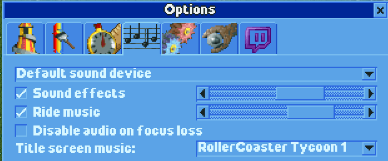
-Choosing the sound device ("default sound device"): there are no more options if you connect an audio device to your phone. So, there is not choice to make in this case.
-Disable audio on focus loss: this is standard Android behavior for apps and doesn't change of course whether you checked the box or not. So, there is no choice again in this case.
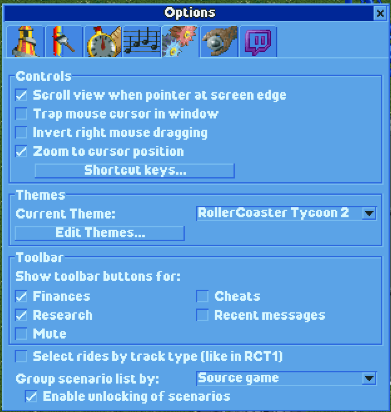
-Scroll view when pointer at screen edge: It's the only way to scroll over the map and is enabled by default. So, users shouldn't get the option to disable this at the moment.
-Trap mouse cursor in window: standard Android behavior does this.
-Invert right mouse dragging: there is no right mouse button of course and no proper touch screen support. It is not useful at the moment, but when proper touch screen support gets added, it becomes useful again as an option to invert the map scrolling when touching the touchscreen to scroll over the map.
Contributor guide
First steps
- Read the whole issue, then the project's contributing guide.
- Comment on the issue to say you are picking it up — it saves two people doing the same work.
- Fork the repository and make your change on a branch.
- Open a pull request that references the issue number.
Research direction
No file, test, or entry point is named. Review the Android options menu and the listed screen, resolution, audio, pointer, and mouse settings; done means determining which options should be greyed out only on Android without changing their availability on other platforms.
Written by the indexing model from the issue text.
Assessment
- Tech stack
- cpp
- Domain
- mobile-dev
- Issue type
- Feature
- Difficulty
- 4/5
- Estimated time
- 3-5 days
- Activity status
- Stale
- Clarity
- Needs clarification
- Newbie friendliness
- 25/100