Not able to enter name into scenario chart
Nobody has claimed this yet.
- Dominant language
- C++
- Stars
- 16.2k
- Forks
- 1.9k
- Avg merge
- 1d 20h
- Merged PRs (30d)
- 80
Description
Operating System
Windows 10
OpenRCT2 build
OpenRCT2, v0.4.0-146-g697fa7c (697fa7c on develop) provided by GitHub
Describe the issue
On any custom parks that have the .park save format I am not able to enter my name into the scenario chart after I beat it. It works fine for .sc4 or .sc6 save files. In addition to that the parks saved with the new save format are not grouped by their difficulty and rather sorted alphabetically
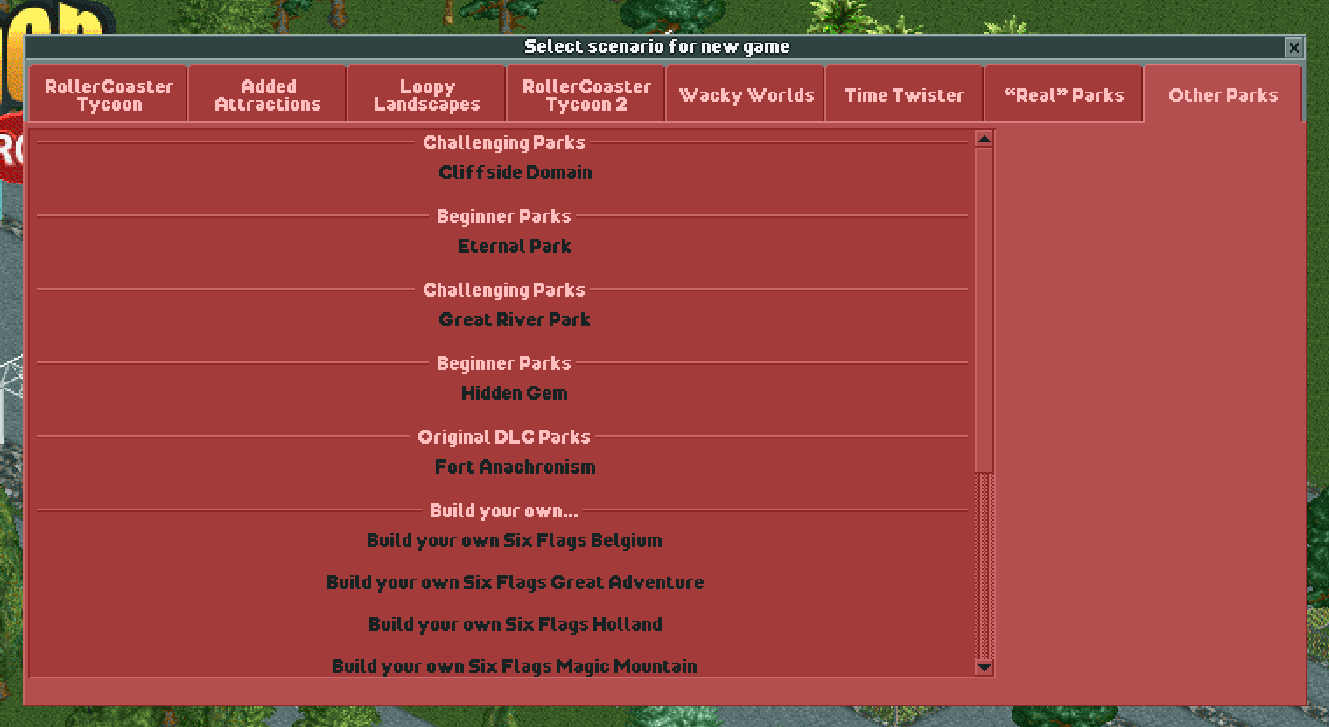
.
Area(s) with issue?
New Save Format (NSF)
Steps to reproduce
- Go into Scenario Editor and create a new scenario
- Save as .park file
- Play park and finish the scenario
Attachments
Contributor guide
First steps
- Read the whole issue, then the project's contributing guide.
- Comment on the issue to say you are picking it up — it saves two people doing the same work.
- Fork the repository and make your change on a branch.
- Open a pull request that references the issue number.
Research direction
Start by reproducing the issue with the attached scenario.zip: compare completing a .park scenario with equivalent .sc4 or .sc6 scenarios, focusing on name entry and scenario-list ordering. Done means the player can enter a name after completion and new-save-format parks are grouped by difficulty rather than sorted alphabetically.
Written by the indexing model from the issue text.
Assessment
- Tech stack
- cpp
- Domain
- game-dev
- Issue type
- Bug
- Difficulty
- 4/5
- Estimated time
- 3-5 days
- Activity status
- Stale
- Clarity
- Mostly clear
- Newbie friendliness
- 35/100