OpenHands / OpenHands/OpenHands
[Bug]: Dockerfile paths lose syntax highlighting in tool results and diffs
Nobody has claimed this yet.
- Dominant language
- TypeScript
- Stars
- 88.5k
- Forks
- 11.6k
- Avg merge
- 2d 22h
- Merged PRs (30d)
- 189
Description
Operating System
Windows
Installation Method
From source (npm run dev / npm run dev:minimal)
Agent Canvas Version
1.16.0 / main at fe09f319b0e66dbbcd2779e6b44c928d8516b44d
Bug Description
getLanguageFromPath() recognizes a bare Dockerfile, but returns text for deploy/Dockerfile, an absolute POSIX path, or a Windows path. File-editor tool results consequently show Dockerfile contents without syntax highlighting. The Monaco diff viewer uses the same resolver. The function splits the entire path on dots without first extracting its final filename.
Steps to Reproduce
Reproduced in the actual Canvas UI with npm run dev:mock on Windows, Node 24.19.0. No live LLM is needed.
- Check out main at
fe09f319b0e66dbbcd2779e6b44c928d8516b44dand runnpm ci. - Apply the reproduction fixture patch. It changes the existing canvas-demo fixture to a file-editor observation for
/workspace/project/deploy/Dockerfile. - Run
npm run dev:mock, openhttp://localhost:3001, add the suggested local mock backend, and skip LLM setup. - Open Generated canvas demo and expand Wrote to Dockerfile/.
The fixture supplies data only; the real chat and syntax-highlighter components render the result. Full reproduction notes.
Actual Behavior
The Dockerfile instructions and strings are all rendered as plain text.
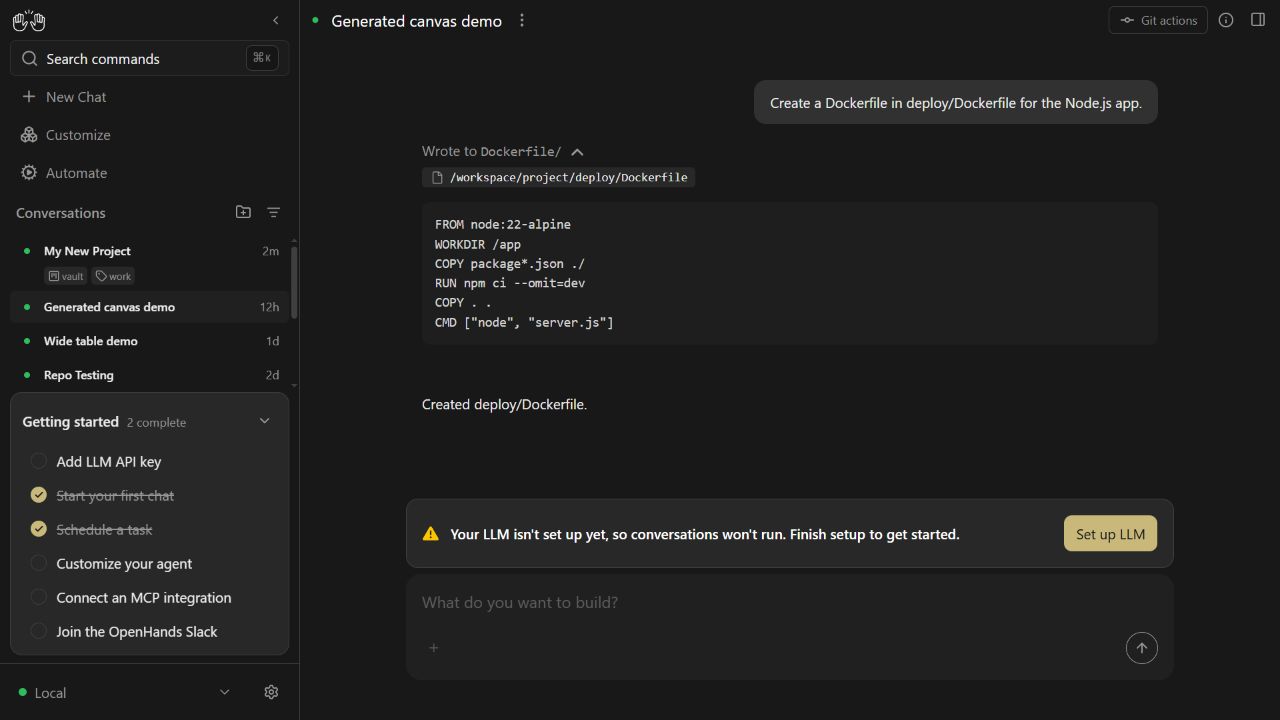
The LLM setup banner is expected in mock mode; this reproduction concerns rendering a persisted tool result.
Expected Behavior
A Dockerfile should select the same language whether its path is a bare filename, relative, or absolute, with either POSIX or Windows separators. Its instructions and strings should retain syntax highlighting.
Relevant Logs
getLanguageFromPath("Dockerfile") => "dockerfile"
getLanguageFromPath("deploy/Dockerfile") => "text"
getLanguageFromPath("/workspace/project/Dockerfile") => "text"
getLanguageFromPath("C:\workspace\project\Dockerfile") => "text"

Regression tests against the base resolver: 4 failed, 8 passed.
Acceptance Criteria
- Relative and absolute Dockerfile paths resolve to
dockerfilewith both POSIX and Windows separators. - Directory names containing dots do not affect basename detection.
- Existing extension detection, unknown files, and backup files such as
Dockerfile.bakretain their behavior. - Regression tests fail on the base resolver and pass with the fix.
- Before-and-after screenshots demonstrate restored highlighting in a real file-editor tool result.
Screenshots
No response
Additional Context
No response
Contributor guide
No contributing guide indexed for this repository
First steps
- Read the whole issue, then the project's contributing guide.
- Comment on the issue to say you are picking it up — it saves two people doing the same work.
- Fork the repository and make your change on a branch.
- Open a pull request that references the issue number.
Research direction
Start at getLanguageFromPath() and the existing resolver regression tests; compare bare, relative, POSIX, and Windows paths, including dotted directories and Dockerfile.bak. Use the .pr/dockerfile-language/fixture.patch and README with npm run dev:mock if validating the UI. Done means the regression tests pass and file-editor results and diffs restore Dockerfile highlighting.
Written by the indexing model from the issue text.
Assessment
- Tech stack
- dockerfile, typescript
- Domain
- devtools, frontend
- Issue type
- Bug
- Difficulty
- 2/5
- Estimated time
- 1-3 hours
- Activity status
- Active
- Clarity
- Clearly specified
- Newbie friendliness
- 82/100