UnsupportedApiVersion error
Open
@xuzhg is already working on this.
Since Nov 16, 2021.
followup
- Dominant language
- C#
- Stars
- 505
- Forks
- 186
- PR merge metrics
- No merged PRs in 30d
Description
Steps to reproduce:
- Create Asp.Net Core Web API project
- This project must have 3 NuGet packages
- Microsoft.AspNetCore.Mvc.Versioning.ApiExplorer
- Swashbuckle.AspNetCore
- Microsoft.AspNetCore.OData 8.0.4
- Create class
public class TestModel
{
    public string Id { get; set; }
    public string Summary { get; set; }
}
- Startup class will look like:
public class Startup
    {
        public Startup(IConfiguration configuration)
        {
            Configuration = configuration;
        }

        public IConfiguration Configuration { get; }

        // This method gets called by the runtime. Use this method to add services to the container.
        public void ConfigureServices(IServiceCollection services)
        {
            services.AddControllers().AddOData(options =>
            {
                options.Select().Count().SkipToken().Expand().SetMaxTop(10);
                options.AddRouteComponents("api/v{version:apiVersion}", BuildEdmModel());
            });

            services.AddApiVersioning(options => options.AssumeDefaultVersionWhenUnspecified = false);
            services.AddVersionedApiExplorer(options => options.SubstituteApiVersionInUrl = true);

            services.AddSwaggerGen(c =>
            {
                c.SwaggerDoc("v1", new OpenApiInfo { Title = "AspNetCoreTest1", Version = "v1" });
            });


        }

        // This method gets called by the runtime. Use this method to configure the HTTP request pipeline.
        public void Configure(IApplicationBuilder app, IWebHostEnvironment env)
        {
            if (env.IsDevelopment())
            {
                app.UseDeveloperExceptionPage();
                app.UseSwagger();
                app.UseSwaggerUI(c => c.SwaggerEndpoint("/swagger/v1/swagger.json", "AspNetCoreTest1 v1"));
            }

            app.UseODataRouteDebug();

            app.UseHttpsRedirection();

            app.UseRouting();

            app.UseEndpoints(endpoints =>
            {
                endpoints.MapControllers();
            });
        }

        private static IEdmModel BuildEdmModel()
        {
            var builder = new ODataConventionModelBuilder();

            builder.EntitySet<TestModel>(nameof(TestModel));

            return builder.GetEdmModel();
        }
    }
- Add controller
[ApiController]
    [ApiVersion("1.0")]
    [EnableQuery(AllowedQueryOptions = AllowedQueryOptions.Select | AllowedQueryOptions.Count | AllowedQueryOptions.Skip | AllowedQueryOptions.Top | AllowedQueryOptions.Expand)]
    [Route("api/v{version:apiVersion}")]
    public class WeatherForecastController : ODataController
    {
        [HttpGet("TestModel({id})")]
        public IActionResult Get(string id)
        {
            var testModel = new TestModel
            {
                Id = id,
                Summary = "Summary"
            };

            return Ok(testModel);
        }
    }
- Start application and then type in browser something like
https:/api/v1/TestModel('id')
OData response will be like
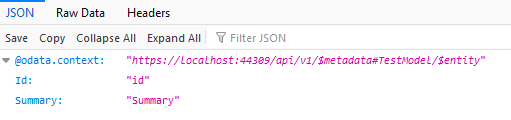
So far so good. Then try to navigate to @odata.context url. You should see OData metadata. Instead you have

Some additional observations:
- If you change
[HttpGet("TestModel({id})")]with[HttpGet("TestModel/{id}")]code works fine. But as I understand both formats are valid, right?
Contributor guide
No contributing guide indexed for this repository
First steps
- Read the whole issue, then the project's contributing guide.
- Comment on the issue to say you are picking it up — it saves two people doing the same work.
- Fork the repository and make your change on a branch.
- Open a pull request that references the issue number.
Assessment
This issue has not been assessed yet.