NginxProxyManager / NginxProxyManager/nginx-proxy-manager
SSL settings are not applied
Nobody has claimed this yet.
- Dominant language
- TypeScript
- Stars
- 34.2k
- Forks
- 3.9k
- Avg merge
- 21h 12m
- Merged PRs (30d)
- 20
Description
Describe the bug
SSL settings are not applied when creating a new proxy. The cert is indeed generated and HTTPS is supported, however, settings such as Force SSL do not take effect. I found out when I added a new proxy and tried accessing the site. I was not redirected to HTTPS.
I verified I had not forgotten to check toggle the buttons by creating a new site and verified the same issue occurred. I also checked the id.conf file and things such as including the force SSL file were missing.
Opening the Edit dialog and toggling the options gets the desired results.
The version of NPM I use is 2.0.13
This is the conf file when I checked Force SSL, HTTP/2 Support and HSTS Enabled.
server {
  set $forward_scheme http;
  set $server         "127.0.0.1";
  set $port           81;

  listen 80;
listen 443 ssl http2;

  server_name my.test.domain.com;


  # Let's Encrypt SSL
  include conf.d/include/letsencrypt-acme-challenge.conf;
  include conf.d/include/ssl-ciphers.conf;
  ssl_certificate /etc/letsencrypt/live/npm-4/fullchain.pem;
  ssl_certificate_key /etc/letsencrypt/live/npm-4/privkey.pem;

# Asset Caching
  include conf.d/include/assets.conf;

  # Block Exploits
  include conf.d/include/block-exploits.conf;

  access_log /data/logs/proxy_host-4.log proxy;

  location / {
    # Proxy!
    include conf.d/include/proxy.conf;
  }
}
To Reproduce
Steps to reproduce the behavior:
- Go to 'Proxy Hosts'
- Click on 'Add proxy host'
- Fill out the site information
- Go to 'SSL' tab
- Toggle on Force SSL, HTTP/2 Support, HSTS Enabled
Expected behavior
The settings will take effect and the site config will reflect the settings.
Screenshots
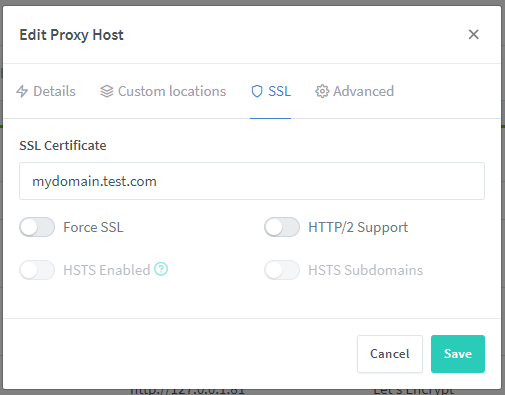
When I select all those and then go edit the host, the certificate is selected but all the options I checked previously are unchecked
Contributor guide
No contributing guide indexed for this repository
First steps
- Read the whole issue, then the project's contributing guide.
- Comment on the issue to say you are picking it up — it saves two people doing the same work.
- Fork the repository and make your change on a branch.
- Open a pull request that references the issue number.
Research direction
Compare the new proxy-host creation flow with the Edit dialog, then inspect the generated id.conf file after enabling Force SSL, HTTP/2 Support, and HSTS Enabled. Reproduce the issue through the listed Proxy Hosts steps; done means the selected options persist and the generated site configuration applies them.
Written by the indexing model from the issue text.
Assessment
- Tech stack
- nginx, typescript
- Domain
- backend, security
- Issue type
- Bug
- Difficulty
- 3/5
- Estimated time
- 1-2 days
- Activity status
- Active
- Clarity
- Mostly clear
- Newbie friendliness
- 68/100