NativeScript / NativeScript/NativeScript
CSS: classes not applied as expected / margins do not work
Nobody has claimed this yet.
- Dominant language
- TypeScript
- Stars
- 25.7k
- Forks
- 1.7k
- Avg merge
- 1d 5h
- Merged PRs (30d)
- 35
Description
Environment
Provide version numbers for the following components (information can be retrieved by running tns info in your project folder or by inspecting the package.json of the project):
- CLI: 5.4.0
- Cross-platform modules: 5.4.0
- Android Runtime: 5.4.0
- iOS Runtime: 5.4.0
- Plugin(s):
Describe the bug
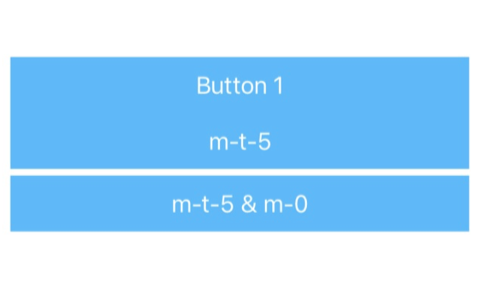
The NativeScript theme provides some nice helper classes for margin and padding. I wanted to apply a margin-top of 5 to my button. I've used m-t-5 which simply did not work on my button. When I've checked, we've already specified margin: 0 for our button (.btn) class. So first I thought it might be a problem of the the order the classes are applied but I could move them around without any success. For some reason I came up with a solution by adding m-0 to the button as well which does not make any sense for me but it works.
To Reproduce
CSS:
.btn {
    margin: 0;
}
Layout:
<StackLayout class="home-panel">
    <Button class="btn btn-primary" text="Button"></Button>

     <!-- Expecting here a margin of 5 at the top, but does not work -->
     <Button class="btn btn-primary m-t-5" text="m-t-5"></Button>

      <!-- This is working for some reason, by adding 'm-0' as additional class, but
	     that doesn't make sense since '.btn' has also 'margin: 0' defined -->
      <Button class="btn btn-primary m-t-5 m-0" text="m-t-5 & m-0"></Button>
 </StackLayout>
Expected behavior
My expectation: m-t-5 (or m-t-N) should overwrite the margin: 0 of the .btn class we specified. The current solution is actually something I'd say is incorrect - since m-0 should overwrite m-t-5
Sample project
I've created a pretty simple playground to demonstrate the problem:
https://play.nativescript.org/?template=play-ng&id=ad5EUa&v=3
Only needed to add the css as described above and changed the layout in the home component.
Want to back this issue? Post a bounty on it! We accept bounties via Bountysource.
Contributor guide
First steps
- Read the whole issue, then the project's contributing guide.
- Comment on the issue to say you are picking it up — it saves two people doing the same work.
- Fork the repository and make your change on a branch.
- Open a pull request that references the issue number.
Research direction
Start with the linked NativeScript Playground reproduction and compare how .btn { margin: 0; }, m-t-5, and m-0 are resolved for Button elements. Trace the CSS styling path responsible for shorthand and directional margins; done means m-t-5 applies predictably alongside .btn, with the reported reproduction covered by a regression test.
Written by the indexing model from the issue text.
Assessment
- Tech stack
- css
- Domain
- frontend
- Issue type
- Bug
- Difficulty
- 3/5
- Estimated time
- 1-2 days
- Activity status
- Stale
- Clarity
- Mostly clear
- Newbie friendliness
- 38/100